SCG: vCenter 7.0 Error: Failure to deploy OVF package
Summary: This article explains how to resolve the error: Failure to deploy the OVF package is sometimes received when attempting to deploy Secure Connect Gateway Virtual Edition on vCenter 7.0.
This article applies to
This article does not apply to
This article is not tied to any specific product.
Not all product versions are identified in this article.
Instructions
Issue: Failed to deploy the OVF package. ThrowableProxy.cause A general system error occurred: Transfer failed: Server not trusted: certificate_unknown(46) the HTTP/s proxy is configured for the transfer.
Error Screenshot:
Cause: On VMware settings, the proxy is enabled so it is getting error while deploy OVF and Transfer failed.
Resolution:
- Log in to the VAMI by going to https://vcentrename:5480 with root credentials.
- Click Networking in the navigation Menu.

- Click Edit next to Proxy Settings.
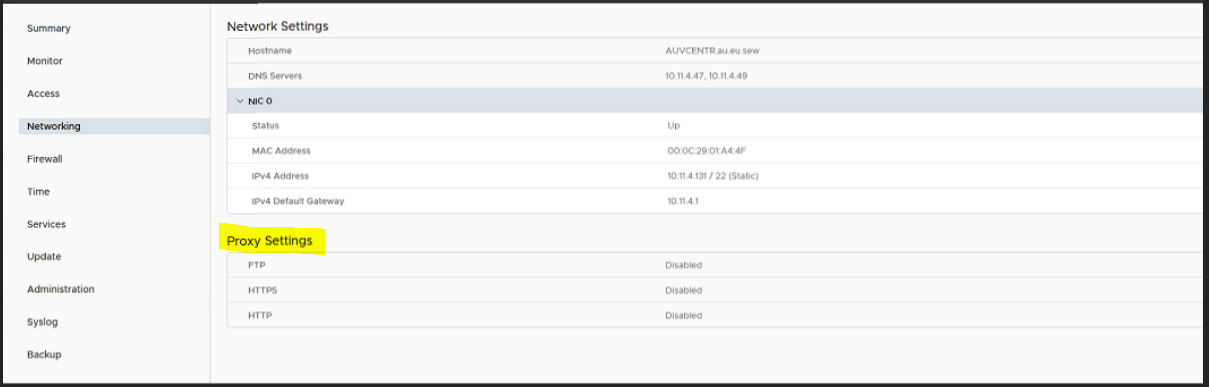
- Here we must edit the proxy settings Enable to Disable and click Save.
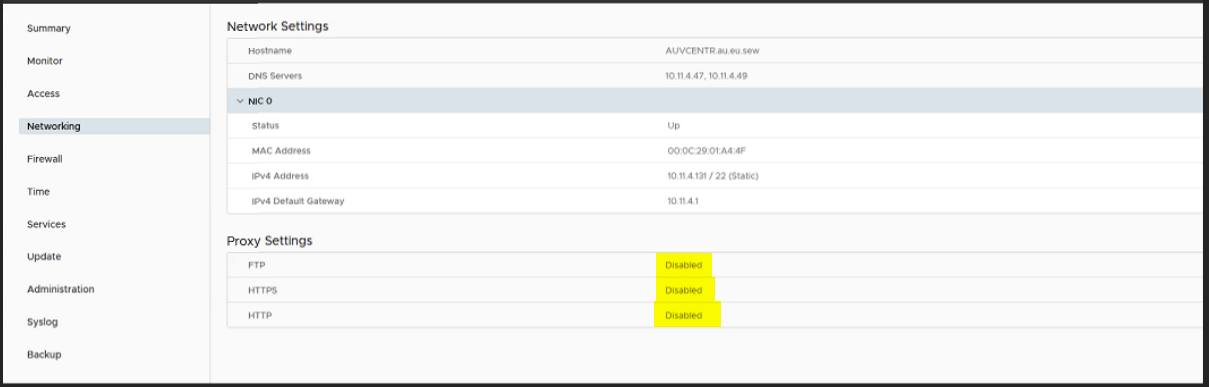
- Now re-attempt to deploy the VM.
Affected Products
Secure Connect Gateway, Secure Connect Gateway - Virtual Edition, VMware ESXi 7.xProducts
C Series, Modular Infrastructure, Rack Servers, Tower ServersArticle Properties
Article Number: 000219268
Article Type: How To
Last Modified: 20 May 2025
Version: 3
Find answers to your questions from other Dell users
Support Services
Check if your device is covered by Support Services.