PowerFlex 4.X - Gateway Resource Update Failed On The Task Install Dependent Packages
Summary: PowerFlex 4.X - Gateway Resource Update Failed On The Task Install Dependent Packages.
This article applies to
This article does not apply to
This article is not tied to any specific product.
Not all product versions are identified in this article.
Symptoms
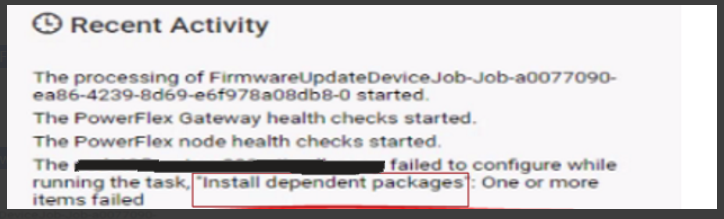
When trying to update the PowerFlex Gateway resource, it encounters an issue during the "Install dependent packages" task and fails.
Screenshot from the PFxM UI showing the failed upgrade task:
Logs from the Thin-Deployer pod job that is responsible for installing the dependent packages:
"item": "java-11-headless",
"msg": "Failure talking to yum: failure: repodata/repomd.xml from centos_extras: [Errno 256] No more mirrors to try.\nhttps://<ip>/httpshare/download/8aaa80e58b494957018b49a837c81ac4/os/VxFlex4.5.0RHEL7Repo/centos_extras/repodata/repomd.xml: [Errno 14] HTTPS Error 404 - Not Found"
The above output states that one of the PowerFlex backend nodes is unable to find the repomd.xml file on the httpshare.
Impact
Unable to upgrade the PowerFlex gateway resource.
Cause
During the process of uploading the compliance file, several directories are generated to house the files being uploaded. A software code problem can result in the unintended duplication of uploaded files, consequently leading to changes in the directory names.
For instance, the expected directory structure by PFxM might be:
../8aaa80e58b494957018b49a837c81ac4/os/VxFlex4.5.0RHEL7Repo/, but it may no longer exist as such.
During the compliance file upload phase, the directories could be renamed as follows:
../8aaa80e58b494957018b49a837c81ac4/os/VxFlex4.5.0RHEL7Repo2/ with a potential trailing number (2 in this case), which could be incremented.
In the context of the upgrade task for installing dependent packages, PFxM creates a repository on the PowerFlex nodes for the appropriate repository manager. This repository includes a file named "scaleio.repo," containing the URL for the files required to install dependent packages. Notably, PFxM uses the URL path without the trailing number. For a specific example, see the code snippet in the symptom section.
Resolution
The file names on the httpshare can be manually adjusted to match PFxM's expectations.
1) SSH to the PowerFlex Manager Platform (PFMP) server
2) Identify the Primary PFMP node that the httpshare pod is hosted on:
|
3) SSH to the PFMP server that was identified from step 2.
4) Change the directory to the httpshare that houses the repository files:
|
Notice that the repository ID will be different for each environment. In this environment, the repository ID is 8aaa80e58b494957018b49a837c81ac4.
5) List out the ../os/ directory, it may look similar to the below output:
pfmp1:/opt/platform/fileshare/8aaa80e58b494957018b49a837c81ac4/os # ls -al
drwxr-xr-x 1 root root  230 Oct 19 18:35 CLC7.1.8OSOVA2
drwxr-xr-x 1 root root  272 Oct 19 18:33 DellEMCPowerFlexEmbeddedOS3
drwxr-xr-x 1 root root  722 Oct 19 18:34 DellEMCPowerFlexEmbeddedOS4
drwxr-xr-x 1 root root 2312 Oct 19 18:34 ESXi7.0219305082
drwxr-xr-x 1 root root  156 Oct 19 18:34 VxFlex4.5.0RHEL7Repo2
drwxr-xr-x 1 root root   12 Oct 19 18:34 VxFlex4.5.0SDC2
drwxr-xr-x 1 root root   82 Oct 19 18:34 VxFlex4.5.0SLES15.3Repo2
drwxr-xr-x 1 root root  294 Oct 19 18:35 VxFlex4.5.0SVMOVA3
drwxr-xr-x 1 root root  294 Oct 19 18:36 VxFlex4.5.0SVMOVA4
6) Create copies, do not remove or rename the directories in this repository. Only create copies of the directories VxFlex4.5.0SLES15.3Repo2 and VxFlex450RHEL7Repo2:
|
The above will create a second copy of each directory without the trailing number.
Notice that the trailing number may vary in each environment.
Once step 6) is completed, the wanted outcome should look similar to the below output:
|
7) Proceed with attempting to update the PowerFlex Gateway resource.
Impacted Versions
PowerFlex 4.x
Fixed In Version
TBD
Article Properties
Article Number: 000219399
Article Type: Solution
Last Modified: 24 Jun 2025
Version: 3
Find answers to your questions from other Dell users
Support Services
Check if your device is covered by Support Services.