NVP vProxy: VM does not appear as a target in the FLR Web Client
Summary: That NetWorker Data Protection Restore Client (DPRC) is not listing a target Virtual Machine (VM) to mount a File Level Restore (FLR). The target VM is the same operating system as the source VM and is powered on in VMware. It is determined that the target VM has a custom note setting in VMware that includes the word "vProxy." This is preventing the VM from being seen as an FLR target as DPRC believes that the VM is a vProxy appliance. It is not possible to perform an FLR mount to a vProxy VM so the VM is not displayed in the DPRC. ...
This article applies to
This article does not apply to
This article is not tied to any specific product.
Not all product versions are identified in this article.
Symptoms
The NetWorker Data Protection Restore Client (DPRC) is used to perform an FLR of a VMware VM.
DPRC displays a VM that is available for source selection:
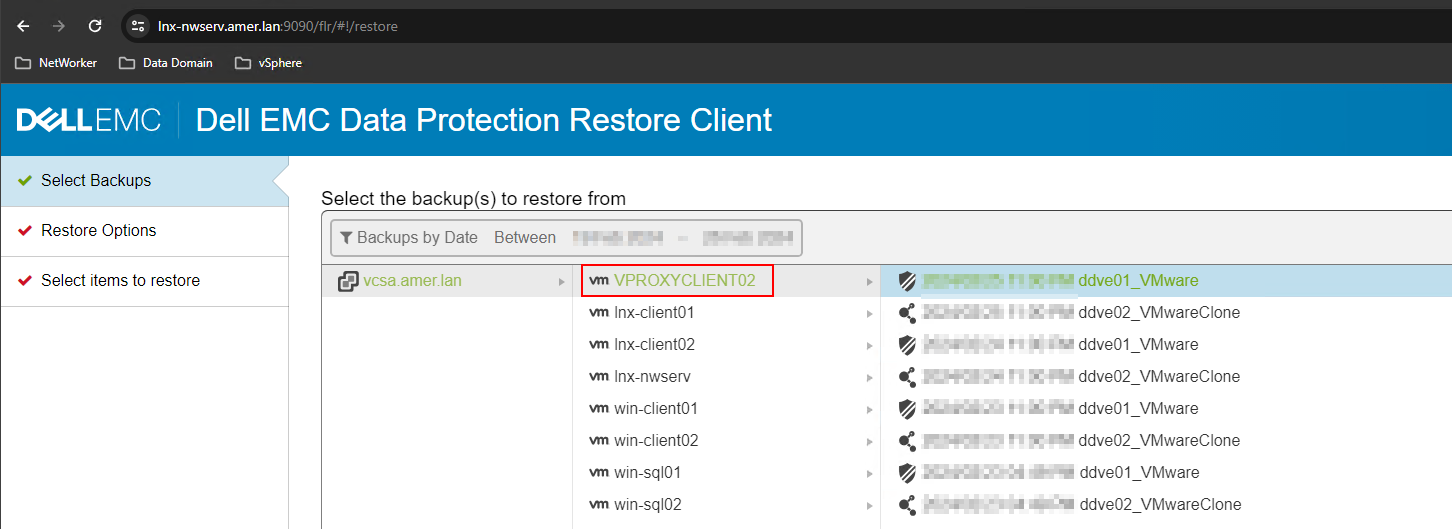
However, the same VM is not listed as an available FLR target:
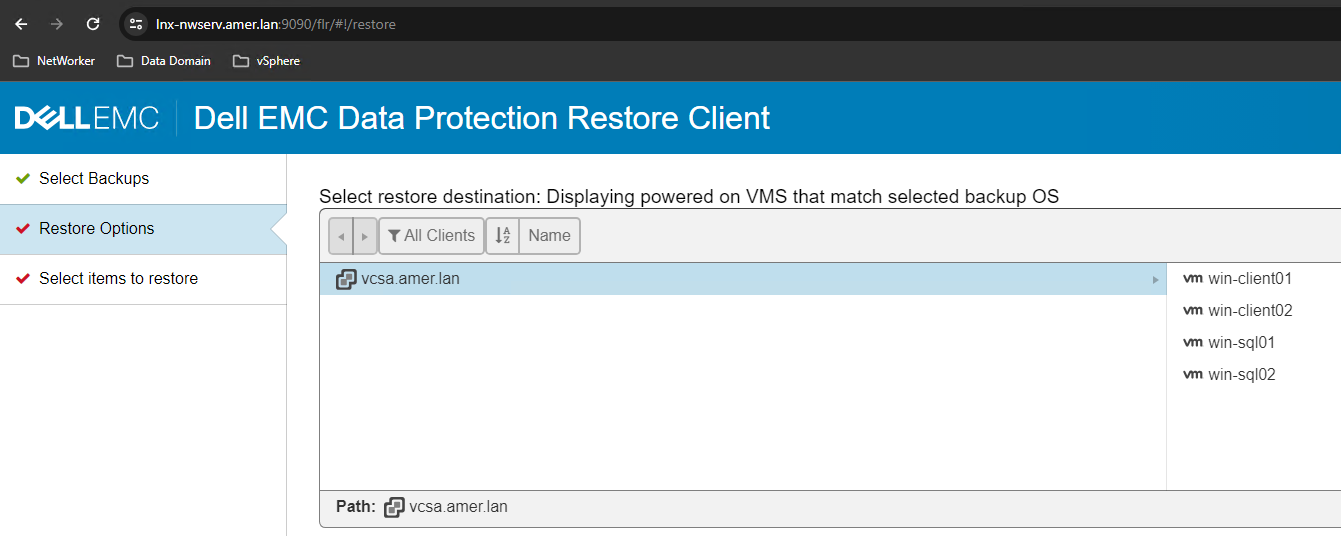
The target VM:
- Is the same operating system type as the source (or same VM)
- Is powered on in VMware
- Is listed as an available target when performing the FLR from the NetWorker Management Console (NMC) or NetWorker Web User Interface (NWUI)
Cause
The target VM contains a "note" in VMware which includes the word "vProxy"
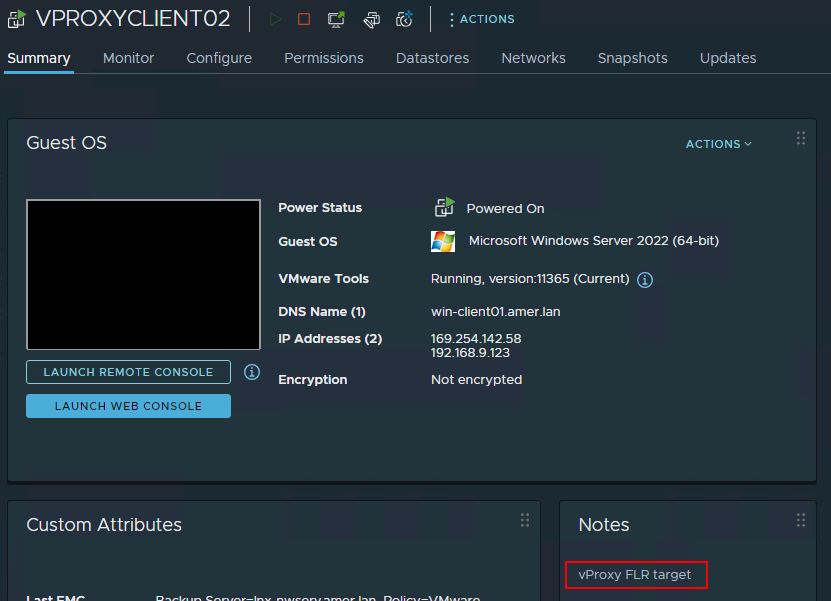
Resolution
- From VMware, remove the VM's "note" containing the word "vProxy."
- From the NetWorker Management Console (NMC) perform a VMware View Refresh:
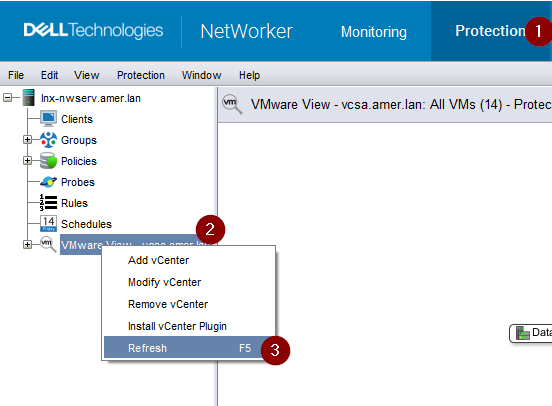
- Log out of the FLR web client and log back in.
- The VM is listed as a target for the FLR if it is powered on and the same operating system platform as the source VM.

NOTE: Avoid using "vProxy" in the name or notes fields of VMs which are not a NetWorker VMware Protection (NVP) vProxy appliance.
Additional Information
If you do not have access to the VMware vCenter, you can run the following command from the NetWorker server.
nsrvim -d --names VCENTER_NAME
This command generates three .xml files on the NetWorker server under:
Linux: /nsr/cores/nsrvim
Windows: On Windows hosts, the files are generated in the same directory from which the nsrvim command was run.
root@lnx-nwserv:~# ls -l /nsr/cores/nsrvim/
total 48
-rw-r--r--. 1 root root    47 Feb 26 13:27 VCENTER_NAME-cat_tags.xml
-rw-r--r--. 1 root root  2527 Feb 26 13:27 VCENTER_NAME-mapping.xml
-rw-r--r--. 1 root root 40242 Feb 26 13:27 VCENTER_NAME.xml
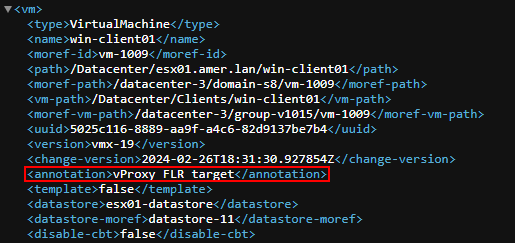
Open the VCENTER_NAME.xml. This shows you if the VM has any notes (annotations) set:
Affected Products
NetWorkerProducts
NetWorker Family, NetWorker SeriesArticle Properties
Article Number: 000222467
Article Type: Solution
Last Modified: 02 Apr 2025
Version: 2
Find answers to your questions from other Dell users
Support Services
Check if your device is covered by Support Services.