NetWorker: Backup fails with "nfs: Illegal minimum retention time" when DD Retention Lock enabled
Summary: NetWorker: Backup fails with "Err: 5955-nfs setattr failed (nfs: Illegal minimum retention time)" when DD Retention Lock enabled
This article applies to
This article does not apply to
This article is not tied to any specific product.
Not all product versions are identified in this article.
Symptoms
When Retention lock is enabled in NetWorker/DD, a backup fails at completion. The workflow action log reports the following error:
Data Domain ddfs.info log reports the following error:
Note: How to collect ddfs.info log from Data Domain - NetWorker: How To Collect ddfs.info log from Data Domain
169684:nsrmmd #8: Setting of retention lock for file '/nve/Backup/41/39/6d1124cb-00000006-550db1ac-660db1ac-02ac5000-a60ba556' failed [5955] ([ 7987] [140219847264064] Thu Apr  4 01:35:32 2024
        ddp_set_retention_time() failed, su_name=, path_name=/nve/Backup/41/39/6d1124cb-00000006-550db1ac-660db1ac-02ac5000-a60ba556, Err: 5955-nfs setattr failed (nfs: Illegal minimum retention time)
).
Data Domain ddfs.info log reports the following error:
nfsproc3_ddp_setattr_3_svc: Retention time(431373) is less than MIN(432000) retention time.
Note: How to collect ddfs.info log from Data Domain - NetWorker: How To Collect ddfs.info log from Data Domain
Cause
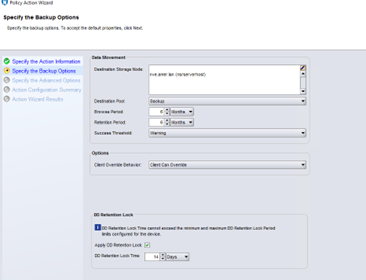
This is expected functionality when the Data Domain Mtree minimum retention period is incorrectly configured. In the example below, the Workflow action "DD Retention lock time" is configured for 14 days and the DD Mtree minimum retention period is set to 14 days.
To view the DD Mtree Retention lock details, you can view in two ways:
DD System Manager

DD CLI

The workflow action "DD Retention Lock Time" attempts to be applied to the save set by the storage node NSRMMD process when the backup completes. If the difference in epoch time between the "policy action DD retention time" passed by the workflow action and the epoch time at save set completion is less than the DD Mtree "Retention period min" value, the backup fails. In this example, the backup started at 4/3 3:44 PM and completed at 4/4 1:35 AM.
*13.956 days is less than the Retention-lock min-retention-period of 14 days configured on the mtree as shown in Figure 2/3.
## Workflow action log
Figure 1: Workflow action configuration
To view the DD Mtree Retention lock details, you can view in two ways:
DD System Manager
- Log in to DD System Manager
- Select Data Management
- Select Mtree
- Select radio check box for mtree
- Scroll down to DD Retention Lock settings
Figure 2: Data Domain System Manager Mtree Retention Lock configuration.
DD CLI
- Log in to DD using Putty
- Run the following command specifying your mtree name
- mtree retention-lock status mtree /data/col1/nve
Figure 3: Data Domain CLI Retention Lock configuration
The workflow action "DD Retention Lock Time" attempts to be applied to the save set by the storage node NSRMMD process when the backup completes. If the difference in epoch time between the "policy action DD retention time" passed by the workflow action and the epoch time at save set completion is less than the DD Mtree "Retention period min" value, the backup fails. In this example, the backup started at 4/3 3:44 PM and completed at 4/4 1:35 AM.
(Epoch time of "policy action DD retention time) - (Epoch time of save set completion) = Effective Retention Lock time.
1713412799 - 1712208932 = 1203867
1203867 = 334.96 hours = 13.956 days
## Workflow action log
42920:nsrndmp_save: browsable savetime=1712173479 <-- 4/3 3:44:39 PM
42927:nsrndmp_save: Successfully done
144324:nsrndmp_save: Adding attribute *policy action jobid = 866757
.144324:nsrndmp_save: Adding attribute *policy name = Bronze
.144324:nsrndmp_save: Adding attribute *policy workflow name = Backup
.144324:nsrndmp_save: Adding attribute *policy action name = backup
.144324:nsrndmp_save: Adding attribute *policy action DD retention time = 1713412799 <-- 4/17 11:59:59 PM
…
169684:nsrmmd #8: Setting of retention lock for file '/nve/Backup/41/39/6d1124cb-00000006-550db1ac-660db1ac-02ac5000-a60ba556' failed [5955] ([ 7987] [140219847264064] Thu Apr  4 01:35:32 2024  = 1712208932 *epoch time at backup completion

ddp_set_retention_time() failed, su_name=, path_name=/nve/Backup/41/39/6d1124cb-00000006-550db1ac-660db1ac-02ac5000-a60ba556, Err: 5955-nfs setattr failed (nfs: Illegal minimum retention time)
).
Resolution
Reduce the DD Mtree Retention period minimum on the Data Domain system using System Manager or CLI to:
For example
(Workflow action DD Retention Lock time) - (longest running backup rounded up in days) - 1 day = DD Mtree Retention period minimum.
14 days - 3 days - 1 day = 10 days
The following are the steps on how to modify the DD Mtree Minimum retention period:
DD System Manager

DD CLI
 Figure 5: Updating DD MTree minimum retention period setting using DD CLI
Default (720 minutes)
OR
Subtract the length of time rounding up in days of the longest running backup minus the workflow action "DD Retention lock time" and subtract by an additional day for buffer:
OR
Subtract the length of time rounding up in days of the longest running backup minus the workflow action "DD Retention lock time" and subtract by an additional day for buffer:
For example
(Workflow action DD Retention Lock time) - (longest running backup rounded up in days) - 1 day = DD Mtree Retention period minimum.
14 days - 3 days - 1 day = 10 days
The following are the steps on how to modify the DD Mtree Minimum retention period:
DD System Manager
- Log in to DD System Manager with admin privileges
- Select Data Management
- Select Mtree
- Select the radio check box for your mtree
- Scroll down to DD Retention Lock settings
- Select Edit
- Select Default or which ever value you chose based on the two options above
Figure 4: Updating DD MTree minimum retention period setting using System Manager
DD CLI
- Log in to DD using Putty with admin privileges
- Run the following command specifying your mtree name
- mtree retention-lock set min-retention-period 720min mtree /data/col1/nve
- Verify settings
- mtree retention-lock status mtree /data/col1/nve
Additional Information
NetWorker/DD Retention Lock Integration Guide - https://dl.dell.com/content/manual17869897-dell-networker-and-data-domain-boost-19-9-integration-guide.pdf?language=en-us
DD Retention Lock FAQ - Data Domain: Retention Lock Frequently Asked Questions
How to Collect DDFS.info from Data Domain - NetWorker: How To Collect ddfs.info log from Data Domain
DD Retention Lock FAQ - Data Domain: Retention Lock Frequently Asked Questions
How to Collect DDFS.info from Data Domain - NetWorker: How To Collect ddfs.info log from Data Domain
Affected Products
NetWorker Family, NetWorkerProducts
Backup and Recovery Manager NetWorker, NetWorker ModuleArticle Properties
Article Number: 000224363
Article Type: Solution
Last Modified: 22 Apr 2024
Version: 1
Find answers to your questions from other Dell users
Support Services
Check if your device is covered by Support Services.