The Intel 5G Solution 5000 Network Cards Disable Power-Saving Option does Not Work
Summary: The following article provides information about there being no way to disable power saving on the Intel 5G Solution 5000 Network card.
This article applies to
This article does not apply to
This article is not tied to any specific product.
Not all product versions are identified in this article.
Symptoms
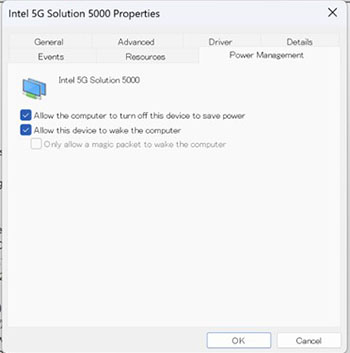
You cannot disable power saving on Intel 5G Solution 5000 network cards (DW5931e)
Owners of Latitude 5x40, 7x40, and 7x50 laptops with an Intel 5G Solution 5000 network card may think there is an issue with the network card. You may contact your IT department or Dell Technical Support to advise that you cannot disable the power-saving mode on the network card. (DW5931e)
This is because when you disable (clear) the power-saving option and restart your laptop, it resumes with the option enabled (checked) again.
Cause
This is because Intel has removed the option to disable power saving. They want to ensure that the laptops power consumption meets Intel's guidelines.
Resolution
Note: The laptop and network card are both working as designed. This is the expected behavior under these circumstances.
The laptop and the network card are both working as they should. Intel has removed the option to turn this function off as part of its design.
Affected Products
Latitude 5340, Latitude 7340, Latitude 7350, Latitude 5440, Latitude 7440, Latitude 7450, Latitude 5540, Latitude 7640, Latitude 7650Article Properties
Article Number: 000226246
Article Type: Solution
Last Modified: 22 Apr 2025
Version: 2
Find answers to your questions from other Dell users
Support Services
Check if your device is covered by Support Services.