Windows Server: The System Clock does not Synchronize due to a Large Time Difference
Summary: This article describes an issue in which the Windows Time service does not synchronize the system clock with a time source. This may happen if the time difference between the local clock and the source clock is too great. ...
This article applies to
This article does not apply to
This article is not tied to any specific product.
Not all product versions are identified in this article.
Symptoms
- The time on a Windows system is incorrect.
- The Windows Time service is configured to synchronize with a time source, but it fails to do so.
- The
w32tm /resynccommand returns "The computer did not resync because the required time change was too big."

- The System event log contains Time-Service error 34, which also refers to a large time difference.

Cause
If the time difference between the local clock and its source exceeds a certain threshold, the local clock does not immediately synchronize.
Resolution
Often, no action is necessary, and the Windows Time service eventually synchronizes the local system clock with its source. If immediate synchronization is needed, one of two registry values can be modified to make this happen.
Registry location: HKEY_LOCAL_MACHINE\SYSTEM\CurrentControlSet\Services\W32Time\Config
MaxPosPhaseCorrection: This value specifies the largest positive time correction (in seconds) that the system will make.MaxNegPhaseCorrection: This value specifies the largest negative time correction (in seconds) that the system will make.
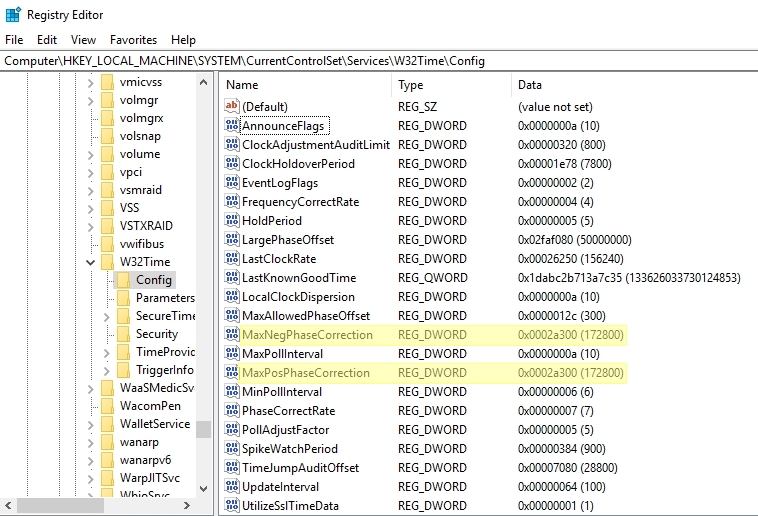
If the system lock must move forward to reach the correct time, set the value of MaxPosPhaseCorrection. If it must move backward, set the value of MaxNegPhaseCorrection. The time difference between the local clock and its source is given in the description of Time-Service error 34, as shown above. Set one of these registry values to be greater than what is shown in the error, or set it to FFFFFFFF (hexadecimal) to specify no limit.
Restart the Windows Time service for the change to take effect. The clock should synchronize shortly after the service is restarted. The registry change can then be reverted.
Additional Information
Large time differences (on the order of days or weeks, for example) are uncommon if the Windows Time service is correctly configured. They can occur as a result of applying a snapshot or checkpoint of a virtual machine, however.
Be wary of inducing large time changes in an Active Directory (AD) domain, as this can interfere with Kerberos authentication. An extreme time change on an AD domain controller can cause the time since its last successful replication to exceed the tombstone lifetime of the forest.
Be wary of inducing large time changes in an Active Directory (AD) domain, as this can interfere with Kerberos authentication. An extreme time change on an AD domain controller can cause the time since its last successful replication to exceed the tombstone lifetime of the forest.
Affected Products
Microsoft Windows Server 2016, Microsoft Windows Server 2019, Microsoft Windows Server 2022Products
PowerEdge FC640, PowerEdge M640, PowerEdge M640 (for PE VRTX), PowerEdge MX740C, PowerEdge MX750c, PowerEdge MX760c, PowerEdge MX840C, PowerEdge R240, PowerEdge R250, PowerEdge R260, PowerEdge R340, PowerEdge R350, PowerEdge R360, PowerEdge R440
, PowerEdge R450, PowerEdge R540, PowerEdge R550, PowerEdge R640, PowerEdge R6415, PowerEdge R650, PowerEdge R650xs, PowerEdge R6515, PowerEdge R6525, PowerEdge R660, PowerEdge R660xs, PowerEdge R6615, PowerEdge R6625, PowerEdge R740, PowerEdge R740XD, PowerEdge R740XD2, PowerEdge R7415, PowerEdge R7425, PowerEdge R750, PowerEdge R750XA, PowerEdge R750xs, PowerEdge R7515, PowerEdge R7525, PowerEdge R760, PowerEdge R760XA, PowerEdge R760xd2, PowerEdge R760xs, PowerEdge R7615, PowerEdge R7625, PowerEdge R840, PowerEdge R860, PowerEdge R940, PowerEdge R940xa, PowerEdge R960, PowerEdge T140, PowerEdge T150, PowerEdge T160, PowerEdge T340, PowerEdge T350, PowerEdge T360, PowerEdge T440, PowerEdge T550, PowerEdge T560, PowerEdge T640
...
Article Properties
Article Number: 000226718
Article Type: Solution
Last Modified: 07 Jan 2025
Version: 2
Find answers to your questions from other Dell users
Support Services
Check if your device is covered by Support Services.