PowerFlex: Apply Resource Updates fail error: No components with valid firmware path found VXFM00516 error 400
Summary: A validation error is triggered after attempting to upgrade a Resource Group (RG).
This article applies to
This article does not apply to
This article is not tied to any specific product.
Not all product versions are identified in this article.
Symptoms
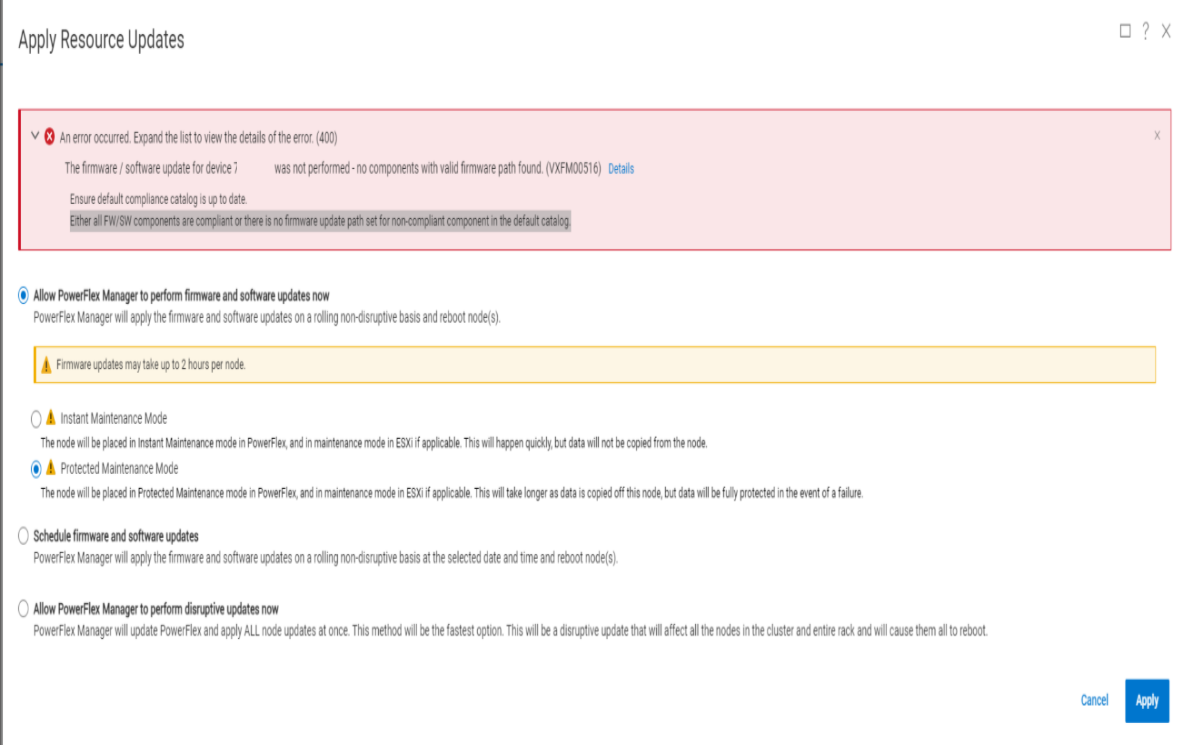
After modifying the RCM with the latest depot file, when trying to initiate an RG upgrade, the following error appears:
Cause
The RG is out of sync with the RCM file. After resource deployment, inventory and compliance updates occur asynchronously, resulting in delays for RG data refresh. If a user attempts to start an upgrade during this update, they will face a validation error that prevents the upgrade until all information is current.
Resolution
After a resource deployment is completed, it might take some time to update the resource group data. A user should wait for several minutes before proceeding with the upgrade.
Products
PowerFlex rack RCM SoftwareArticle Properties
Article Number: 000227226
Article Type: Solution
Last Modified: 18 Nov 2025
Version: 2
Find answers to your questions from other Dell users
Support Services
Check if your device is covered by Support Services.