Live Optics | Dossier | Complete a Linux Dossier Scan
Summary: This article describes how to complete a Linux Dossier scan.
This article applies to
This article does not apply to
This article is not tied to any specific product.
Not all product versions are identified in this article.
Instructions
Before beginning
Download and extract the Dossier software from the Live Optics web portal. Dossier collectors can be found in the Collectors tab under Dossier.
- The Linux Dossier collector is downloaded as Dossier.Linux.x64.tar.gz. Unpack the tar.gz file using the following command:
tar-xzf LiveOptics.Dossier.Linux.x64.tar.gz - Once the tar.gz file is unpacked, two files are displayed, the EULA_all.pdf and the LiveOptics.Dossier.Linux.ConsoleApp.
- To grant the collector execution rights, type:
chmod +x LiveOptics.Dossier.Linux.ConsoleApp - To check which what options are available to the Linux Dossier collector use the --help options:
./LiveOptics.Dossier.Linux.ConsoleApp --help
Scan multiple directories by adding paths one after another with spaces:
./LiveOptics.Dossier.Linux.ConsoleApp /mnt/c/Users/tamk1/Desktop/New\ folder /mnt/c/Users/tamk1/Desktop/New\ folder\ 2/

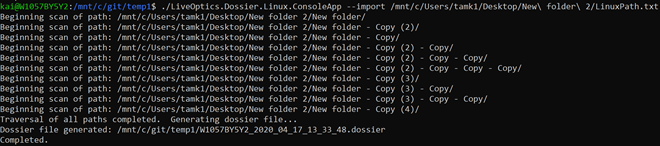
Scan a directory with an import file by adding multiple paths separated by a new line to a text file. To import the text file, use the --import command:
./LiveOptics.Dossier.Linux.ConsoleApp --import /mnt/c/Users/tamk1/Desktop/New\ folder\ 2/10Paths.txt
Scan a directory with a compression option using the --percmp command:
./LiveOptics.Dossier.Linux.ConsoleApp --percmp 10 /mnt/c/Users/tamk1/Desktop/New\ folder\ 2/
Enter an integer value after this optional parameter to represent the percentage value (the default is 0%).
Scan a directory with a deduplication option using the --dedup command:
./LiveOptics.Dossier.Linux.ConsoleApp --dedup /mnt/c/Users/tamk1/Desktop/New\ folder\ 2/.

Scan a directory with a compression and deduplication option:
./LiveOptics.Dossier.Linux.ConsoleApp --percmp 10 --dedup /mnt/c/Users/tamk1/Desktop/New\ folder\ 2

Additional Information
If you have any questions, please reach out to Live Optics Support at liveoptics.support@dell.com.
Affected Products
File Level RetentionArticle Properties
Article Number: 000228667
Article Type: How To
Last Modified: 25 Mar 2025
Version: 3
Find answers to your questions from other Dell users
Support Services
Check if your device is covered by Support Services.