Dell Precision and Latitude Laptops Cannot Boot After the M.2 PCIe SSD2 is Disabled in the BIOS
Summary: This article provides information about a No Boot issue with the Precision 3571 and Latitude 5531 when the M.2 PCIe BIOS settings are changed.
This article applies to
This article does not apply to
This article is not tied to any specific product.
Not all product versions are identified in this article.
Symptoms
The Dell Precision 3571 and Latitude 5531 might not boot to Windows or stay on the Dell Logo screen. This happens when Windows is installed on the M.2 PCIe SSD1 and the M.2 PCIe SSD2 option is changed to “Off” in the BIOS storage settings.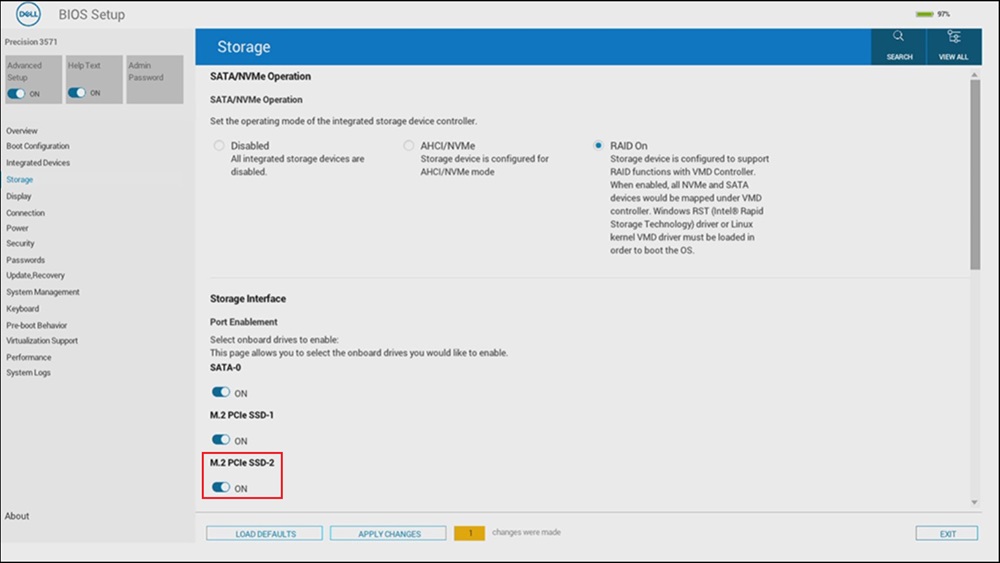
Affected Systems:
- Precision 3571
- Latitude 5531
Cause
This happens due to a limitation with the Intel Alder Lake chipset.
Resolution
M.2 PCIe SSD BIOS Options
If Windows is installed on the drive in the m.2 PCIe SSD1 slot, the BIOS setting for M.2 PCIe SSD2 will need to stay "On".
Affected Products
Latitude 5531, Precision 3571Article Properties
Article Number: 000229541
Article Type: Solution
Last Modified: 24 Apr 2025
Version: 3
Find answers to your questions from other Dell users
Support Services
Check if your device is covered by Support Services.