NetWorker:在 Windows Server 上将 NMC 升级到 19.10+ 失败
Summary: 在 Windows 服务器上升级 NetWorker Management Console (NMC) 服务器软件包失败。要安装/升级的 NMC 软件包为 19.9+。
This article applies to
This article does not apply to
This article is not tied to any specific product.
Not all product versions are identified in this article.
Symptoms
- 选择安装 NetWorker Management Console (NMC) 软件包进行安装时,安装失败并回滚。
- 这。。\EMC NetWorker\Management\GST\logs\gstdbinit.log报告:
waiting for server to start.... done
server started
107567:gstdbinit: Unable to allocate ODBC connection
107571:gstdbinit: ODBC Error:IM003:160:Specified driver could not be loaded due to system error  126: The specified module could not be found. (PostgreSQL Unicode(x64), C:\Program Files\EMC NetWorker\Management\GST\postgres_latest\odbc\psqlodbc35w.dll).
waiting for server to shut down.... done
server stopped
- 这。。\EMC NetWorker\Management\GST\logs\gstdbinit.log报告:
- NMC 程序包安装成功,但 NMC 服务器进程 (gstd) 无法启动。错误记录在 ..\EMC NetWorker\GST\logs\gstd.raw指示无法加载 Postgres 模块。
YYYY-MM-DDTHH:mm:SS 1 5 0 5560 8512 0 NMC_SERVER_HOSTNAME gstd NSR notice MM/DD/YY HH:mm:SS gstd-D1    IM003: Specified driver could not be loaded due to system error 126: The specified module could not be found. (PostgreSQL ANSI(x64), C:\Program Files\EMC NetWorker\Management\GST\postgres_latest\odbc\psqlodbc30a.dll).
YYYY-MM-DDTHH:mm:SS 1 5 0 5560 8512 0 NMC_SERVER_HOSTNAME gstd NSR notice MM/DD/YY HH:mm:SS gstd-D1 Internal error: could not get database handle.
YYYY-MM-DDTHH:mm:SS 1 5 0 5560 8512 0 NMC_SERVER_HOSTNAME gstd NSR notice MM/DD/YY HH:mm:SS gstd-D0 Internal error: could not get database handle.
YYYY-MM-DDTHH:mm:SS 1 5 0 5560 8512 0 NMC_SERVER_HOSTNAME gstd NSR notice MM/DD/YY HH:mm:SS gstd-D0 Please also see the log files in 'pg_log' directory inside the product's database directory for the database server's output messages
YYYY-MM-DDTHH:mm:SS 1 5 0 5560 8512 0 NMC_SERVER_HOSTNAME gstd NSR notice MM/DD/YY HH:mm:SS gstd-D0 Internal error: could not release database handle.
YYYY-MM-DDTHH:mm:SS 2 0 0 5560 8512 0 NMC_SERVER_HOSTNAME gstd NSR warning library error 22 os error 0
Cause
Windows 服务器缺少 Microsoft Visual C++ 2015 - 2022 软件包。软件包未列在以下位置:
控制面板 ->程序 -> 程序和功能
提醒:NetWorker 19.10 安装指南将 Microsoft Visual C++ 2015 - 2022 可再分发列为在 Windows 上安装 NetWorker 和 NMC 软件所需的软件包。NetWorker 安装指南可在 https://www.dell.com/support/home/product-support/product/networker/docs 下找到。有关依赖关系方面的任何差异,请参阅特定于版本的 NetWorker 安装指南。
Resolution
1.在 Windows 主机上安装 X64 Microsoft Visual C++ 2015 - 2022 可再发行组件。该软件包可从以下位置获取:
https://learn.microsoft.com/cpp/windows/latest-supported-vc-redist?view=msvc-170

安装后,软件包应列在“控制面板”-> “程序”-> “程序和功能”下:
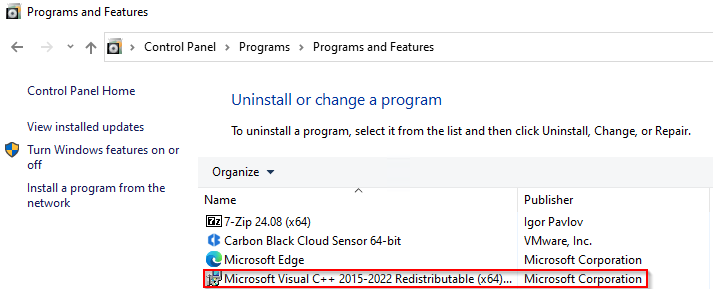
2.安装 NetWorker 和 NMC 软件包。
3.验证 NMC 服务器是否可从 NMC 启动程序访问。
Additional Information
Affected Products
NetWorkerProducts
NetWorker FamilyArticle Properties
Article Number: 000235248
Article Type: Solution
Last Modified: 18 Jun 2025
Version: 6
Find answers to your questions from other Dell users
Support Services
Check if your device is covered by Support Services.