NetWorker: Upgrade von NMC auf 19.10+ auf Windows Server schlägt fehl
Summary: Das Upgrade des NMC-Serverpakets (NetWorker Management Console) auf einem Windows-Server schlägt fehl. Das NMC-Paket, das installiert/aktualisiert wird, ist 19.9+.
This article applies to
This article does not apply to
This article is not tied to any specific product.
Not all product versions are identified in this article.
Symptoms
- Die Installation schlägt fehl und führt ein Rollback durch, wenn das NetWorker Management Console (NMC)-Paket zur Installation ausgewählt ist.
- Das.. \EMC NetWorker\Management\GST\logs\gstdbinit.log berichtet:
waiting for server to start.... done
server started
107567:gstdbinit: Unable to allocate ODBC connection
107571:gstdbinit: ODBC Error:IM003:160:Specified driver could not be loaded due to system error  126: The specified module could not be found. (PostgreSQL Unicode(x64), C:\Program Files\EMC NetWorker\Management\GST\postgres_latest\odbc\psqlodbc35w.dll).
waiting for server to shut down.... done
server stopped
- Das.. \EMC NetWorker\Management\GST\logs\gstdbinit.log berichtet:
- Das NMC-Paket wurde erfolgreich installiert, aber der NMC-Serverprozess (gstd) kann nicht gestartet werden. Fehler protokolliert in .. \EMC NetWorker\GST\logs\gstd.raw geben an, dass das Postgres-Modul nicht geladen werden konnte.
YYYY-MM-DDTHH:mm:SS 1 5 0 5560 8512 0 NMC_SERVER_HOSTNAME gstd NSR notice MM/DD/YY HH:mm:SS gstd-D1    IM003: Specified driver could not be loaded due to system error 126: The specified module could not be found. (PostgreSQL ANSI(x64), C:\Program Files\EMC NetWorker\Management\GST\postgres_latest\odbc\psqlodbc30a.dll).
YYYY-MM-DDTHH:mm:SS 1 5 0 5560 8512 0 NMC_SERVER_HOSTNAME gstd NSR notice MM/DD/YY HH:mm:SS gstd-D1 Internal error: could not get database handle.
YYYY-MM-DDTHH:mm:SS 1 5 0 5560 8512 0 NMC_SERVER_HOSTNAME gstd NSR notice MM/DD/YY HH:mm:SS gstd-D0 Internal error: could not get database handle.
YYYY-MM-DDTHH:mm:SS 1 5 0 5560 8512 0 NMC_SERVER_HOSTNAME gstd NSR notice MM/DD/YY HH:mm:SS gstd-D0 Please also see the log files in 'pg_log' directory inside the product's database directory for the database server's output messages
YYYY-MM-DDTHH:mm:SS 1 5 0 5560 8512 0 NMC_SERVER_HOSTNAME gstd NSR notice MM/DD/YY HH:mm:SS gstd-D0 Internal error: could not release database handle.
YYYY-MM-DDTHH:mm:SS 2 0 0 5560 8512 0 NMC_SERVER_HOSTNAME gstd NSR warning library error 22 os error 0
Cause
Auf dem Windows-Server fehlt das Microsoft Visual C++ 2015 - 2022-Paket. Das Paket ist nicht aufgeführt unter:
Systemsteuerung –>Programme –> Programme und Funktionen
HINWEIS: Im NetWorker 19.10 Installationshandbuch ist Microsoft Visual C++ 2015 – 2022 Redistributable als erforderliches Paket für die Installation der NetWorker- und NMC-Software unter Windows aufgeführt. Die NetWorker-Installationshandbücher finden Sie unter https://www.dell.com/support/home/product-support/product/networker/docs. Unterschiede in den Abhängigkeiten finden Sie im versionsspezifischen NetWorker-Installationshandbuch.
Resolution
1. Installieren Sie X64 Microsoft Visual C++ 2015 - 2022 Redistributable auf dem Windows-Host. Das Paket erhalten Sie bei:
https://learn.microsoft.com/cpp/windows/latest-supported-vc-redist?view=msvc-170

Nach der Installation sollte das Paket unter Systemsteuerung -> Programme -> Programme und Funktionen aufgeführt werden:
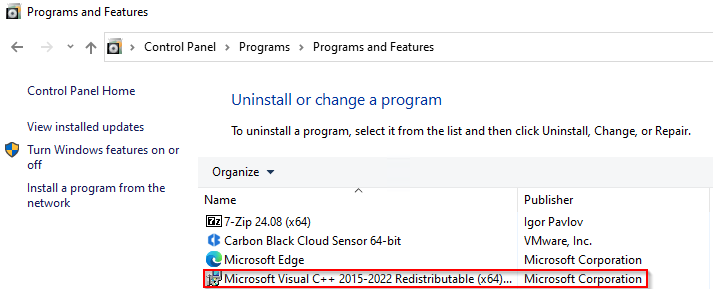
2. Installieren Sie NetWorker- und NMC-Pakete.
3. Überprüfen Sie, ob der NMC-Server über das NMC-Startprogramm zugänglich ist.
Additional Information
NetWorker: Anleitung zum Wiederherstellen der NMC-Datenbank
NMC-Datenbankbackup schlägt nach Aktualisierung auf NetWorker 19.11
fehlNetWorker: NMC-Service- und Zugriffsprobleme (Allgemeiner Troubleshooting-Leitfaden)
Affected Products
NetWorkerProducts
NetWorker FamilyArticle Properties
Article Number: 000235248
Article Type: Solution
Last Modified: 18 Jun 2025
Version: 6
Find answers to your questions from other Dell users
Support Services
Check if your device is covered by Support Services.