NetWorker : Échec de la mise à niveau de NMC vers la version 19.10+ sur Windows Server
Summary: La mise à niveau du package serveur NetWorker Management Console (NMC) sur un serveur Windows échoue. Le package NMC en cours d’installation/de mise à niveau est 19.9+.
This article applies to
This article does not apply to
This article is not tied to any specific product.
Not all product versions are identified in this article.
Symptoms
- L’installation échoue et le retour arrière lorsque le package NetWorker Management Console (NMC) est sélectionné pour l’installation.
- Le.. \EMC NetWorker\Management\GST\logs\gstdbinit.log reports :
waiting for server to start.... done
server started
107567:gstdbinit: Unable to allocate ODBC connection
107571:gstdbinit: ODBC Error:IM003:160:Specified driver could not be loaded due to system error  126: The specified module could not be found. (PostgreSQL Unicode(x64), C:\Program Files\EMC NetWorker\Management\GST\postgres_latest\odbc\psqlodbc35w.dll).
waiting for server to shut down.... done
server stopped
- Le.. \EMC NetWorker\Management\GST\logs\gstdbinit.log reports :
- Le package NMC a été installé avec succès, mais le processus du serveur NMC (gstd) n’a pas pu démarrer. Erreurs consignées dans le fichier .. \EMC NetWorker\GST\logs\gstd.raw indiquer qu’il n’a pas pu charger le module Postgres.
YYYY-MM-DDTHH:mm:SS 1 5 0 5560 8512 0 NMC_SERVER_HOSTNAME gstd NSR notice MM/DD/YY HH:mm:SS gstd-D1    IM003: Specified driver could not be loaded due to system error 126: The specified module could not be found. (PostgreSQL ANSI(x64), C:\Program Files\EMC NetWorker\Management\GST\postgres_latest\odbc\psqlodbc30a.dll).
YYYY-MM-DDTHH:mm:SS 1 5 0 5560 8512 0 NMC_SERVER_HOSTNAME gstd NSR notice MM/DD/YY HH:mm:SS gstd-D1 Internal error: could not get database handle.
YYYY-MM-DDTHH:mm:SS 1 5 0 5560 8512 0 NMC_SERVER_HOSTNAME gstd NSR notice MM/DD/YY HH:mm:SS gstd-D0 Internal error: could not get database handle.
YYYY-MM-DDTHH:mm:SS 1 5 0 5560 8512 0 NMC_SERVER_HOSTNAME gstd NSR notice MM/DD/YY HH:mm:SS gstd-D0 Please also see the log files in 'pg_log' directory inside the product's database directory for the database server's output messages
YYYY-MM-DDTHH:mm:SS 1 5 0 5560 8512 0 NMC_SERVER_HOSTNAME gstd NSR notice MM/DD/YY HH:mm:SS gstd-D0 Internal error: could not release database handle.
YYYY-MM-DDTHH:mm:SS 2 0 0 5560 8512 0 NMC_SERVER_HOSTNAME gstd NSR warning library error 22 os error 0
Cause
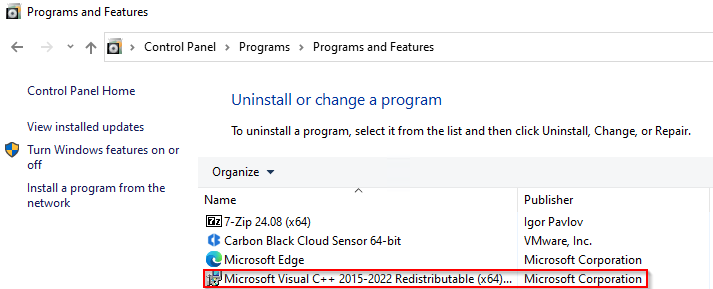
Le package Microsoft Visual C++ 2015 - 2022 est manquant sur le serveur Windows. Le package n’est pas répertorié sous :
Panneau de configuration ->Programmes -> Programmes et fonctionnalités
Remarque : Le Guide d’installation de NetWorker 19.10 répertorie Microsoft Visual C++ 2015 - 2022 Redistributable en tant que package requis pour l’installation des logiciels NetWorker et NMC sous Windows. Les guides d’installation de NetWorker sont disponibles sous https://www.dell.com/support/home/product-support/product/networker/docs. Reportez-vous au Guide d’installation spécifique à la version de NetWorker pour connaître les différences de dépendances.
Resolution
1. Installez X64 Microsoft Visual C++ 2015 - 2022 Redistributable sur l’hôte Windows. Le package peut être obtenu auprès de :
https://learn.microsoft.com/cpp/windows/latest-supported-vc-redist?view=msvc-170

Une fois installé, le package doit être répertorié sous Panneau de configuration -> Programmes -> Programmes et fonctionnalités :
2. Installez les packages NetWorker et NMC.
3. Vérifiez que le serveur NMC est accessible à partir du lanceur NMC.
Additional Information
NetWorker : Comment restaurer la base de données NMC ?
Échec de la sauvegarde de la base de données NMC après la mise à jour vers NetWorker 19.11
NetWorker : Problèmes de service et d’accessibilité NMC (Guide de dépannage général)
Affected Products
NetWorkerProducts
NetWorker FamilyArticle Properties
Article Number: 000235248
Article Type: Solution
Last Modified: 18 Jun 2025
Version: 6
Find answers to your questions from other Dell users
Support Services
Check if your device is covered by Support Services.