NetWorker: Upgrade van NMC naar 19.10+ op Windows Server mislukt
Summary: Het upgraden van het NMC-serverpakket (NetWorker Management Console) op een Windows-server mislukt. Het NMC pakket dat wordt geïnstalleerd/geüpgraded is 19.9+.
This article applies to
This article does not apply to
This article is not tied to any specific product.
Not all product versions are identified in this article.
Symptoms
- De installatie mislukt en wordt teruggedraaid wanneer het installeren van het NMC-pakket (NetWorker Management Console) is geselecteerd voor installatie.
- De.. \EMC NetWorker\Management\GST\logs\gstdbinit.log reports:
waiting for server to start.... done
server started
107567:gstdbinit: Unable to allocate ODBC connection
107571:gstdbinit: ODBC Error:IM003:160:Specified driver could not be loaded due to system error  126: The specified module could not be found. (PostgreSQL Unicode(x64), C:\Program Files\EMC NetWorker\Management\GST\postgres_latest\odbc\psqlodbc35w.dll).
waiting for server to shut down.... done
server stopped
- De.. \EMC NetWorker\Management\GST\logs\gstdbinit.log reports:
- NMC pakket is geïnstalleerd, maar het NMC server process (gstd) kan niet worden gestart. Fouten geregistreerd in de .. \EMC NetWorker\GST\logs\gstd.raw geven aan dat de Postgres-module niet kon worden geladen.
YYYY-MM-DDTHH:mm:SS 1 5 0 5560 8512 0 NMC_SERVER_HOSTNAME gstd NSR notice MM/DD/YY HH:mm:SS gstd-D1    IM003: Specified driver could not be loaded due to system error 126: The specified module could not be found. (PostgreSQL ANSI(x64), C:\Program Files\EMC NetWorker\Management\GST\postgres_latest\odbc\psqlodbc30a.dll).
YYYY-MM-DDTHH:mm:SS 1 5 0 5560 8512 0 NMC_SERVER_HOSTNAME gstd NSR notice MM/DD/YY HH:mm:SS gstd-D1 Internal error: could not get database handle.
YYYY-MM-DDTHH:mm:SS 1 5 0 5560 8512 0 NMC_SERVER_HOSTNAME gstd NSR notice MM/DD/YY HH:mm:SS gstd-D0 Internal error: could not get database handle.
YYYY-MM-DDTHH:mm:SS 1 5 0 5560 8512 0 NMC_SERVER_HOSTNAME gstd NSR notice MM/DD/YY HH:mm:SS gstd-D0 Please also see the log files in 'pg_log' directory inside the product's database directory for the database server's output messages
YYYY-MM-DDTHH:mm:SS 1 5 0 5560 8512 0 NMC_SERVER_HOSTNAME gstd NSR notice MM/DD/YY HH:mm:SS gstd-D0 Internal error: could not release database handle.
YYYY-MM-DDTHH:mm:SS 2 0 0 5560 8512 0 NMC_SERVER_HOSTNAME gstd NSR warning library error 22 os error 0
Cause
De Windows-server mist het Microsoft Visual C++ 2015 - 2022-pakket. Het pakket staat niet vermeld onder:
Configuratiescherm ->Programma's -> Programma's en onderdelen
OPMERKING: De NetWorker 19.10 installatiehandleiding vermeldt Microsoft Visual C++ 2015 - 2022 Redistributable als een vereist pakket voor het installeren van NetWorker- en NMC-software op Windows. De NetWorker-installatiehandleidingen zijn beschikbaar onder https://www.dell.com/support/home/product-support/product/networker/docs. Raadpleeg de versiespecifieke installatiehandleiding van NetWorker voor eventuele verschillen in afhankelijkheden.
Resolution
1. Installeer X64 Microsoft Visual C++ 2015 - 2022 Redistributable op de Windows-host. Het pakket is verkrijgbaar bij:
https://learn.microsoft.com/cpp/windows/latest-supported-vc-redist?view=msvc-170

Zodra het pakket is geïnstalleerd, wordt het weergegeven onder Configuratiescherm -> Programma's -> Programma's en onderdelen:
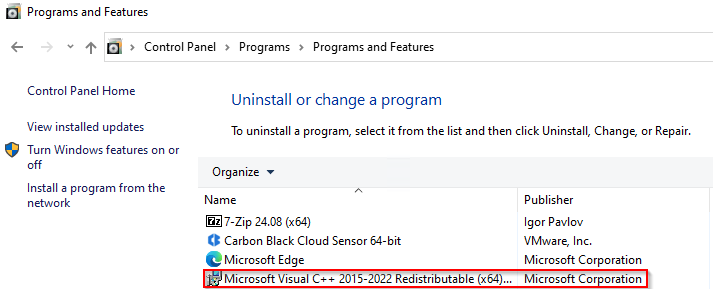
2. NetWorker- en NMC-pakketten installeren.
3. Bevestig dat de NMC server toegankelijk is via de NMC launcher.
Additional Information
NetWorker: Hoe de NMC database te herstellen?
Back-up van NMC database mislukt na update naar NetWorker 19.11
NetWorker: NMC service- en toegankelijkheidsproblemen (Algemene probleemoplossingsgids
Affected Products
NetWorkerProducts
NetWorker FamilyArticle Properties
Article Number: 000235248
Article Type: Solution
Last Modified: 18 Jun 2025
Version: 6
Find answers to your questions from other Dell users
Support Services
Check if your device is covered by Support Services.