PowerFlex 4.X: Dial Home SIO03.02.0000005에 대한 PFMP에서 디바이스 오류를 지우는 방법
Summary: 이 문서에서는 DH(Dial Home) SIO03.02.0000005가 트리거될 때 PFMP(PowerFlex Manager Platform)에서 디바이스 오류를 지우는 방법에 대해 설명합니다.
This article applies to
This article does not apply to
This article is not tied to any specific product.
Not all product versions are identified in this article.
Instructions
디바이스에 운영 체제의 오류가 많을 경우 PowerFlex Manager에서 알림이 생성되어 영향을 받은 디스크의 SDS 및 디스크 이름이 나열됩니다.
- PowerFlex Manager Alert 페이지에서 SDS 이름 및 디스크 경로를 캡처합니다.

이 예에서 디스크 경로는 N/A0009이며 이는 디스크 슬롯 9임을 의미합니다.
디스크가 오류 상태인 경우 경로는 16진수이므로 N/A 0000 <slot no> N/A000A는 슬롯 10을 의미하고, B는 11을 의미하는 방식으로 변경됩니다.
SDS 이름은 경로 옆에 있는 필드입니다. 이 예에서는 일반 <SDS 이름을 >입력합니다.
- 디스크 경로가 올바르게(/dev/sdf) 나열되면 디스크가 여전히 정상 상태임을 의미합니다. 알림을 무시할 수 있지만 오류 상태로 전환되지 않도록 이 디스크를 잠시 주시합니다(어쨌든 알림이 생성됨).
- 디스크가 NA000X이고 여기서 X는 dIsk의 슬롯 번호인 경우 오류 상태에 있으며 오류 조치가 필요함을 의미합니다.
- 디스크 오류를 지우려면 다음으로 이동하십시오.

알림에서 캡처된 SDS 이름을 선택하고 오른쪽 창에서 모든 SDS 디바이스를 나열합니다.
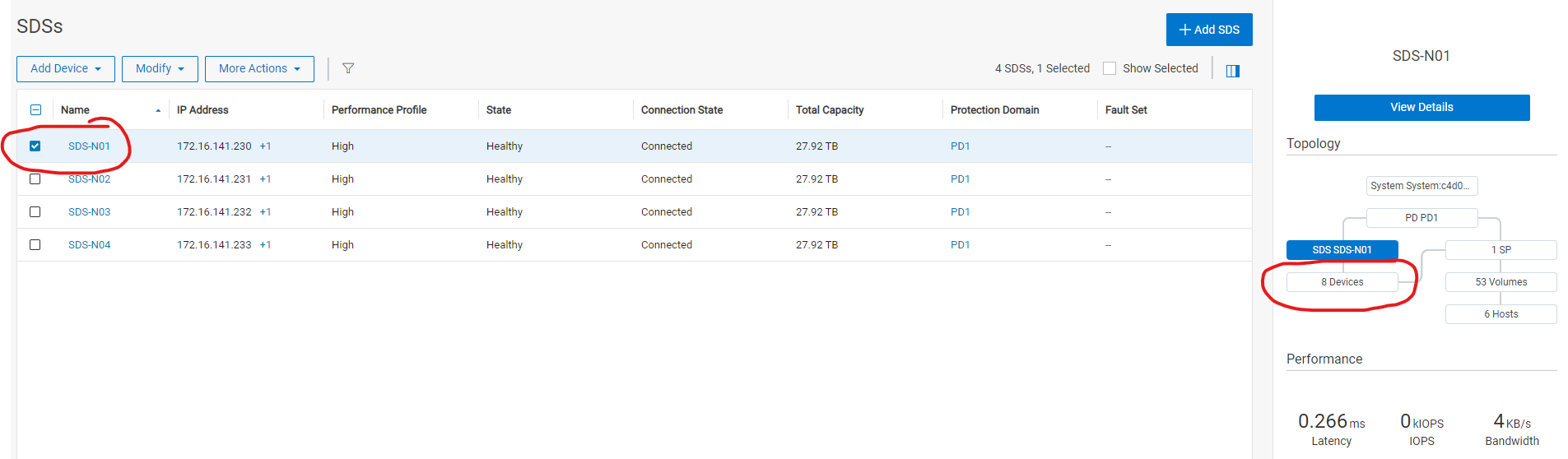
알림 NA0009에서 캡처된 디바이스 경로를 선택합니다. 이 예에서는 추가 작업에서 clear errors(디스크가 오류 상태인 경우 활성화되어야 함)를 클릭합니다.

- 48시간 동안 오류를 해결한 후 디스크 상태를 모니터링합니다. 오류 상태로 돌아가면 디스크를 교체해야 합니다.
Additional Information
PowerFlex 3.6의 경우 PowerFlex 3.6 PowerFlex 프레젠테이션 서버에서 디스크 오류 지우기 문서를 참조하십시오.
Products
PowerFlex rack, VxFlex Ready Nodes, PowerFlex custom node, PowerFlex appliance R650, PowerFlex appliance R6525, PowerFlex appliance R660, PowerFlex appliance R6625, Powerflex appliance R750, PowerFlex appliance R760, PowerFlex appliance R7625
, PowerFlex custom node, PowerFlex custom node R650, PowerFlex custom node R6525, PowerFlex custom node R660, PowerFlex custom node R6625, PowerFlex custom node R750, PowerFlex custom node R760, PowerFlex custom node R7625, PowerFlex rack connectivity, PowerFlex rack HW, PowerFlex rack RCM Software, VxFlex Ready Node, VxFlex Ready Node R640, VxFlex Ready Node R740xd, PowerFlex appliance R640, PowerFlex appliance R740XD, PowerFlex appliance R7525, PowerFlex appliance R840, VxFlex Ready Node R840
...
Article Properties
Article Number: 000256801
Article Type: How To
Last Modified: 10 Jan 2025
Version: 3
Find answers to your questions from other Dell users
Support Services
Check if your device is covered by Support Services.