PowerFlex 4.X: How to Clear Device Error from PFMP for Dial Home SIO03.02.0000005
Summary: This article explains how to clear device errors from the PowerFlex Manager Platform (PFMP) when a Dial Home (DH) SIO03.02.0000005 is triggered.
This article applies to
This article does not apply to
This article is not tied to any specific product.
Not all product versions are identified in this article.
Instructions
When a device has numerous errors from the operating system, an alert is generated from PowerFlex Manager listing the SDS and disk name for the impacted disk.
- Capture the SDS name and Disk path from the PowerFlex Manager Alert page:

In this example, the disk path is N/A0009 which means it is Disk slot 9.
When a disk is in an error state, the path changes to N/A 0000 <slot no> N/A000A which means slot 10,B which means 11, and so on as it is hexadecimal.
SDS name is the field beside the path, in this example, we put generic <SDS name >.
- If the disk path is listed correctly (/dev/sdf), that means the disk is still in a healthy state. The alert can be ignored but keep an eye on this disk for some time to ensure it does not turn into an error state (the alert is generated anyway).
- If the disk is NA000X where X is the slot number of the dIsk, it means it is in an error state and error action is required.
- To clear the disk error, go to:
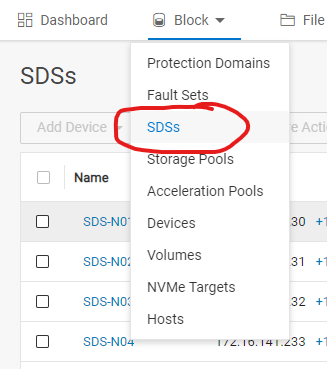
Select the SDS name which was captured from the alert and list all SDS devices from the right pane:
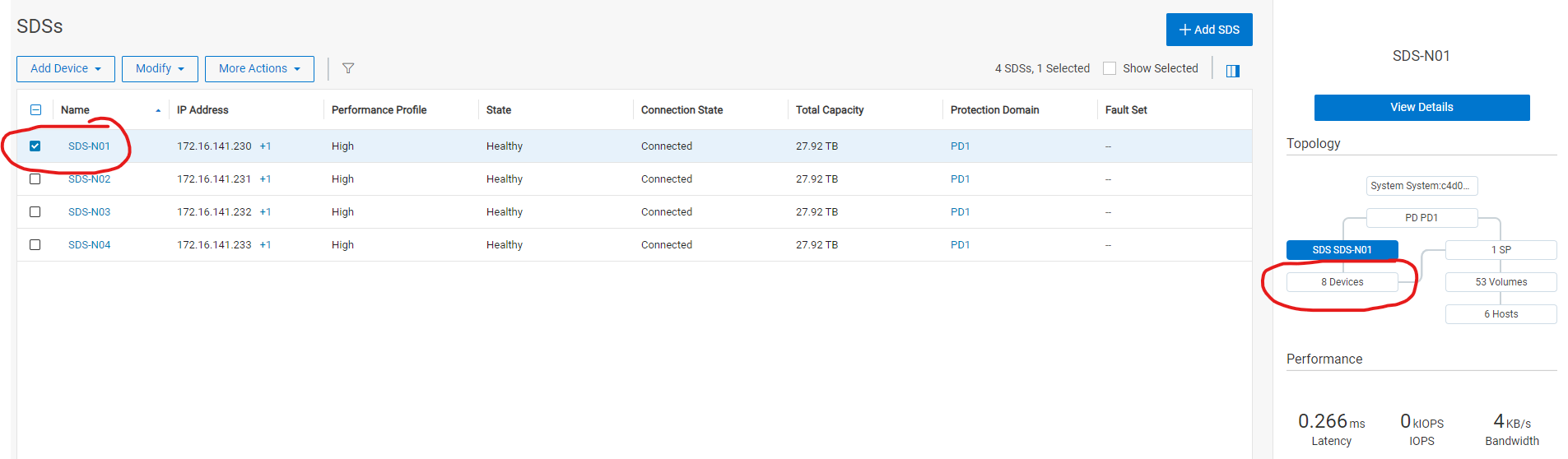
Select the device path captured from the alert NA0009. In our example and from more actions, click clear errors (which should be active if the disk is in an error state).

- Monitor the disk status after clearing the errors for 48 hours. If it returns back to error state, disk replacement is required.
Additional Information
For PowerFlex 3.6, check article PowerFlex 3.6 Clearing Disk Errors in PowerFlex Presentation Server.
Products
PowerFlex rack, VxFlex Ready Nodes, PowerFlex custom node, PowerFlex appliance R650, PowerFlex appliance R6525, PowerFlex appliance R660, PowerFlex appliance R6625, Powerflex appliance R750, PowerFlex appliance R760, PowerFlex appliance R7625
, PowerFlex custom node, PowerFlex custom node R650, PowerFlex custom node R6525, PowerFlex custom node R660, PowerFlex custom node R6625, PowerFlex custom node R750, PowerFlex custom node R760, PowerFlex custom node R7625, PowerFlex rack connectivity, PowerFlex rack HW, PowerFlex rack RCM Software, VxFlex Ready Node, VxFlex Ready Node R640, VxFlex Ready Node R740xd, PowerFlex appliance R640, PowerFlex appliance R740XD, PowerFlex appliance R7525, PowerFlex appliance R840, VxFlex Ready Node R840
...
Article Properties
Article Number: 000256801
Article Type: How To
Last Modified: 10 Jan 2025
Version: 3
Find answers to your questions from other Dell users
Support Services
Check if your device is covered by Support Services.