Bluetooth Connection Issues With Dell Wireless Headsets
Summary: Intermittent problems with establishing or maintaining Bluetooth connections may occur with affected Dell wireless headsets.
This article applies to
This article does not apply to
This article is not tied to any specific product.
Not all product versions are identified in this article.
Symptoms
Affected Dell wireless headsets may not correctly appear in Microsoft Teams as an available microphone device. The microphone device may not appear at all, or the speaker device may appear twice, as both a Dell WLx024 Headset Hands-Free and Dell WLx024 Headset.
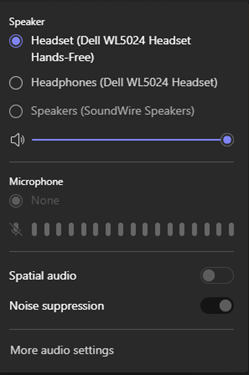
Affected Headsets:
Dell Pro Premium Wireless ANC Headset WL7024Dell Pro Plus Wireless ANC Headset WL5024Dell Pro Wireless Headset WL3024
Cause
A Windows drivers pointer issue causes this error.
Resolution
If experiencing Bluetooth connectivity issues with an affected Dell wireless headset, try the following steps:
- Update the headset to the latest firmware using the dongle using Dell Display and Peripheral Manager (DDPM) or the standalone installer from Dell Support.
- Ensure that the computer is up to date with the latest BIOS and Bluetooth device firmware. If using a Dell computer, reference:
- Clear the Microsoft Teams application cache.
- Quit Microsoft Teams.
- Right-click the Start button and then click Run.
- Type
%appdata%\Microsoft\Teamsand then click Run. - Delete all files and folders in the directory.
- Start Microsoft Teams.
Note: For more details, see Clear the Teams client cache
.
- Restart the computer if the hibernate function is typically used.
If the problem persists, then restart the headset when the issue occurs.
Affected Products
Dell Pro Wireless Headset WL3024, Dell Pro Plus Wireless ANC Headset WL5024, Dell Pro Premium Wireless ANC Headset WL7024Article Properties
Article Number: 000296542
Article Type: Solution
Last Modified: 13 Nov 2025
Version: 6
Find answers to your questions from other Dell users
Support Services
Check if your device is covered by Support Services.