Data Domain: Alerts on DD3300
Sommaire: This document discusses hardware monitoring performed on DD3300 with hardware monitoring processes and ensure that alerts are reported on DD3300.
Cet article s’applique à
Cet article ne s’applique pas à
Cet article n’est lié à aucun produit spécifique.
Toutes les versions de produits ne sont pas identifiées dans cet article.
Instructions
Issue: Alerts on DD3300
Resolution: To see below how hardware monitoring is done on DD3300.
Resolution: To see below how hardware monitoring is done on DD3300.
Hardware Monitoring
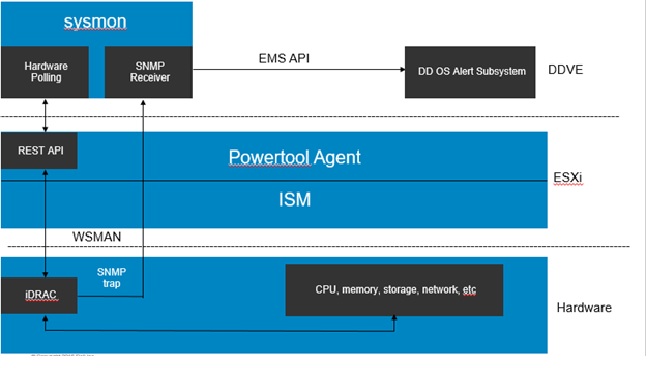
Hardware monitoring with the DD3300 leverages several tools to monitor hardware and ensure that alerts are reported in the logs and Data Domain UI.
- Sysmon queries PowerTools every 60 seconds using REST API
- Sysmon builds the hardware inventory file from information from PowerTools
- CLI parses and presents the inventory file.
- The inventory file is at /ddr/etc/hw_inventory.json
- Health status file is stored in the following file /ddr/etc/hw_health.json
- Do not edit the .json files.
Alerts on DD3300
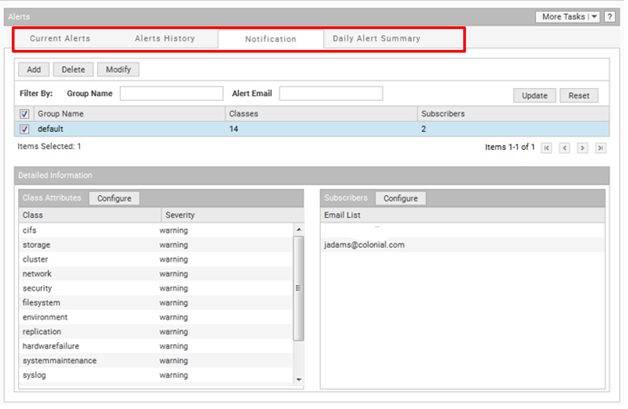
Screenshot of the Alerts > Notifications tab.
Hardware alerts are reported in the UI and CLI through the DD3300 leveraging of SNMP and the iDRAC hardware. Multiple SNMP traps can be converted into one DD OS alert. Using hardware inventory, sysmon automatically clears some DD OS alerts.
Hardware alerts are supported for the following DD3300 components:
Hardware alerts are supported for the following DD3300 components:
- Power Supply Unit (PSU)
- Fans
- Temperature
- Memory
- CPU
- NIC
- Hard drives
Managing Alerts

Daily Alert Summary
The DD OS alert system has the following characteristics:
The DD OS alert system has the following characteristics:
- You can configure settings to determine who receives DD Management Center alert notifications and daily alert summaries
- Data Domain Management Center (DDMC) and Data Domain systems use the same alert system
- Detailed information about the alert system is described in the Data Domain Operating System Administration Guide
- The groups that are configured to receive DDMC alert notifications are listed in the Settings | System | Support | Notifications tab
- Selecting a group in the table populates the <wintitle>Details</wintitle> panel for alert class attributes
- Subscribers receive notifications when alerts reach the severity that is configured for the alert class
- 8:00 AM daily is the default time to send to the email addresses of those subscribed in the list
Filtering the Alert Notifications List
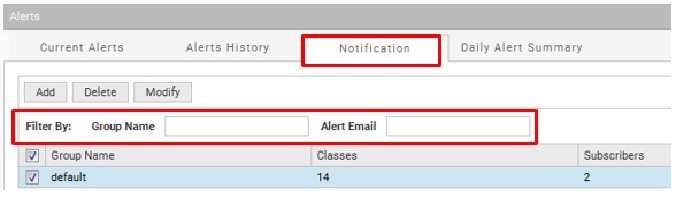
Alerts > Notification > Filter By configuration panel.
Follow these recommendations when using the notification filter feature:
- To filter in the notifications group list, type a group name or subscriber email in the appropriate text box in the Filter By area
- Select Update to apply the filter to the display
- Look at the top of the notification list to see the results
- Click the <uicontrol>Reset</uicontrol> button to return the group list to the default order
Creating an Alert Notification Group
By default, all alerts are sent to the autosupport-alert@autosupport.datadomain.com email group, but more groups can be created to receive specific classes of alert notifications.
Use the Notification tab to add notification groups and select the severity level for each group:
Use the Notification tab to add notification groups and select the severity level for each group:
- Select Health > Alerts > Notification
- Click Add to display the Add Group dialog box
- Type the group name in the Group Name box
- Select the check box of one or more alert classes for which notifications are to be sent
- Select another level in the associated listbox to change the default severity level for a class
- Click OK
The alerts notify-list CLI command provides the equivalent functionality.
# alerts notify-list add eng_lab emails mlee@urcompany.com,bob@urcompany.com
The severity levels are listed in ascending severity level. Emergency is the highest severity level.
# alerts notify-list add eng_lab emails mlee@urcompany.com,bob@urcompany.com
The severity levels are listed in ascending severity level. Emergency is the highest severity level.
Produits touchés
Data DomainProduits
Data Domain, DD OS 6.2, DD OS, DD OS 6.0, DD OS 6.1Propriétés de l’article
Numéro d’article: 000012883
Type d’article: How To
Dernière modification: 21 avr. 2026
Version: 7
Obtenez des réponses à vos questions auprès d’autre utilisateurs de Dell
Services de soutien
Vérifiez si votre appareil est couvert par les services de soutien.