How to Identify the Dell Full Disk Encryption Version
Sommaire: Learn how to identify the version of Dell Full Disk Encryption by following these step-by-step instructions.
Cet article s’applique à
Cet article ne s’applique pas à
Cet article n’est lié à aucun produit spécifique.
Toutes les versions de produits ne sont pas identifiées dans cet article.
Instructions
Knowing the version of Dell Full Disk Encryption allows an administrator to:
- Identify known issues
- Determine UI differences
- Understand workflow changes
- Verify system requirements
Affected Products:
- Dell Full Disk Encryption
Affected Operating Systems:
- Windows
Versioning can be determined either through the product user interface (UI) or through the product Installer. Click the appropriate method for more information.
UI
Note: Dell Full Disk Encryption must be installed before identifying the version through the UI.
- On the Windows Desktop, double-click Dell Data Security Console.
 Note: Alternatively, the Dell Data Security Console can be accessed using Windows Explorer at
%SYSTEMDRIVE%\Program Files\Dell\Dell Data Protection\Security Tools\Dell.SecurityFramework.Console.exe. - In the upper right corner of the Dell Data Security Console, click the gear icon and then select About.

- Record the version displayed.
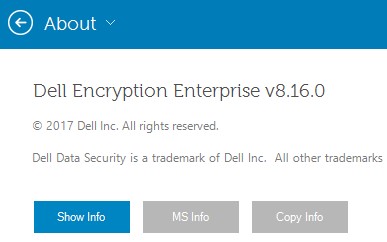 Note: The version may differ from the example above.
Installer
Note: For information about downloading the installer, reference How to Download Dell Encryption Enterprise or Dell Encryption Personal.
- Extract the child installers from the Dell Data Security Master Installer.
Note: Reference How to Extract Child Installers from the Dell Data Security Master Installer for more information.
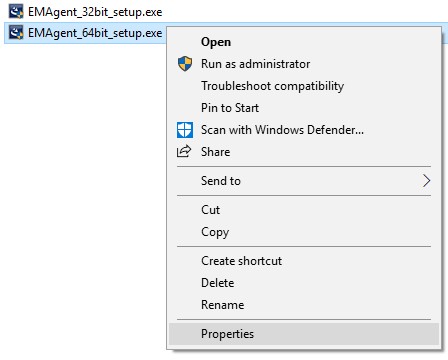
- In the extracted master installer path, right-click [EXTRACTED PATH]
\Encryption Management Agent\EMAgent_[BITDEPTH]_setup.exeand then select Properties.
- Click the Details tab.

- Record the first three numbers of Product version. In the example, 8.16.0 are the first three numbers.
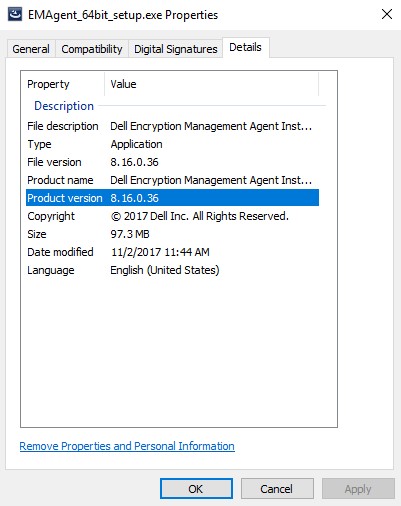 Note: The version may differ from the example above.
Produits touchés
Dell EncryptionPropriétés de l’article
Numéro d’article: 000124907
Type d’article: How To
Dernière modification: 10 août 2026
Version: 13
Obtenez des réponses à vos questions auprès d’autre utilisateurs de Dell
Services de soutien
Vérifiez si votre appareil est couvert par les services de soutien.