如何确定 Dell Full Disk Encryption 版本
Sommaire: 按照这些分步说明了解如何识别 Dell Full Disk Encryption 的版本。
Cet article s’applique à
Cet article ne s’applique pas à
Cet article n’est lié à aucun produit spécifique.
Toutes les versions de produits ne sont pas identifiées dans cet article.
Instructions
了解 Dell Full Disk Encryption 的版本使管理员能够:
- 识别已知问题
- 确定UI差异
- 了解工作流程更改
- 验证系统要求
受影响的产品:
- Dell Full Disk Encryption
受影响的操作系统:
- Windows
可以通过产品用户界面 (UI) 或产品安装程序确定版本。单击相应方法以了解更多信息。
UI
必须先安装 Dell Full Disk Encryption,然后才能通过 UI 确定版本。
- 在 Windows 桌面上,双击 Dell Data Security 控制台。
 或者,可以使用 Windows 资源管理器访问 Dell Data Security Console,网址:。
%SYSTEMDRIVE%\Program Files\Dell\Dell Data Protection\Security Tools\Dell.SecurityFramework.Console.exe。 - 在 Dell Data Security 控制台的右上角,单击齿轮图标,然后选择 About。

- 记录显示的版本。
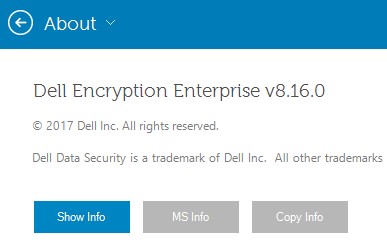 版本可能与上面的示例不同。
安装程序
有关下载安装程序的信息,请参阅如何下载 Dell Encryption Enterprise 或 Dell Encryption Personal。
- 从 Dell Data Security 主安装程序中解压子安装程序。
有关更多信息,请参阅如何从 Dell Data Security 主安装程序中解压子安装程序(英文版)。
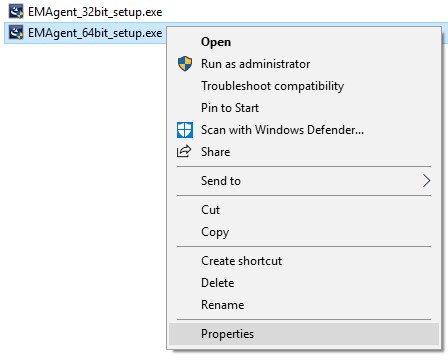
- 在解压的主安装程序路径中,右键单击 [解压的路径]
\Encryption Management Agent\EMAgent_[位深度]_setup.exe然后选择 属性。
- 单击详细信息选项卡。

- 记录产品版本的前三个数字。在此示例中,8.16.0 即为前三个数字。
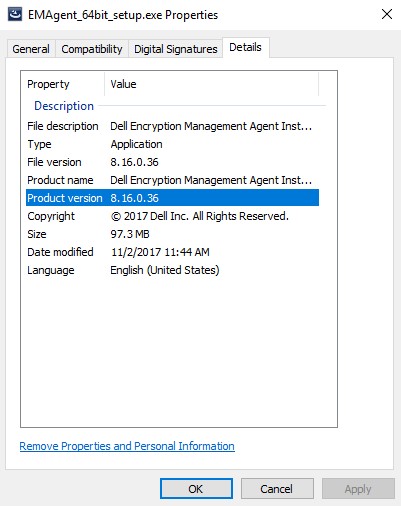 版本可能与上面的示例不同。
Renseignements supplémentaires
Vidéos
Produits touchés
Dell EncryptionPropriétés de l’article
Numéro d’article: 000124907
Type d’article: How To
Dernière modification: 10 août 2026
Version: 13
Obtenez des réponses à vos questions auprès d’autre utilisateurs de Dell
Services de soutien
Vérifiez si votre appareil est couvert par les services de soutien.