How to Install Dell Encryption Enterprise
Sommaire: Learn how to install Dell Encryption Enterprise or Dell Data Protection Enterprise Edition by following these instructions for either the user interface (UI) or the command line (CLI).
Cet article s’applique à
Cet article ne s’applique pas à
Cet article n’est lié à aucun produit spécifique.
Toutes les versions de produits ne sont pas identifiées dans cet article.
Instructions
This article provides the steps for installing Dell Encryption Enterprise (formerly Dell Data Protection Enterprise Edition) and Dell Encryption Enterprise for Server (formerly Dell Data Protection Server Encryption).
Affected Products:
- Dell Encryption Enterprise
- Dell Data Protection Enterprise Edition
- Dell Encryption Enterprise for Server
- Dell Data Protection Server Encryption
Affected Versions:
- 8.0.X and Later
Affected Operating Systems:
- Windows
Dell Encryption Enterprise and Dell Encryption Enterprise for Server use the same installer. The installation can be performed on Windows through the user interface (UI) or command-line interface (CLI) switches. Click the appropriate method for more information.
Note: Dell Encryption Enterprise must be downloaded and extracted from the Master Installer.
- For information about the download process, reference How to Download Dell Encryption Enterprise or Dell Encryption Personal.
- For information about the extraction process, reference How to Extract Child Installers from the Dell Data Security Master Installer.
UI
The UI installation process differs between versions.
Click the appropriate client version for specific installation steps.
Note: For information about locating the product version, reference How to Identify the Dell Encryption Enterprise or Dell Encryption Personal Version.
10.1.0 and Later
- Double-click DDPE_64bit_setup.exe or DDPE_32bit_setup.exe to launch the installation wizard.

- If any missing requirements are detected, click Install. Otherwise go to Step 3.
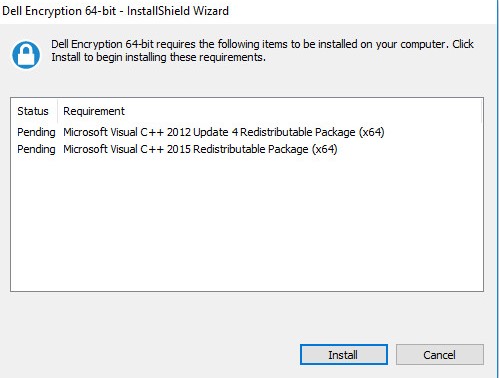 Note: Missing requirements may differ in your environment from the screenshot example. For more information about product system requirements, reference Dell Encryption Enterprise System Requirements.
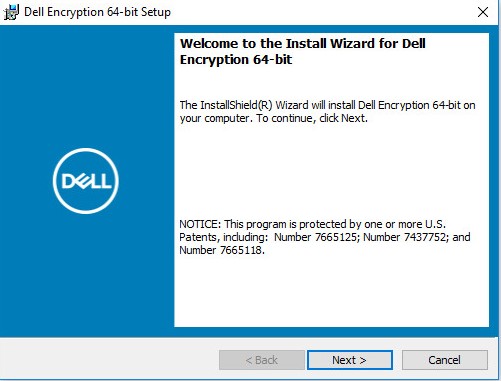
 - Click Next to proceed.
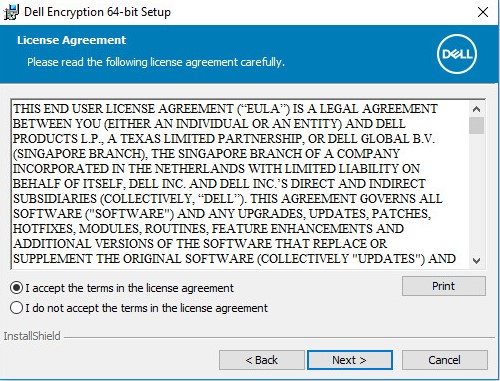
- Click I Accept the terms in the license agreement and then click Next.
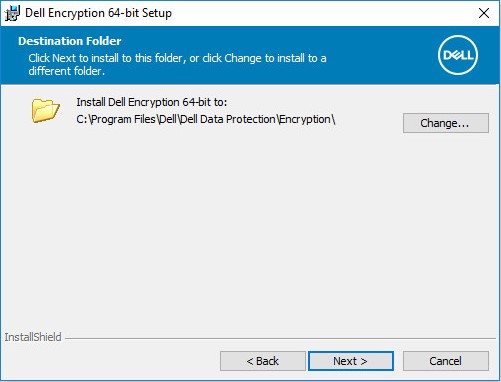
- Optionally Change the installation location and then click Next.
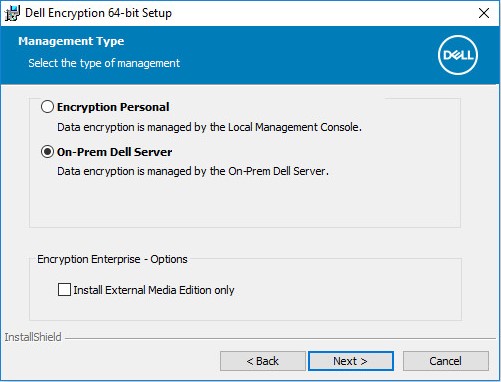
- Click On-Prem Dell Management Server and then click Next.
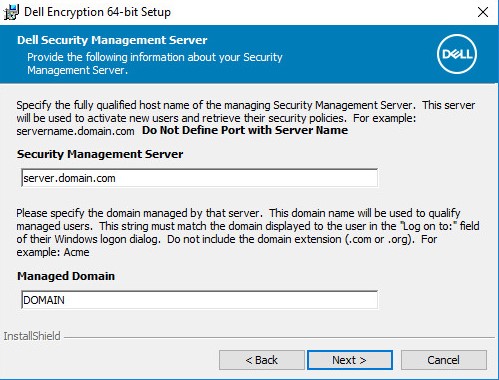
- Populate the Security Management Server Name and optionally change the Managed Domain. Once populated, click Next to proceed.
 Note:
Note:- Security Management Server = Fully Qualified Domain Name (FQDN) or IP address of the Dell Security Management Server
- The example that is used for Security Management Server in the image will differ in your environment.
- Change the Dell Policy Proxy Host Name if the FQDN differs from the Security Management Server Name (Step 7) and then click Next.
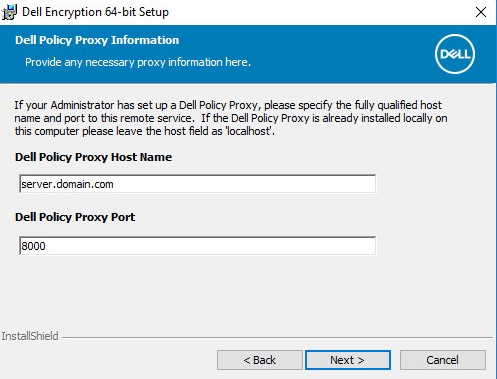 Note: Port 8000 is used by default for policy inventory processing. This configuration may differ in your environment.
 - Change the Dell Device Server URL if the FQDN differs from the Security Management Server Name (Step 7) and then click Next.
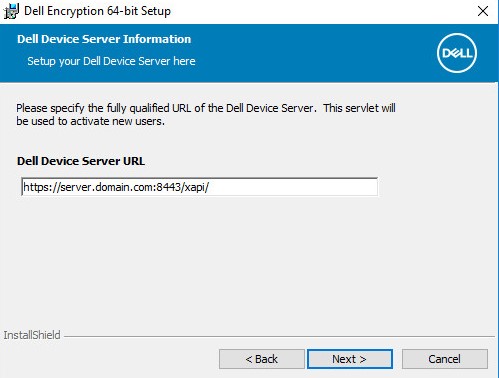 Note: Port 8443 is used by default for activation. This configuration may differ in your environment.
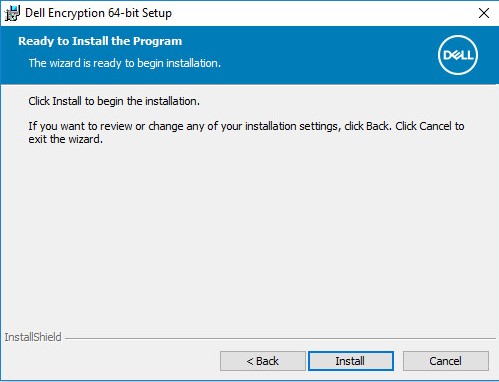
 - Click Install.
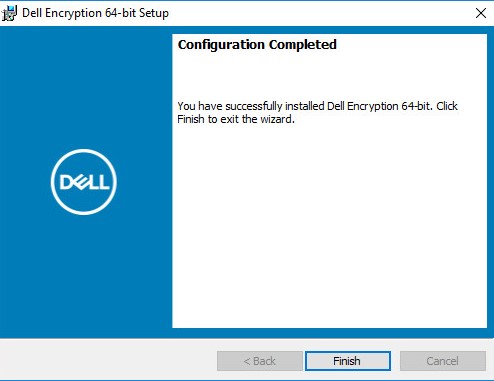
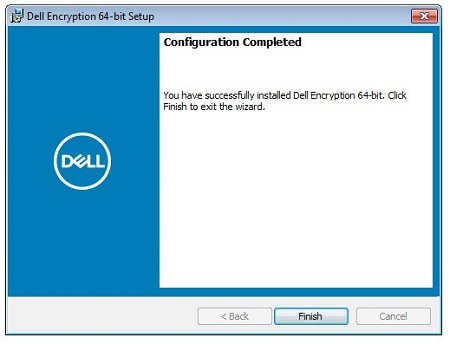
- Upon installation, click Finish to close the UI.
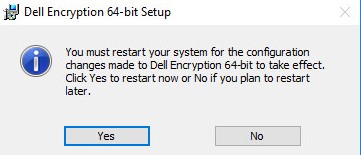
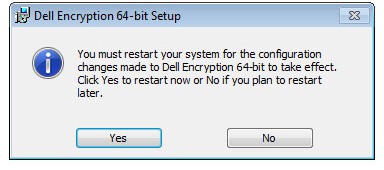
- Click Yes to reboot the machine.
10.0.0 to 10.0.1
- Double-click DDPE_64bit_setup.exe or DDPE_32bit_setup.exe to launch the installation wizard.

- If any missing requirements are detected, click Install. Otherwise go to Step 3.
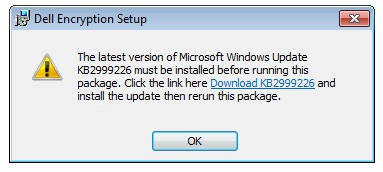 Note: Missing requirements may differ in your environment from the screenshot example. For more information about product system requirements, reference Dell Encryption Enterprise System Requirements.
 - Click Next to proceed.
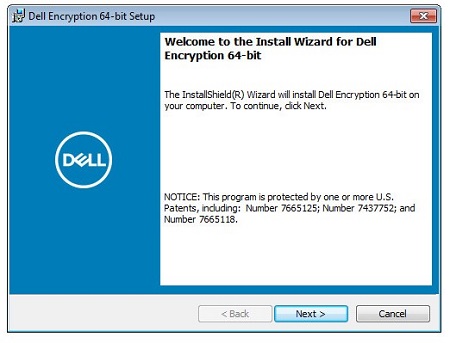
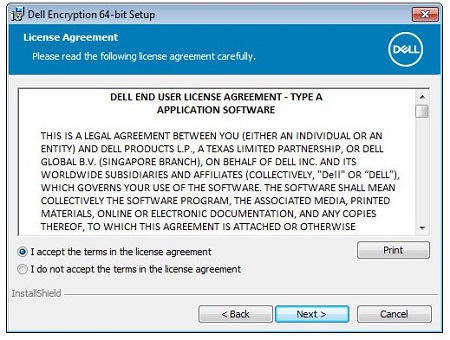
- Click I Accept the terms in the license agreement and then click Next.
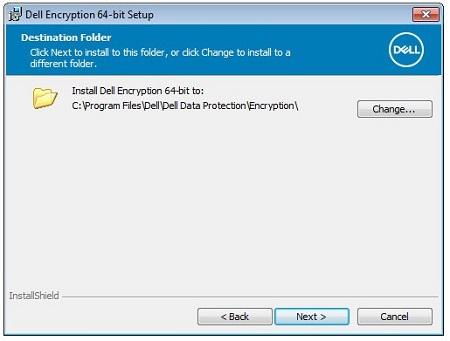
- Optionally Change the installation location and then click Next.
- Click On-Prem Dell Management Server and then click Next.
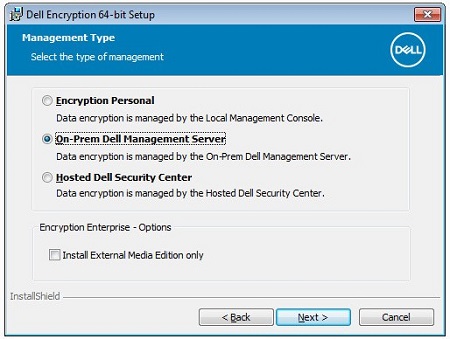 Note: Hosted Dell Security Center is not available.
 - Populate the Security Management Server Name and optionally change the Managed Domain. Once populated click Next to proceed.
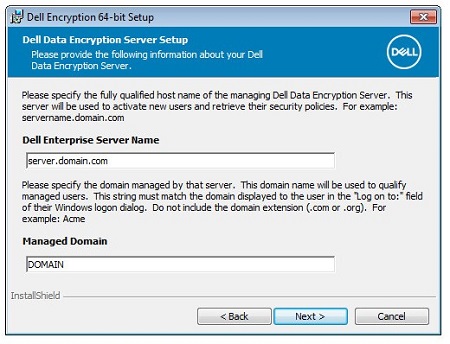 Note:
Note:- Security Management Server = Fully Qualified Domain Name (FQDN) or IP address of the Dell Security Management Server
- The example that is used for Security Management Server in the image will differ in your environment.
- Change the Dell Policy Proxy Host Name if the FQDN differs from the Security Management Server Name (Step 7) and then click Next.
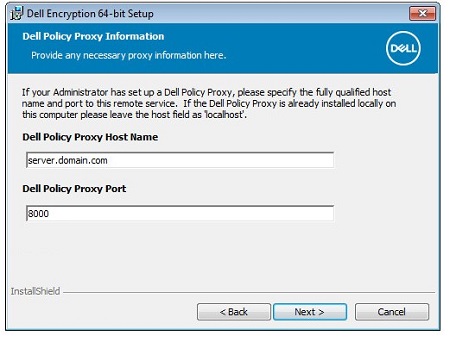 Note: Port 8000 is used by default for policy inventory processing. This configuration may differ in your environment.
 - Change the Dell Device Server URL if the FQDN differs from the Security Management Server Name (Step 7) and then click Next.
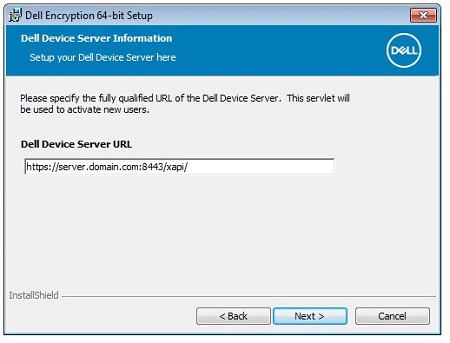 Note: Port 8443 is used by default for activation. This configuration may differ in your environment.
 - Click Install.
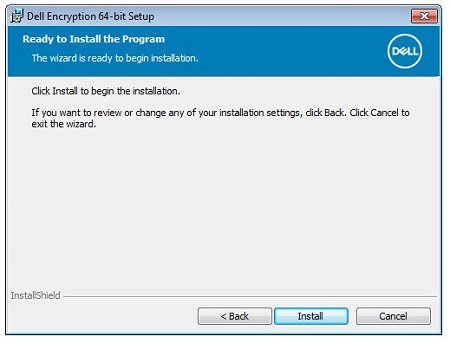
- Upon installation, click Finish to close the UI.
- Click Yes to reboot the machine.
8.16.0 to 8.18.X
- Double-click DDPE_64bit_setup.exe or DDPE_32bit_setup.exe to launch the installation wizard.

- If any missing requirements are detected, click Install. Otherwise go to Step 3.
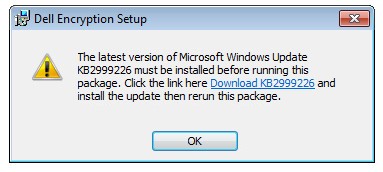 Note: Missing requirements may differ in your environment from the screenshot example. For more information about product system requirements, reference Dell Encryption Enterprise System Requirements.
 - Click Next to proceed.
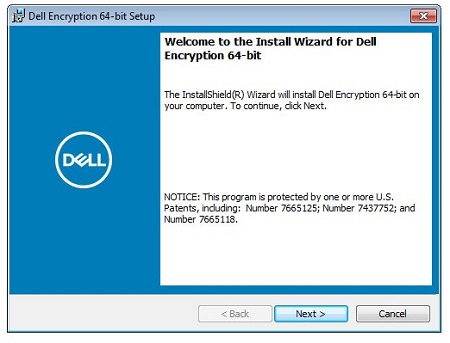
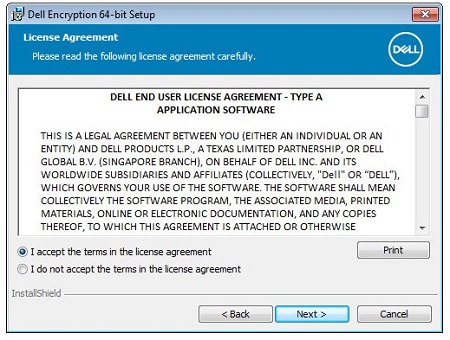
- Click I accept the terms in the license agreement and then click Next.
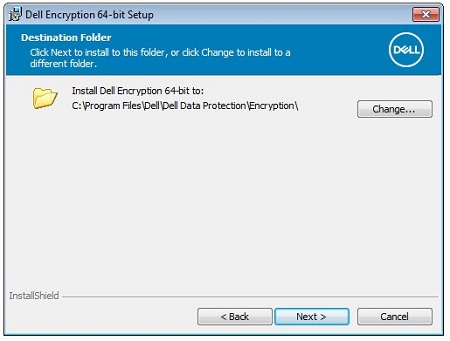
- Optionally Change the installation location and then click Next.
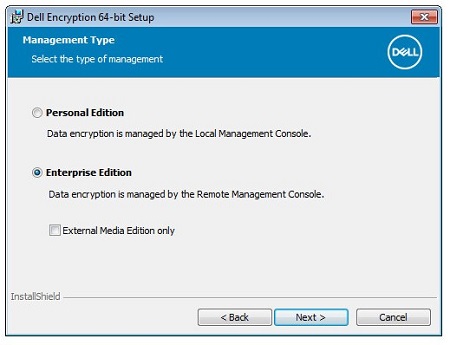
- Click Enterprise Edition and then click Next.
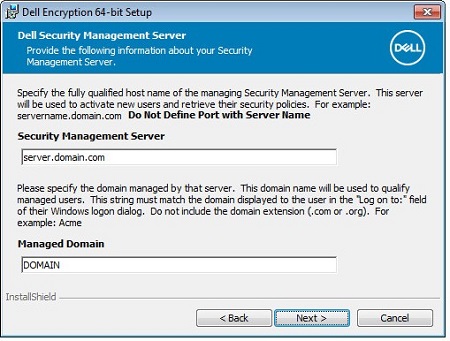
- Populate the Security Management Server Name and optionally change the Managed Domain. Once populated click Next to proceed.
 Note:
Note:- Security Management Server = Fully Qualified Domain Name (FQDN) or IP address of the Dell Security Management Server
- The example that is used for Security Management Server will differ in your environment.
- Change the Dell Policy Proxy Host Name if the FQDN differs from the Security Management Server Name (Step 7) and then click Next.
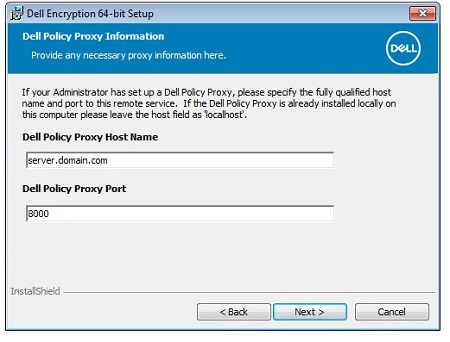 Note: Port 8000 is used by default for policy inventory processing. This configuration may differ in your environment.
 - Change the Dell Device Server URL if the FQDN differs from the Security Management Server Name (Step 7) and then click Next.
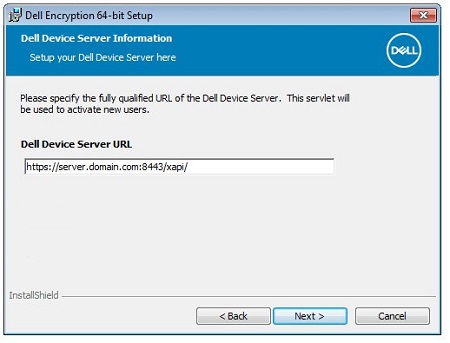 Note: Port 8443 is used by default for activation. This configuration may differ in your environment.
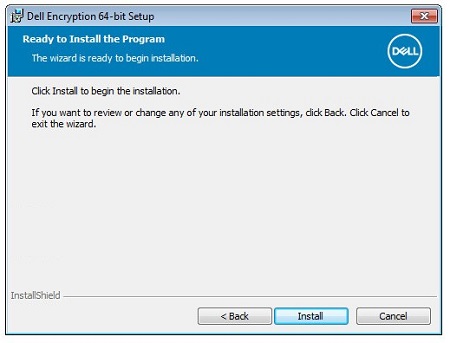
 - Click Install.
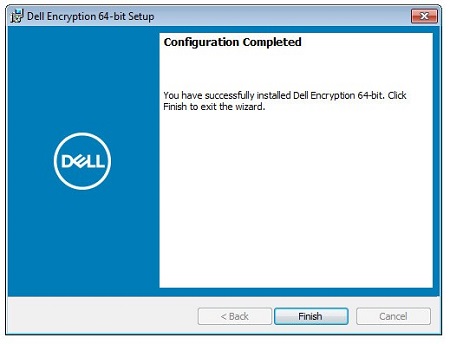
- Upon installation, click Finish to close the UI.
- Click Yes to reboot the machine.
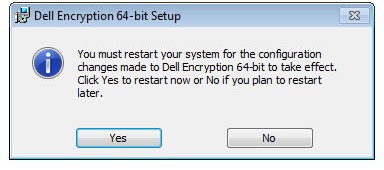
8.15.0
- Double-click DDPE_64bit_setup.exe or DDPE_32bit_setup.exe to launch the installation wizard.

- If any missing requirements are detected, click Install. Otherwise go to Step 3.
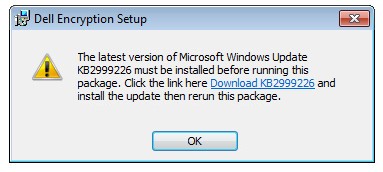 Note: Missing requirements may differ in your environment from the screenshot example. For more information about product system requirements, reference Dell Encryption Enterprise System Requirements.
 - Click Next to proceed.
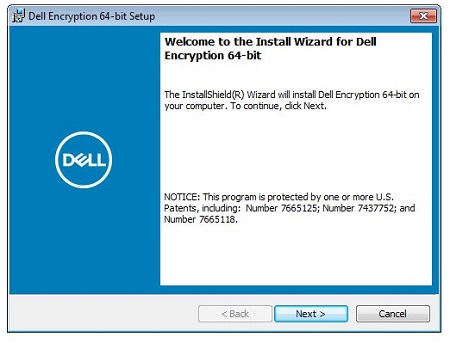
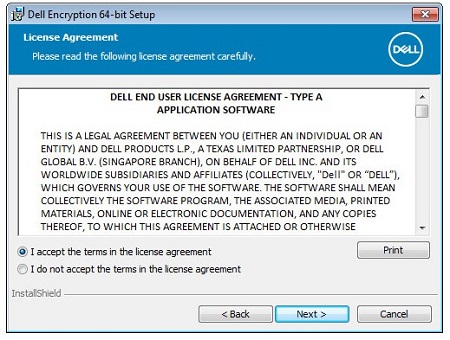
- Click I accept the terms in the license agreement and then click Next.
- Optionally Change the installation location and then click Next.
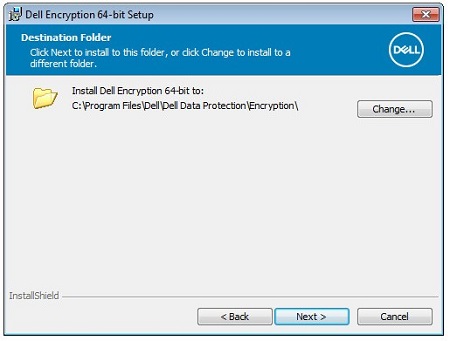
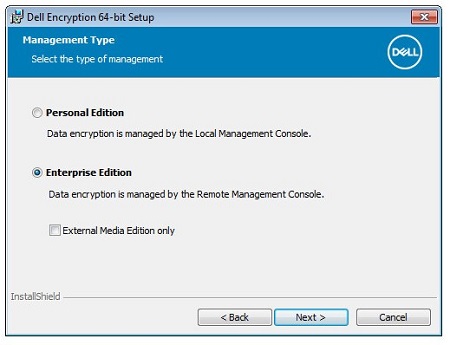
- Click Enterprise Edition and then click Next.
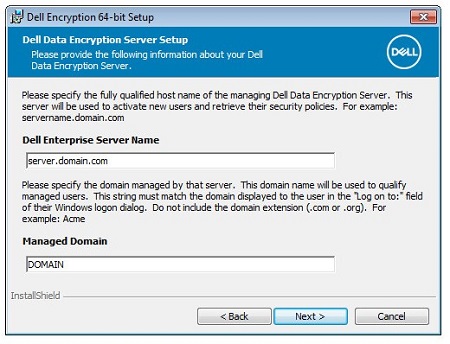
- Populate the Dell Enterprise Server Name and optionally change the Managed Domain. Once populated click Next to proceed.
 Note:
Note:- Dell Enterprise Server Name = Fully Qualified Domain Name (FQDN) or IP address of the Dell Security Management Server
- The example that is used for Dell Enterprise Server Name will differ in your environment.
- Change the Dell Policy Proxy Host Name if the FQDN differs from the Dell Enterprise Server Name (Step 7) and then click Next.
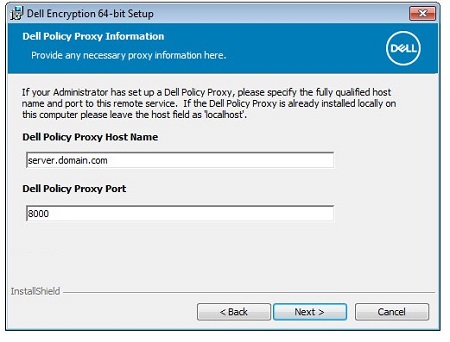 Note: Port 8000 is used by default for policy inventory processing. This configuration may differ in your environment.
 - Change the Dell Device Server URL if the FQDN differs from the Dell Enterprise Server Name (Step 7) and then click Next.
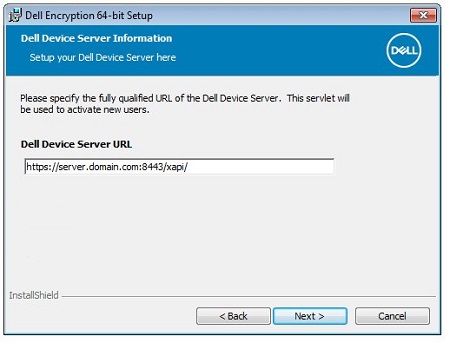 Note: Port 8443 is used by default for activation. This configuration may differ in your environment.
 - Click Install.
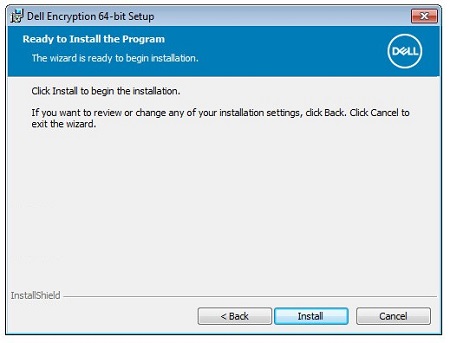
- Upon installation, click Finish to close the UI.
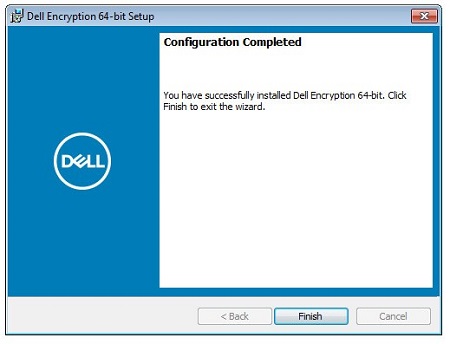
- Click Yes to reboot the machine.
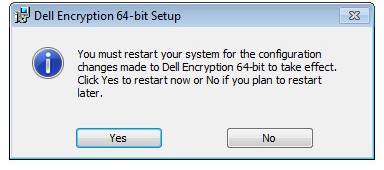
8.7.0 to 8.13.X
- Double-click DDPE_64bit_setup.exe or DDPE_32bit_setup.exe to launch the installation wizard.

- If any missing requirements are detected, click Install. Otherwise go to Step 3.
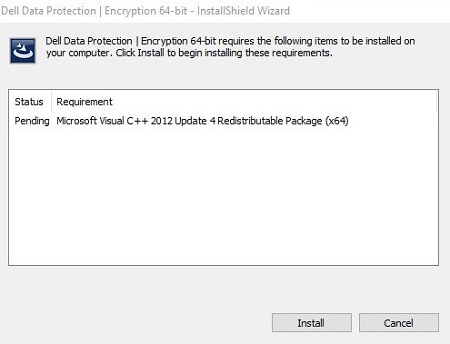 Note: Missing requirements may differ in your environment from the screenshot example. For more information about product system requirements, reference Dell Data Protection Enterprise Edition System Requirements.
 - Click Next to proceed.
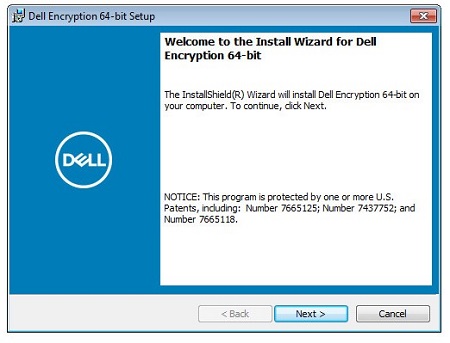
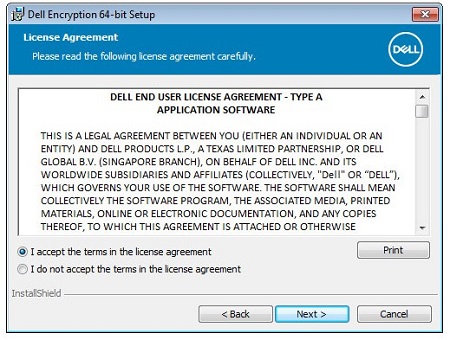
- Click I accept the terms in the license agreement and then click Next.
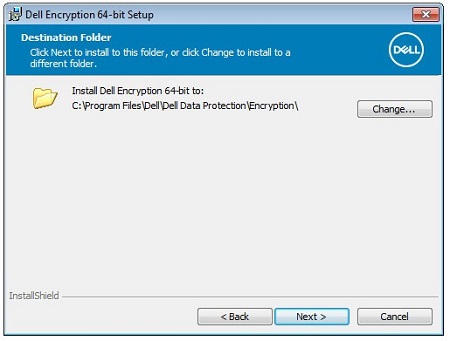
- Optionally Change the installation location and then click Next.
- Click Next.
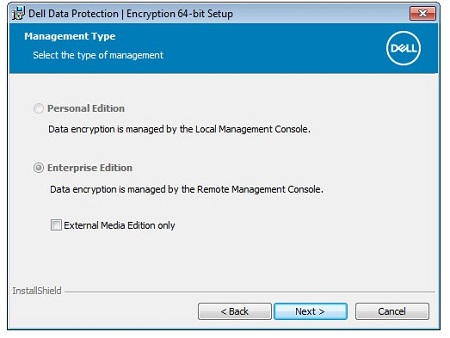
- Populate the Dell Enterprise Server Name and optionally change the Managed Domain. Once populated click Next to proceed.
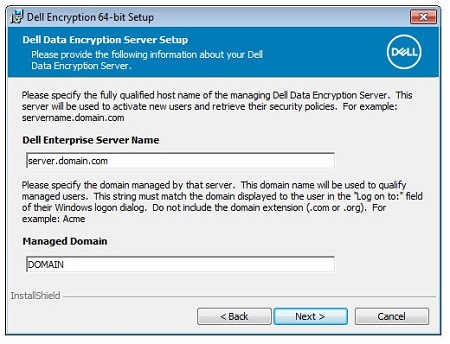 Note:
Note:- Dell Enterprise Server Name = Fully Qualified Domain Name (FQDN) or IP address of the Dell Security Management Server
- The example that is used for Dell Enterprise Server Name will differ in your environment.
- Change the Dell Policy Proxy Host Name if the FQDN differs from the Dell Enterprise Server Name (Step 7) and then click Next.
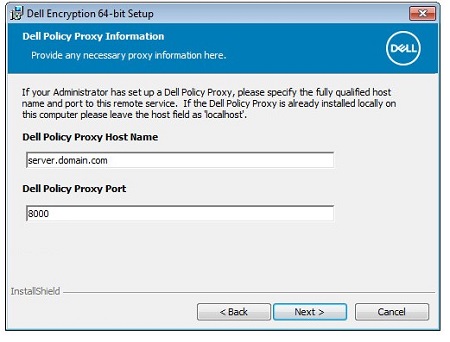 Note: Port 8000 is used by default for policy inventory processing. This configuration may differ in your environment.
 - Change the Dell Device Server URL if the FQDN differs from the Dell Enterprise Server Name (Step 7) and then click Next.
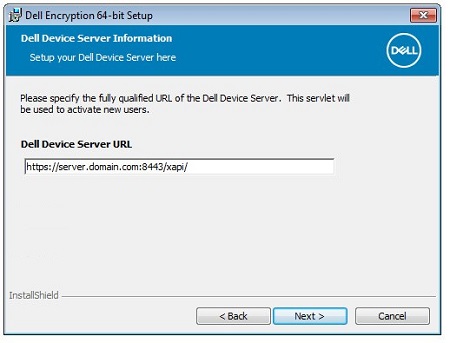 Note: Port 8443 is used by default for activation. This configuration may differ in your environment.
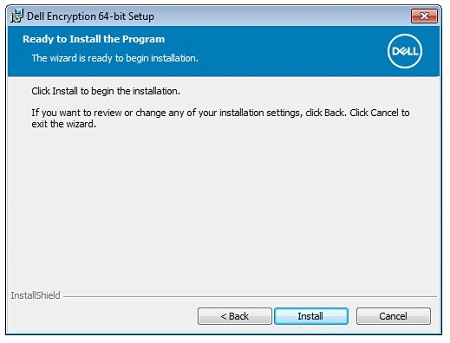
 - Click Install.
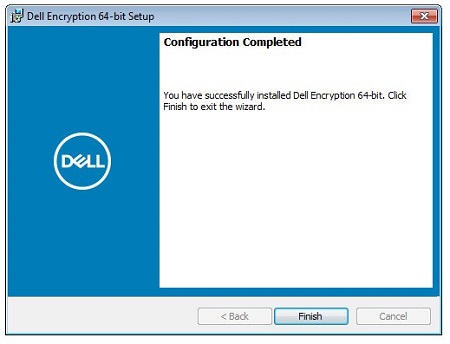
- Upon installation, click Finish to close the UI.
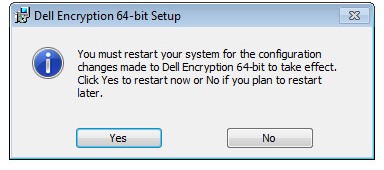
- Click Yes to reboot the machine.
8.0.0 to 8.6.X
- Double-click DDPE_64bit_setup.exe or DDPE_32bit_setup.exe to launch the installation wizard.

- If any missing requirements are detected, click Install. Otherwise go to Step 3.
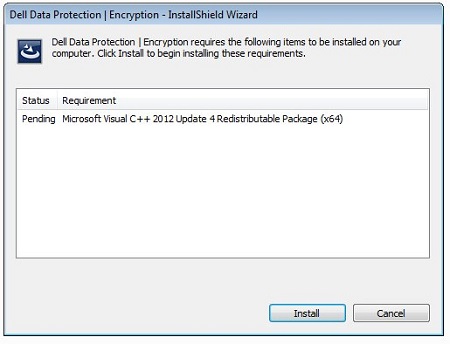 Note: Missing requirements may differ in your environment from the screenshot example. For more information about product system requirements, reference Dell Data Protection Enterprise Edition System Requirements.
 - Click Next to proceed.
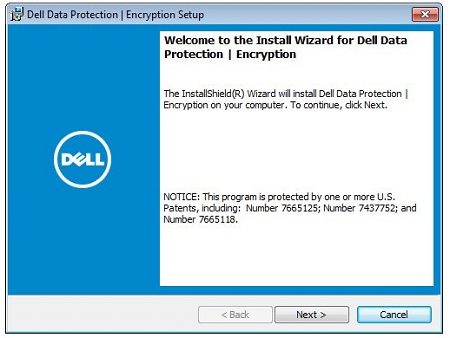
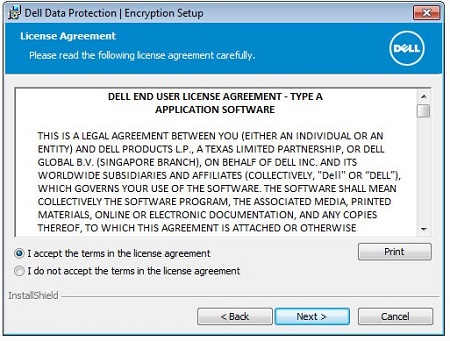
- Accept the terms in the license agreement and then click Next.
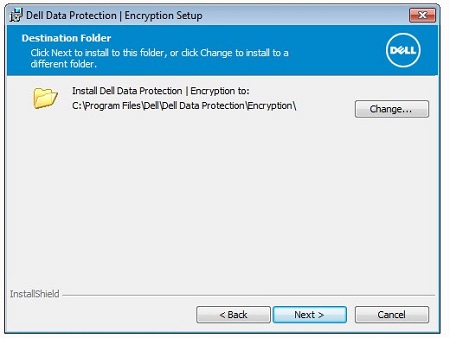
- Optionally Change the installation location and then click Next.
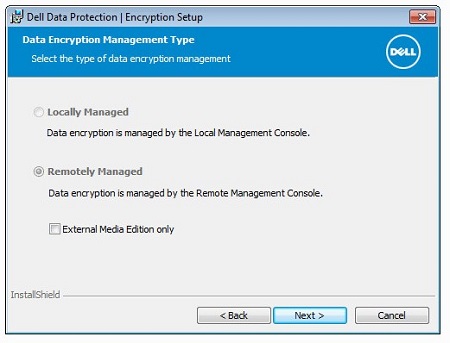
- Click Next.
- Populate the Dell Enterprise Server Name and optionally change the Managed Domain. Once populated click Next to proceed.
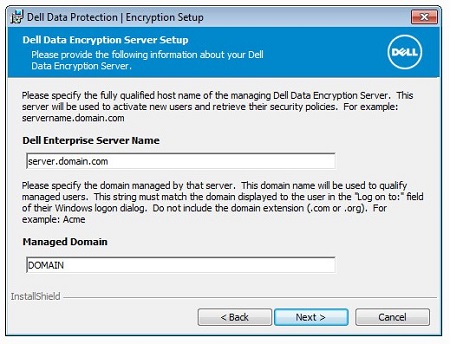 Note:
Note:- Dell Enterprise Server Name = Fully Qualified Domain Name (FQDN) or IP address of the Dell Security Management Server
- The example that is used for Dell Enterprise Server Name will differ in your environment.
- Change the Dell Policy Proxy Host Name if the FQDN differs from the Dell Enterprise Server Name (Step 7) and then click Next.
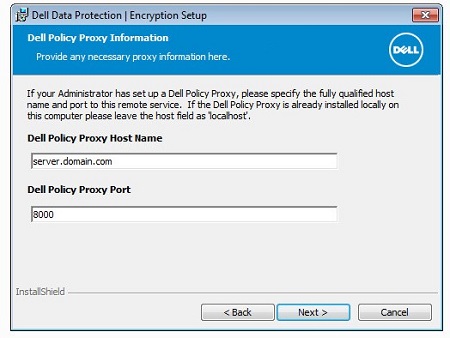 Note: Port 8000 is used by default for policy inventory processing. This configuration may differ in your environment.
 - Change the Dell Device Server URL if the FQDN differs from the Dell Enterprise Server Name (Step 7) and then click Next.
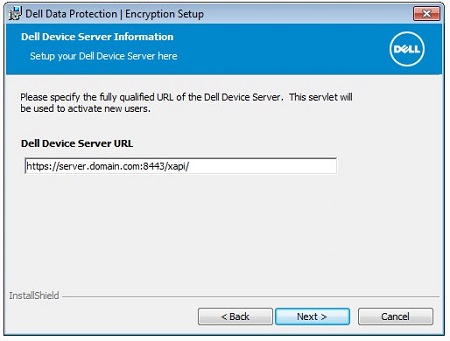 Note: Port 8443 is used by default for activation. This configuration may differ in your environment.
 - Click Install.
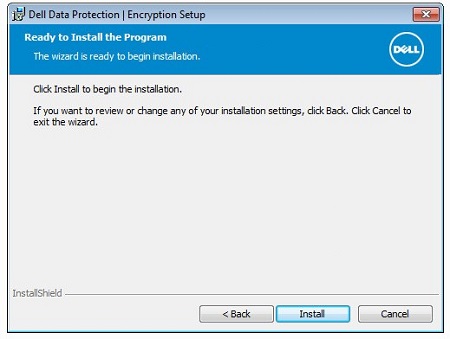
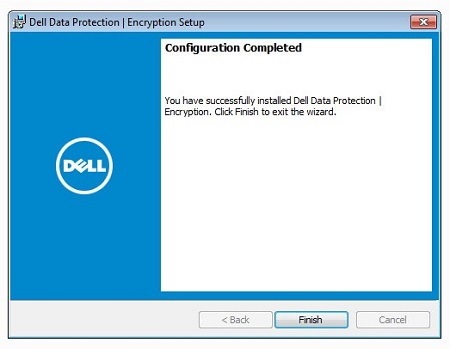
- Upon installation, click Finish to close the UI.
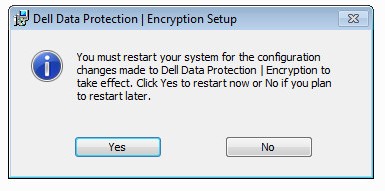
- Click Yes to reboot the machine.
CLI
The CLI installation process differs between versions.
Click the appropriate client version for specific installation steps.
Note: For information about locating the product version, reference How to Identify the Dell Encryption Enterprise or Dell Encryption Personal Version.
10.4.0 and Later
Dell Encryption Enterprise allows flexibility in command-line installation options through the usage of switches, options, and parameters.
Note: Command-line switches and parameters are case-sensitive.
| Switch | Meaning |
|---|---|
/V |
Passes variables to the MSI file inside the executable. The content must always be enclosed in plain-text quotes. |
/S |
Installs the MSI file in Silent Mode. |
/X |
Runs the MSI file in Uninstall Mode. |
/L*V |
Logging verbose output. The content must always be enclosed in plain-text quotes. |
/QB |
User interface with Cancel button. Prompts for device reboot on installation completion. |
/QB- |
Installation UI with Cancel button. Reboots device automatically on installation completion. |
/QB! |
User interface without Cancel button. Prompts for device reboot on installation completion. |
/QB!- |
Installation UI without Cancel button. Reboots device automatically on installation completion. |
/QN |
Runs the MSI file with no user interface. |
| Parameters | Values | Purpose |
|---|---|---|
SERVERHOSTNAME= |
See examples below | This parameter is required. Fully qualified domain name (FQDN) or static IP of Dell Security Management Server. |
POLICYPROXYHOSTNAME= |
See examples below | This parameter is required. FQDN or static IP of Dell Security Management Server used to process policy and inventory. |
GKPORT= |
See examples below | (Optionally) specify a nonstandard port. Defaults to 8000 if not specified. Port used with POLICYPROXYHOSTNAME. |
DEVICESERVERURL= |
See examples below | This parameter is required. Web address and port that is used to activate Dell Data Security endpoints. |
SLOTTEDACTIVATION= |
0 (Disables slotted activation) | (Optionally) delay activation of Dell Data Security from boot. |
SLOTTEDACTIVATION= |
1 (Enables slotted activation) | (Optionally) delay activation of Dell Data Security from boot. |
INSTALLDIR= |
See examples below | (Optionally) change the installation directory. The path must start and end with \" if the specified directory includes a space. |
MANAGEDDOMAIN= |
See examples below | Organization domain name. |
CALREPEAT= |
See examples below | This parameter is required if the SLOTTEDACTIVATION value 1 is chosen. Schedules how long to retry on failed activations. The value is time in seconds. |
SLOTINTERVALS= |
See examples below | This parameter is required if the SLOTTEDACTIVATION value 1 is chosen. Sets a range of time to randomly attempt an activation. The value is time in seconds. |
MISSTHRESHHOLD= |
See examples below | This optional parameter can only be used if the SLOTTEDACTIVATION value 1 is chosen. Sets how many attempts to activate before a reboot is required. If not defined, it defaults to 0 (infinite times). |
REBOOT= |
REALLYSUPPRESS |
Prevents reboot, though a reboot is still necessary. |
HIDEOVERLAYICONS= |
0 (Enables overlay icons on protected files) | Hides the icon indicator for files that are protected with Dell Data Security. |
HIDEOVERLAYICONS= |
1 (Disables overlay icons on protected files) | Hides the icon indicator for files that are protected with Dell Data Security. |
HIDESYSTRAYICON= |
0 (Enables System Tray shortcut) | Hides the application from the Windows System Tray. |
HIDESYSTRAYICON= |
1 (Disables the System Tray shortcut) | Hides the application from the Windows System Tray. |
EME= |
1 (EEM Mode) | Installs as Encryption External Media (EEM) mode. |
OPTIN=1 |
0 (Prevents Opt-In) | Enables users to activate post-Windows authentication. |
OPTIN=1 |
1 (Enables Opt-In) | Enables users to activate post-Windows authentication. |
SERVERMODE=1 |
0 (Prevents Server Encryption) | Installs as Server Encryption mode (KIOSK mode). |
SERVERMODE=1 |
1 (Enables Server Encryption) | Installs as Server Encryption mode (KIOSK mode). |
ENABLE_FDE_LM |
0 (Disables installation of Full Disk Encryption with active Dell Encryption Enterprise) | Allows or disables installation of Full Disk Encryption to run concurrently with Dell Encryption Enterprise. |
ENABLE_FDE_LM |
1 (Enables installation of Full Disk Encryption with Dell Encryption Enterprise) | Allows or disables installation of Full Disk Encryption to run concurrently with Dell Encryption Enterprise. |
CLI Installation Examples:
Example #1:
DDPE_64bit_setup.exe /s /v"SERVERHOSTNAME=FQDN.domain.com POLICYPROXYHOSTNAME=FQDN2.domain.com DEVICESERVERURL=https://FQDN.domain.com:8443/xapi/ ENABLE_FDE_LM=1 SLOTTEDACTIVATION=1 CALREPEAT=900 SLOTINTERVALS=120,600 REBOOT=ReallySuppress /l*v C:\Dell\ShieldInstall.log /qn"
Example #1 contains:
- Installer = DDPE_64bit_setup.exe
- Silent install = Yes
- Dell Security Management Server =
FQDN.domain.com - Policy Proxy location =
FQDN2.domain.com - Policy Proxy port = 8000 (Default value since not defined)
- Activation URL =
https://FQDN.domain.com:8443/xapi/ - Full Disk Encryption can also be installed = Yes
- Slotted Activation enabled = Yes
- Activation attempt = 120 to 600 seconds post-Windows authentication
- Activation retry (on failure) = Every 900 seconds until successful
- Reboot post install = No
- Installation Log =
C:\Dell\ShieldInstall.log
Example #2:
DDPE_32bit_setup.exe /s /v"SERVERHOSTNAME=FQDN.domain.com POLICYPROXYHOSTNAME=FQDN.domain.com DEVICESERVERURL=https://FQDN.domain.com:8443/xapi/ ENABLE_FDE_LM=0 SLOTTEDACTIVATION=1 CALREPEAT=3600 SLOTINTERVALS=90,150 REBOOT=ReallySuppress /l*v ShieldInstall.log /qn"
Example #2 contains:
- Installer = DDPE_32bit_setup.exe
- Silent install = Yes
- Dell Security Management Server =
FQDN.domain.com - Policy Proxy location =
FQDN.domain.com - Policy Proxy port = 8000 (Default value since not defined)
- Activation URL =
https://FQDN.domain.com:8443/xapi/ - Full Disk Encryption can also be installed = No
- Slotted Activation enabled = Yes
- Activation attempt = 90 to 150 seconds post-Windows authentication
- Activation retry (on failure) = Every 3,600 seconds (one hour) until successful
- Reboot post install = Yes (Default value since not defined)
- Installation Log = ShieldInstall.log created in the directory of the installer
Example #3:
DDPE_32bit_setup.exe /v"SERVERHOSTNAME=FQDN.domain.com POLICYPROXYHOSTNAME=FQDN.domain.com INSTALLDIR=\"D:\Program Files\Dell\" GKPORT=1234 DEVICESERVERURL=https://DMZServer.domain.com:1111/xapi/ REBOOT=ReallySuppress"
Example #3 contains:
- Installer = DDPE_32bit_setup.exe
- Silent install = No
- Dell Security Management Server =
DMZServer.domain.com - Policy Proxy location =
FQDN.domain.com - Policy Proxy port = 1234
- Activation URL =
https://FQDN.domain.com:1111/xapi/ - Installation directory =
D:\Program Files\Dell\ - Full Disk Encryption can also be installed = No
- Slotted Activation enabled = No
- Activation attempt = At Windows authentication (Default value since not defined)
- Activation retry = On reboot (Default value since not defined)
- Reboot post install = No
- Installation Log =
%TEMP%\MSI<XXXX>.log(Default value since not defined)
Note: In MSI<XXXX>.log, a random alphanumeric is assigned for
<XXXX>.
8.17.2 to 10.3.1
Dell Encryption Enterprise allows flexibility in command-line installation options through the usage of switches, options, and parameters.
Note: Command-line switches and parameters are case-sensitive.
| Switch | Meaning |
|---|---|
/V |
Passes variables to the MSI file inside the executable. The content must always be enclosed in plain-text quotes. |
/S |
Installs the MSI file in Silent Mode. |
/X |
Runs the MSI file in Uninstall Mode. |
/L*V |
Logging verbose output. The content must always be enclosed in plain-text quotes. |
/QB |
User interface with Cancel button. Prompts for device reboot on installation completion. |
/QB- |
Installation UI with Cancel button. Reboots device automatically on installation completion. |
/QB! |
User interface without Cancel button. Prompts for device reboot on installation completion. |
/QB!- |
Installation UI without Cancel button. Reboots device automatically on installation completion. |
/QN |
Runs the MSI file with no user interface. |
| Parameters | Values | Purpose |
|---|---|---|
SERVERHOSTNAME= |
See examples below | This parameter is required. Fully qualified domain name (FQDN) or static IP of Dell Security Management Server. |
POLICYPROXYHOSTNAME= |
See examples below | This parameter is required. FQDN or static IP of Dell Security Management Server used to process policy and inventory. |
GKPORT= |
See examples below | (Optionally) specify a nonstandard port. Defaults to 8000 if not specified. Port used with POLICYPROXYHOSTNAME. |
DEVICESERVERURL= |
See examples below | This parameter is required. Web address and port that is used to activate Dell Data Security endpoints. |
SLOTTEDACTIVATION= |
0 (Disables slotted activation) | (Optionally) delay activation of Dell Data Security from boot. |
SLOTTEDACTIVATION= |
1 (Enables slotted activation) | (Optionally) delay activation of Dell Data Security from boot. |
MANAGEDDOMAIN= |
See examples below | Organization domain name. |
CALREPEAT= |
See examples below | This parameter is required if the SLOTTEDACTIVATION value 1 is chosen. Schedules how long to retry on failed activations. The value is time in seconds. |
SLOTINTERVALS= |
See examples below | This parameter is required if the SLOTTEDACTIVATION value 1 is chosen. Sets a range of time to randomly attempt an activation. The value is time in seconds. |
MISSTHRESHHOLD= |
See examples below | This optional parameter can only be used if the SLOTTEDACTIVATION value 1 is chosen. Sets how many attempts to activate before a reboot is required. If not defined, it defaults to 0 (infinite times). |
REBOOT= |
REALLYSUPPRESS |
Prevents reboot, though a reboot is still necessary. |
HIDEOVERLAYICONS= |
0 (Enables overlay icons on protected files) | Hides the icon indicator for files that are protected with Dell Data Security. |
HIDEOVERLAYICONS= |
1 (Disables overlay icons on protected files) | Hides the icon indicator for files that are protected with Dell Data Security. |
HIDESYSTRAYICON= |
0 (Enables System Tray shortcut) | Hides the application from the Windows System Tray. |
HIDESYSTRAYICON= |
1 (Disables the System Tray shortcut) | Hides the application from the Windows System Tray. |
EME= |
1 (EEM Mode) | Installs as Encryption External Media (EEM) mode. |
OPTIN=1 |
0 (Prevents Opt-In) | Enables users to activate post-Windows authentication. |
OPTIN=1 |
1 (Enables Opt-In) | Enables users to activate post-Windows authentication. |
SERVERMODE=1 |
0 (Prevents Server Encryption) | Installs as Server Encryption mode (KIOSK mode). |
SERVERMODE=1 |
1 (Enables Server Encryption) | Installs as Server Encryption mode (KIOSK mode). |
ENABLE_FDE_LM |
0 (Disables installation of Full Disk Encryption with active Dell Encryption Enterprise) | Allows or disables installation of Full Disk Encryption to run concurrently with Dell Encryption Enterprise. |
ENABLE_FDE_LM |
1 (Enables installation of Full Disk Encryption with Dell Encryption Enterprise) | Allows or disables installation of Full Disk Encryption to run concurrently with Dell Encryption Enterprise. |
CLI Installation Examples:
Example #1:
DDPE_64bit_setup.exe /s /v"SERVERHOSTNAME=FQDN.domain.com POLICYPROXYHOSTNAME=FQDN2.domain.com DEVICESERVERURL=https://FQDN.domain.com:8443/xapi/ ENABLE_FDE_LM=1 SLOTTEDACTIVATION=1 CALREPEAT=900 SLOTINTERVALS=120,600 REBOOT=ReallySuppress /l*v C:\Dell\ShieldInstall.log /qn"
Example #1 contains:
- Installer = DDPE_64bit_setup.exe
- Silent install = Yes
- Dell Security Management Server =
FQDN.domain.com - Policy Proxy location =
FQDN2.domain.com - Policy Proxy port = 8000 (Default value since not defined)
- Activation URL =
https://FQDN.domain.com:8443/xapi/ - Full Disk Encryption can also be installed = Yes
- Slotted Activation enabled = Yes
- Activation attempt = 120 to 600 seconds post-Windows authentication
- Activation retry (on failure) = Every 900 seconds until successful
- Reboot post install = No
- Installation Log =
C:\Dell\ShieldInstall.log
Example #2:
DDPE_32bit_setup.exe /s /v"SERVERHOSTNAME=FQDN.domain.com POLICYPROXYHOSTNAME=FQDN.domain.com DEVICESERVERURL=https://FQDN.domain.com:8443/xapi/ ENABLE_FDE_LM=0 SLOTTEDACTIVATION=1 CALREPEAT=3600 SLOTINTERVALS=90,150 REBOOT=ReallySuppress /l*v ShieldInstall.log /qn"
Example #2 contains:
- Installer = DDPE_32bit_setup.exe
- Silent install = Yes
- Dell Security Management Server =
FQDN.domain.com - Policy Proxy location =
FQDN.domain.com - Policy Proxy port = 8000 (Default value since not defined)
- Activation URL =
https://FQDN.domain.com:8443/xapi/ - Full Disk Encryption can also be installed = No
- Slotted Activation enabled = Yes
- Activation attempt = 90 to 150 seconds post-Windows authentication
- Activation retry (on failure) = Every 3,600 seconds (one hour) until successful
- Reboot post install = Yes (Default value since not defined)
- Installation Log = ShieldInstall.log created in the directory of the Installer
Example #3:
DDPE_32bit_setup.exe /v"SERVERHOSTNAME=FQDN.domain.com POLICYPROXYHOSTNAME=FQDN.domain.com GKPORT=1234 DEVICESERVERURL=https://DMZServer.domain.com:1111/xapi/ REBOOT=ReallySuppress"
Example #3 contains:
- Installer = DDPE_32bit_setup.exe
- Silent install = No
- Dell Security Management Server =
DMZServer.domain.com - Policy Proxy location =
FQDN.domain.com - Policy Proxy port = 1234
- Activation URL =
https://FQDN.domain.com:1111/xapi/ - Full Disk Encryption can also be installed = No
- Slotted Activation enabled = No
- Activation attempt = At Windows authentication (Default value since not defined)
- Activation retry = On reboot (Default value since not defined)
- Reboot post install = No
- Installation Log =
%TEMP%\MSI<XXXX>.log(Default value since not defined)
Note: In MSI<XXXX>.log, a random alphanumeric is assigned for
<XXXX>.
8.15.0 to 8.17.1
Dell Encryption Enterprise allows flexibility in command-line installation options through the usage of switches, options, and parameters.
Note: Command-line switches and parameters are case-sensitive.
| Switch | Meaning |
|---|---|
/V |
Passes variables to the MSI file inside the executable. The content must always be enclosed in plain-text quotes. |
/S |
Installs the MSI file in Silent Mode. |
/X |
Runs the MSI file in Uninstall Mode. |
/L*V |
Logging verbose output. The content must always be enclosed in plain-text quotes. |
/QB |
User interface with Cancel button. Prompts for device reboot on installation completion. |
/QB- |
Installation UI with Cancel button. Reboots device automatically on installation completion. |
/QB! |
User interface without Cancel button. Prompts for device reboot on installation completion. |
/QB!- |
Installation UI without Cancel button. Reboots device automatically on installation completion. |
/QN |
Runs the MSI file with no user interface. |
| Parameters | Values | Purpose |
|---|---|---|
SERVERHOSTNAME= |
See examples below | This parameter is required. Fully qualified domain name (FQDN) or static IP of Dell Security Management Server. |
POLICYPROXYHOSTNAME= |
See examples below | This parameter is required. FQDN or static IP of Dell Security Management Server used to process policy and inventory. |
GKPORT= |
See examples below | (Optionally) specify a nonstandard port. Defaults to 8000 if not specified. Port used with POLICYPROXYHOSTNAME. |
DEVICESERVERURL= |
See examples below | This parameter is required. Web address and port that is used to activate Dell Data Security endpoints. |
SLOTTEDACTIVATION= |
0 (Disables slotted activation) | (Optionally) delay activation of Dell Data Security from boot. |
SLOTTEDACTIVATION= |
1 (Enables slotted activation) | (Optionally) delay activation of Dell Data Security from boot. |
MANAGEDDOMAIN= |
See examples below | Organization domain name. |
CALREPEAT= |
See examples below | This parameter is required if the SLOTTEDACTIVATION value 1 is chosen. Schedules how long to retry on failed activations. The value is time in seconds. |
SLOTINTERVALS= |
See examples below | This parameter is required if the SLOTTEDACTIVATION value 1 is chosen. Sets a range of time to randomly attempt an activation. The value is time in seconds. |
MISSTHRESHHOLD= |
See examples below | This optional parameter can only be used if the SLOTTEDACTIVATION value 1 is chosen. Sets how many attempts to activate before a reboot is required. If not defined, it defaults to 0 (infinite times). |
REBOOT= |
REALLYSUPPRESS |
Prevents reboot, though a reboot is still necessary. |
HIDEOVERLAYICONS= |
0 (Enables overlay icons on protected files) | Hides the icon indicator for files that are protected with Dell Data Security. |
HIDEOVERLAYICONS= |
1 (Disables overlay icons on protected files) | Hides the icon indicator for files that are protected with Dell Data Security. |
HIDESYSTRAYICON= |
0 (Enables System Tray shortcut) | Hides the application from the Windows System Tray. |
HIDESYSTRAYICON= |
1 (Disables the System Tray shortcut) | Hides the application from the Windows System Tray. |
EME= |
1 (EEM Mode) | Installs as Encryption External Media (EEM) mode. |
OPTIN=1 |
0 (Prevents Opt-In) | Enables users to activate post-Windows authentication. |
OPTIN=1 |
1 (Enables Opt-In) | Enables users to activate post-Windows authentication. |
SERVERMODE=1 |
0 (Prevents Server Encryption) | Installs as Server Encryption mode (KIOSK mode). |
SERVERMODE=1 |
1 (Enables Server Encryption) | Installs as Server Encryption mode (KIOSK mode). |
CLI Installation Examples:
Example #1:
DDPE_64bit_setup.exe /s /v"SERVERHOSTNAME=FQDN.domain.com POLICYPROXYHOSTNAME=FQDN2.domain.com DEVICESERVERURL=https://FQDN.domain.com:8443/xapi/ SLOTTEDACTIVATION=1 CALREPEAT=900 SLOTINTERVALS=120,600 REBOOT=ReallySuppress /l*v C:\Dell\ShieldInstall.log /qn"
Example #1 contains:
- Installer = DDPE_64bit_setup.exe
- Silent install = Yes
- Dell Security Management Server =
FQDN.domain.com - Policy Proxy location =
FQDN2.domain.com - Policy Proxy port = 8000 (Default value since not defined)
- Activation URL =
https://FQDN.domain.com:8443/xapi/ - Slotted Activation enabled = Yes
- Activation attempt = 120 to 600 seconds post-Windows authentication
- Activation retry (on failure) = Every 900 seconds until successful
- Reboot post install = No
- Installation Log =
C:\Dell\ShieldInstall.log
Example #2:
DDPE_32bit_setup.exe /s /v"SERVERHOSTNAME=FQDN.domain.com POLICYPROXYHOSTNAME=FQDN.domain.com DEVICESERVERURL=https://FQDN.domain.com:8443/xapi/ SLOTTEDACTIVATION=1 CALREPEAT=3600 SLOTINTERVALS=90,150 REBOOT=ReallySuppress /l*v ShieldInstall.log /qn"
Example #2 contains:
- Installer = DDPE_32bit_setup.exe
- Silent install = Yes
- Dell Security Management Server =
FQDN.domain.com - Policy Proxy location =
FQDN.domain.com - Policy Proxy port = 8000 (Default value since not defined)
- Activation URL =
https://FQDN.domain.com:8443/xapi/ - Slotted Activation enabled = Yes
- Activation attempt = 90 to 150 seconds post-Windows authentication
- Activation retry (on failure) = Every 3,600 seconds (one hour) until successful
- Reboot post install = Yes (Default value since not defined)
- Installation Log = ShieldInstall.log created in the directory of the Installer
Example #3:
DDPE_32bit_setup.exe /v"SERVERHOSTNAME=FQDN.domain.com POLICYPROXYHOSTNAME=FQDN.domain.com GKPORT=1234 DEVICESERVERURL=https://DMZServer.domain.com:1111/xapi/ REBOOT=ReallySuppress"
Example #3 contains:
- Installer = DDPE_32bit_setup.exe
- Silent install = No
- Dell Security Management Server =
DMZServer.domain.com - Policy Proxy location =
FQDN.domain.com - Policy Proxy port = 1234
- Activation URL =
https://FQDN.domain.com:1111/xapi/ - Slotted Activation enabled = No
- Activation attempt = At Windows authentication (Default value since not defined)
- Activation retry = On reboot (Default value since not defined)
- Reboot post install = No
- Installation Log =
%TEMP%\MSI<XXXX>.log(Default value since not defined)
Note: In MSIXXXX.log, a random alphanumeric is assigned for
<XXXX>.
8.6.0 to 8.13.X
Dell Encryption Enterprise allows flexibility in command-line installation options through the usage of switches, options, and parameters.
Note: Command-line switches and parameters are case-sensitive.
| Switch | Meaning |
|---|---|
/V |
Passes variables to the MSI file inside the executable. The content must always be enclosed in plain-text quotes. |
/S |
Installs the MSI file in Silent Mode. |
/X |
Runs the MSI file in Uninstall Mode. |
/L*V |
Logging verbose output. The content must always be enclosed in plain-text quotes. |
/QB |
User interface with Cancel button. Prompts for device reboot on installation completion. |
/QB- |
Installation UI with Cancel button. Reboots device automatically on installation completion. |
/QB! |
User interface without Cancel button. Prompts for device reboot on installation completion. |
/QB!- |
Installation UI without Cancel button. Reboots device automatically on installation completion. |
/QN |
Runs the MSI file with no user interface. |
| Parameters | Values | Purpose |
|---|---|---|
SERVERHOSTNAME= |
See examples below | This parameter is required. Fully qualified domain name (FQDN) or static IP of Dell Security Management Server. |
POLICYPROXYHOSTNAME= |
See examples below | This parameter is required. FQDN or static IP of Dell Security Management Server used to process policy and inventory. |
GKPORT= |
See examples below | (Optionally) specify a nonstandard port. Defaults to 8000 if not specified. Port used with POLICYPROXYHOSTNAME. |
DEVICESERVERURL= |
See examples below | This parameter is required. Web address and port that is used to activate Dell Data Security endpoints. |
SLOTTEDACTIVATION= |
0 (Disables slotted activation) | (Optionally) delay activation of Dell Data Security from boot. |
SLOTTEDACTIVATION= |
1 (Enables slotted activation) | (Optionally) delay activation of Dell Data Security from boot. |
MANAGEDDOMAIN= |
See examples below | Organization domain name. |
CALREPEAT= |
See examples below | This parameter is required if the SLOTTEDACTIVATION value 1 is chosen. Schedules how long to retry on failed activations. The value is time in seconds. |
SLOTINTERVALS= |
See examples below | This parameter is required if the SLOTTEDACTIVATION value 1 is chosen. Sets a range of time to randomly attempt an activation. The value is time in seconds. |
MISSTHRESHHOLD= |
See examples below | This optional parameter can only be used if the SLOTTEDACTIVATION value 1 is chosen. Sets how many attempts to activate before a reboot is required. If not defined, it defaults to 0 (infinite times). |
REBOOT= |
REALLYSUPPRESS |
Prevents reboot, though a reboot is still necessary. |
HIDEOVERLAYICONS= |
0 (Enables overlay icons on protected files) | Hides the icon indicator for files that are protected with Dell Data Security. |
HIDEOVERLAYICONS= |
1 (Disables overlay icons on protected files) | Hides the icon indicator for files that are protected with Dell Data Security. |
HIDESYSTRAYICON= |
0 (Enables System Tray shortcut) | Hides the application from the Windows System Tray. |
HIDESYSTRAYICON= |
1 (Disables the System Tray shortcut) | Hides the application from the Windows System Tray. |
EME= |
1 (EEM Mode) | Installs as Encryption External Media (EEM) mode. |
OPTIN=1 |
0 (Prevents Opt-In) | Enables users to activate post-Windows authentication. |
OPTIN=1 |
1 (Enables Opt-In) | Enables users to activate post-Windows authentication. |
CLI Installation Examples:
Example #1:
DDPE_64bit_setup.exe /s /v"SERVERHOSTNAME=FQDN.domain.com POLICYPROXYHOSTNAME=FQDN2.domain.com DEVICESERVERURL=https://FQDN.domain.com:8443/xapi/ SLOTTEDACTIVATION=1 CALREPEAT=900 SLOTINTERVALS=120,600 REBOOT=ReallySuppress /l*v C:\Dell\ShieldInstall.log /qn"
Example #1 contains:
- Installer = DDPE_64bit_setup.exe
- Silent install = Yes
- Dell Security Management Server =
FQDN.domain.com - Policy Proxy location =
FQDN2.domain.com - Policy Proxy port = 8000 (Default value since not defined)
- Activation URL =
https://FQDN.domain.com:8443/xapi/ - Slotted Activation enabled = Yes
- Activation attempt = 120 to 600 seconds post-Windows authentication
- Activation retry (on failure) = Every 900 seconds until successful
- Reboot post install = No
- Installation Log =
C:\Dell\ShieldInstall.log
Example #2:
DDPE_32bit_setup.exe /s /v"SERVERHOSTNAME=FQDN.domain.com POLICYPROXYHOSTNAME=FQDN.domain.com DEVICESERVERURL=https://FQDN.domain.com:8443/xapi/ SLOTTEDACTIVATION=1 CALREPEAT=3600 SLOTINTERVALS=90,150 REBOOT=ReallySuppress /l*v ShieldInstall.log /qn"
Example #2 contains:
- Installer = DDPE_32bit_setup.exe
- Silent install = Yes
- Dell Security Management Server =
FQDN.domain.com - Policy Proxy location =
FQDN.domain.com - Policy Proxy port = 8000 (Default value since not defined)
- Activation URL =
https://FQDN.domain.com:8443/xapi/ - Slotted Activation enabled = Yes
- Activation attempt = 90 to 150 seconds post-Windows authentication
- Activation retry (on failure) = Every 3,600 seconds (one hour) until successful
- Reboot post install = Yes (Default value since not defined)
- Installation Log = ShieldInstall.log created in the directory of the Installer
Example #3:
DDPE_32bit_setup.exe /v"SERVERHOSTNAME=FQDN.domain.com POLICYPROXYHOSTNAME=FQDN.domain.com GKPORT=1234 DEVICESERVERURL=https://DMZServer.domain.com:1111/xapi/ REBOOT=ReallySuppress"
Example #3 contains:
- Installer = DDPE_32bit_setup.exe
- Silent install = No
- Dell Security Management Server =
DMZServer.domain.com - Policy Proxy location =
FQDN.domain.com - Policy Proxy port = 1234
- Activation URL =
https://FQDN.domain.com:1111/xapi/ - Slotted Activation enabled = No
- Activation attempt = At Windows authentication (Default value since not defined)
- Activation retry = On reboot (Default value since not defined)
- Reboot post install = No
- Installation Log =
%TEMP%\MSI<XXXX>.log(Default value since not defined)
Note: In MSI<XXXX>.log, a random alphanumeric is assigned for
<XXXX>.
8.0.0 to 8.5.X
Dell Encryption Enterprise allows flexibility in command-line installation options through the usage of switches, options, and parameters.
Note: Command-line switches and parameters are case-sensitive.
| Switch | Meaning |
|---|---|
/V |
Passes variables to the .msi inside the executable. The content must always be enclosed in plain-text quotes. |
/S |
Installs the MSI file in Silent Mode. |
/X |
Runs the MSI file in Uninstall Mode. |
/L*V |
Logging verbose output. The content must always be enclosed in plain-text quotes. |
/QB |
User interface with Cancel button. Prompts for device reboot on installation completion. |
/QB- |
Installation UI with Cancel button. Reboots device automatically on installation completion. |
/QB! |
User interface without Cancel button. Prompts for device reboot on installation completion. |
/QB!- |
Installation UI without Cancel button. Reboots device automatically on installation completion. |
/QN |
Runs the MSI file with no user interface. |
| Parameters | Values | Purpose |
|---|---|---|
SERVERHOSTNAME= |
See examples below | This parameter is required. Fully qualified domain name (FQDN) or static IP of Dell Security Management Server. |
POLICYPROXYHOSTNAME= |
See examples below | This parameter is required. FQDN or static IP of Dell Security Management Server used to process policy and inventory. |
GKPORT= |
See examples below | (Optionally) specify a nonstandard port. Defaults to 8000 if not specified. Port used with POLICYPROXYHOSTNAME. |
DEVICESERVERURL= |
See examples below | This parameter is required. Web address and port that is used to activate Dell Data Security endpoints. |
SLOTTEDACTIVATION= |
0 (Disables slotted activation) | (Optionally) delay activation of Dell Data Security from boot. |
SLOTTEDACTIVATION= |
1 (Enables slotted activation) | (Optionally) delay activation of Dell Data Security from boot. |
CALREPEAT= |
See examples below | This parameter is required if the SLOTTEDACTIVATION value 1 is chosen. Schedules how long to retry on failed activations. The value is time in seconds. |
SLOTINTERVALS= |
See examples below | This parameter is required if the SLOTTEDACTIVATION value 1 is chosen. Sets a range of time to randomly attempt an activation. The value is time in seconds. |
MISSTHRESHHOLD= |
See examples below | This optional parameter can only be used if the SLOTTEDACTIVATION value 1 is chosen. Sets how many attempts to activate before a reboot is required. If not defined, it defaults to 0 (infinite times). |
REBOOT= |
REALLYSUPPRESS |
Prevents reboot, though a reboot is still necessary. |
HIDEOVERLAYICONS= |
0 (Enables overlay icons on protected files) | Hides the icon indicator for files that are protected with Dell Data Security. |
HIDEOVERLAYICONS= |
1 (Disables overlay icons on protected files) | Hides the icon indicator for files that are protected with Dell Data Security. |
HIDESYSTRAYICON= |
0 (Enables System Tray shortcut) | Hides the application from the Windows System Tray. |
HIDESYSTRAYICON= |
1 (Disables the System Tray shortcut) | Hides the application from the Windows System Tray. |
EME= |
1 (EEM Mode) | Installs as Encryption External Media (EEM) mode. |
CLI Installation Examples:
Example #1:
DDPE_64bit_setup.exe /s /v"SERVERHOSTNAME=FQDN.domain.com POLICYPROXYHOSTNAME=FQDN2.domain.com DEVICESERVERURL=https://FQDN.domain.com:8443/xapi/ SLOTTEDACTIVATION=1 CALREPEAT=900 SLOTINTERVALS=120,600 REBOOT=ReallySuppress /l*v C:\Dell\ShieldInstall.log /qn"
Example #1 contains:
- Installer = DDPE_64bit_setup.exe
- Silent install = Yes
- Dell Security Management Server =
FQDN.domain.com - Policy Proxy location =
FQDN2.domain.com - Policy Proxy port = 8000 (Default value since not defined)
- Activation URL =
https://FQDN.domain.com:8443/xapi/ - Slotted Activation enabled = Yes
- Activation attempt = 120 to 600 seconds post-Windows authentication
- Activation retry (on failure) = Every 900 seconds until successful
- Reboot post install = No
- Installation Log =
C:\Dell\ShieldInstall.log
Example #2:
DDPE_32bit_setup.exe /s /v"SERVERHOSTNAME=FQDN.domain.com POLICYPROXYHOSTNAME=FQDN.domain.com DEVICESERVERURL=https://FQDN.domain.com:8443/xapi/ SLOTTEDACTIVATION=1 CALREPEAT=3600 SLOTINTERVALS=90,150 REBOOT=ReallySuppress /l*v ShieldInstall.log /qn"
Example #2 contains:
- Installer = DDPE_32bit_setup.exe
- Silent install = Yes
- Dell Security Management Server =
FQDN.domain.com - Policy Proxy location =
FQDN.domain.com - Policy Proxy port = 8000 (Default value since not defined)
- Activation URL =
https://FQDN.domain.com:8443/xapi/ - Slotted Activation enabled = Yes
- Activation attempt = 90 to 150 seconds post-Windows authentication
- Activation retry (on failure) = Every 3,600 seconds (one hour) until successful
- Reboot post install = Yes (Default value since not defined)
- Installation Log = ShieldInstall.log created in the directory of the installer
Example #3:
DDPE_32bit_setup.exe /v"SERVERHOSTNAME=FQDN.domain.com POLICYPROXYHOSTNAME=FQDN.domain.com GKPORT=1234 DEVICESERVERURL=https://DMZServer.domain.com:1111/xapi/ REBOOT=ReallySuppress"
Example #3 contains:
- Installer = DDPE_32bit_setup.exe
- Silent install = No
- Dell Security Management Server =
DMZServer.domain.com - Policy Proxy location =
FQDN.domain.com - Policy Proxy port = 1234
- Activation URL =
https://FQDN.domain.com:1111/xapi/ - Slotted Activation enabled = No
- Activation attempt = At Windows authentication (Default value since not defined)
- Activation retry = On reboot (Default value since not defined)
- Reboot post install = No
- Installation Log =
%TEMP%\MSI<XXXX>.log(Default value since not defined)
Note: In MSI<XXXX>.log, a random alphanumeric is assigned for
<XXXX>.
Produits touchés
Dell EncryptionPropriétés de l’article
Numéro d’article: 000124911
Type d’article: How To
Dernière modification: 07 juill. 2026
Version: 19
Obtenez des réponses à vos questions auprès d’autre utilisateurs de Dell
Services de soutien
Vérifiez si votre appareil est couvert par les services de soutien.