Identifiera versionen av huvudinstallationsprogrammet för Dell Data Security
Sommaire: Ta reda på hur du identifierar versionen av huvudinstallationsprogrammet för Dell Data Security (tidigare Dell Data Protection) genom att följa dessa stegvisa instruktioner.
Cet article s’applique à
Cet article ne s’applique pas à
Cet article n’est lié à aucun produit spécifique.
Toutes les versions de produits ne sont pas identifiées dans cet article.
Instructions
Obs!
- Från och med december 2022 har Dell Endpoint Security Suite Enterprise nått slutet av sin försäljningscykel. Den här produkten och dess artiklar uppdateras inte längre av Dell.
- Från och med december 2019 har Dell Endpoint Security Suite Enterprise nått slutet av sin försäljningscykel. Den här produkten och dess artiklar uppdateras inte längre av Dell.
- Mer information finns i Policy för produktlivscykel (slut på support/slut på livscykel) för Dell Data Security. Om du har några frågor om alternativa artiklar kan du antingen kontakta ditt försäljningsteam eller endpointsecurity@dell.com.
- Mer information om aktuella produkter finns i Endpoint Security.
Versionen av huvudinstallationsprogrammet för Dell Data Security (tidigare Dell Data Protection) kan användas för att
- upptäcka kända problem
- förstå ändringar i arbetsflödet
- kontrollera systemkraven.
Berörda produkter:
- Dell Encryption Enterprise
- Dell Data Protection | Enterprise Edition
- Dell Personal-kryptering
- Dell Data Protection | Mobile Edition
- Dell Endpoint Security Suite Enterprise
- Dell Endpoint Security Suite Pro
Berörda operativsystem:
- Windows
- [MASTER INSTALLER] måste laddas ned innan versionen kan identifieras.
- Produktnamnet för [MASTER INSTALLER] varierar beroende på program:
DDSSetup.exeDDSSetup.exe för Dell Encryption EnterpriseDDSSetup.exeDDSSetup.exe för Dell Encryption PersonalDDSSuite.exeDDSSuite.exe för Dell Endpoint Security Suite EnterpriseDDSSuite.exeDDSSuite.exe för Dell Endpoint Security SuiteDDPSetup.exeDDPSetup.exe för Dell Data Protection | Enterprise EditionDDPSetup.exeDDPSetup.exe för Dell Data Protection | Personal EditionDDPSuite.exeDDPSuite.exe för Dell Data Protection | Endpoint Security SuiteDDPSuite.exeDDPSuite.exe för Dell Data Protection | Endpoint Security Suite Enterprise
Information om nedladdning av DDSSetup eller DDPSetup finns i Ladda ner Dell Encryption Enterprise eller Dell Encryption Personal.
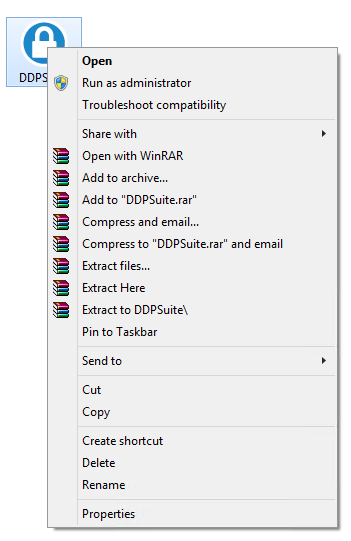
- Högerklicka på [MASTER INSTALLER] och välj Egenskaper.
- Klicka på fliken Information.

- Anteckna produktversionen.
 Produktversionen av din klient behöver inte vara densamma som i skärmbilden ovan.
Renseignements supplémentaires
Vidéos
Produits touchés
Dell Encryption, Dell Endpoint Security Suite Pro, Dell Endpoint Security Suite EnterprisePropriétés de l’article
Numéro d’article: 000124917
Type d’article: How To
Dernière modification: 06 août 2026
Version: 12
Obtenez des réponses à vos questions auprès d’autre utilisateurs de Dell
Services de soutien
Vérifiez si votre appareil est couvert par les services de soutien.