Dell Encryption External Media – Aktiv
Sommaire: In diesem Artikel wird beschrieben, wie Sie Dell Encryption External Media (ehemals Dell Data Protection | External Media Edition) mithilfe einer XML-Datei.
Cet article s’applique à
Cet article ne s’applique pas à
Cet article n’est lié à aucun produit spécifique.
Toutes les versions de produits ne sont pas identifiées dans cet article.
Instructions
Betroffene Produkte:
- Dell Data Protection | External Media Edition
- Dell Encryption External Media
Dialogfelder "EMS anpassen"
Funktionsweise
Eine XML-Datei mit dem Namen EMSStrings.xml wird verwendet, um EMS-Dialogfelder anzupassen. Die Datei muss in C:\Windows\System32 abgelegt werden, damit die Anpassungen angewendet werden können. Jedes Gerät, das von einem Computer mit benutzerdefinierten Dialogfeldern bereitgestellt wird, verfügt über die Datei EMSStrings.xml, die _Encryption_Data_Do_Not_Delete_ Datei hinzugefügt wird, sodass die Anpassungen mit dem Gerät übertragen werden.
Die Anpassungen werden in der folgenden Reihenfolge angewendet:
- Wenn ein abgeschirmtes Gerät über eine EMSStrings.xml-Datei verfügt, wird diese Datei verwendet.
- Ist dies nicht der Fall, platzieren Sie die Datei in C:\Windows\System32 wird angewendet (falls vorhanden).
- Platzieren Sie die Datei für Version 8.18 und höher in C:\Program Files\Dell\Dell Data Protection\Encryption.
Wann wird die XML-Datei auf dem Gerät aktualisiert?
Jedes Mal, wenn ein Gerät authentifiziert und der Eigentümer angemeldet ist, wird die XML-Datei mit der Datei unter C:\Windows\System32 aktualisiert.
Wann wird die Änderung angewendet, wenn die XML-Datei aktualisiert wird?
Sobald die Datei in C:\Windows\System32 bearbeitet wurde, wird der neue Text beim nächsten Einfügen eines Geräts angewendet. Denken Sie daran, dass, wenn ein verschlüsseltes Gerät immer noch über die ältere XML-Datei verfügt, wir diese verwenden, aber schließlich die XML-Datei auf dem Gerät aktualisiert wird.
Ist der EE-Server oder VE-Server beteiligt?
Nein, der EE-Server oder VE-Server liefert die XML-Datei nicht. Die XML-Datei kann mithilfe einer beliebigen Push-Technologie, die Ihrem Unternehmen zur Verfügung steht, auf den Clientcomputer übertragen werden.
Wie lautet das Format der XML-Datei?
Versionselement
Das Element version definiert die Clientversion. Das Versionselement wird nur für die Protokollierung verwendet.
<version>
<cmgClient>8.x.x</cmgClient>
<customStrings>1.0</customStrings>
</version>
Sprachsatz
Ein Sprachsatz ist Dialoganpassungen für eine bestimmte Sprache.
<languageSet languageId="0x00"></languageSet>
Die languageId definiert die primäre Zielsprache gemäß Windows-Definition. In diesem Fall definiert 0x00 den Standardsprachesatz. Wenn die aktuelle MUI-Sprache des Benutzers gefunden wird, verwenden wir diese. Andernfalls verwenden wir die Standardsprache (0x00).
Die folgenden Sprach-IDs sind verfügbar:
|
LANG_NEUTRAL 0x00 LANG_ARMENIAN 0x2b LANG_BELARUSIAN 0x23 LANG_CHINESE 0x04 LANG_DIVEHI 0x65 LANG_FAEROESE 0x38 LANG_GALICIAN 0x56 LANG_GUJARATI 0x47 LANG_ICELANDIC 0x0f LANG_KANNADA 0x4b LANG_KOREAN 0x12 LANG_MACEDONIAN 0x2f LANG_MARATHI 0x4e LANG_ROMANIAN 0x18 LANG_ORIYA 0x48 LANG_SINDHI 0x59 LANG_SWAHILI 0x41 LANG_TATAR 0x44 LANG_UKRAINIAN 0x22 |
LANG_AFRIKAANS 0x36 LANG_ASSAMESE 0x4d LANG_BENGALI 0x45 LANG_CROATIAN 0x1a LANG_DUTCH 0x13 LANG_FARSI 0x29 LANG_GEORGIAN 0x37 LANG_HEBREW 0x0d LANG_INDONESIAN 0x21 LANG_KASHMIRI 0x60 LANG_KYRGYZ 0x40 LANG_MALAY 0x3e LANG_MONGOLIAN 0x50 LANG_POLISH 0x15 LANG_RUSSIAN 0x19 LANG_SLOVAK 0x1b LANG_SWEDISH 0x1d LANG_TELUGU 0x4a LANG_URDU 0x20 |
LANG_ALBANIAN 0x1c LANG_AZERI 0x2c LANG_BULGARIAN 0x02 LANG_BULGARIAN 0x02 LANG_CZECH 0x05 LANG_ENGLISH 0x09 LANG_FINNISH 0x0b LANG_GERMAN 0x07 LANG_HINDI 0x39 LANG_ITALIAN 0x10 LANG_KAZAK 0x3f LANG_LATVIAN 0x26 LANG_MALAYALAM 0x4c LANG_NEPALI 0x61 LANG_PORTUGUESE 0x16 LANG_SANSKRIT 0x4f LANG_SLOVENIAN 0x24 LANG_SYRIAC 0x5a LANG_THAI 0x1e LANG_THAI 0x1e LANG_UZBEK 0x43 LANG_BULGARIAN 0x02 |
LANG_ARABIC 0x01 LANG_BASQUE 0x2d LANG_CATALAN 0x03 LANG_DANISH 0x06 LANG_ESTONIAN 0x25 LANG_FRENCH 0x0c LANG_GREEK 0x08 LANG_HUNGARIAN 0x0e LANG_HUNGARIAN 0x0e LANG_JAPANESE 0x11 LANG_KONKANI 0x57 LANG_LITHUANIAN 0x27 LANG_MANIPURI 0x58 LANG_NORWEGIAN 0x14 LANG_PUNJABI 0x46 LANG_SERBIAN 0x1a LANG_SPANISH 0x0a LANG_TAMIL 0x49 LANG_SPANISH 0x0a LANG_TURKISH 0x1f LANG_VIETNAMESE 0x2a |
Dialogfeld "Customization XML Element"
Das DIALOGFELD XML-Element wird verwendet, um ein Dialogfeld anzupassen. Im Folgenden finden Sie ein Beispiel für einen grundlegenden Dialoganpassungseintrag:
<dialog id="A-1">
<message>Ask to Shield unprotected media.[EndState: ALL]</message>
</dialog>
ID-Attribut
Jedes Dialoganpassungselement erfordert ein ID-Attribut, das definiert, welches Dialogfeld angepasst wird. Die tabelle der Screenshots unten definiert die Dialogfeld-IDs.
endstate (Endstate) Attribut
Einige Dialogfelder unterstützen das Attribut endState. Dieses Attribut kann verwendet werden, um verschiedene Anpassungen für ein bestimmtes Dialogfeld bereitzustellen, die je nach dem resultierenden Endstatus des Geräts variieren können, wenn der Benutzer den Prozess nicht fortführen kann. Beispielsweise kann das A-1-Dialogfeld drei verschiedene Einträge haben, einen für jeden Endstatus:
<dialog id="A-1" endState="blocked">
<message>Ask to Shield unprotected media.[EndState: BLOCKED]</message>
<link url="https:\\www.dell.com">Link to more info about encryption or being blocked...</link>

</dialog>
<dialog id="A-1" endState="readonly">
<message>Ask to Shield unprotected media.[EndState: READ-ONLY]</message>
</dialog>
<dialog id="A-1" endState="fullaccess">
<message>Ask to Shield unprotected media.[EndState: FULL ACCESS]</message>
</dialog>
Hinweis:
- Der ist ein XML-codierter Wagenrücklauf.
- Wenn das Attribut "endState " nicht angegeben ist, wird der Eintrag für alle möglichen Endstatus verwendet.
Nachricht Untergeordnetes Element
Das Meldungselement wird verwendet, um die primäre Meldung für das Dialogfeld anzupassen.
verbinden Untergeordnetes Element
Das Linkelement unterstützt nur das A-? Dialoge, ermöglicht das Hinzufügen eines URL-Links zum Dialogfeld. Es hat die folgende Form:
<link url="https:\\www.dell.com">Link to more info about encryption or the end state...</link>
Dabei gibt das Attribut url den Link und den internen Text die anklickbare Meldung an, die angezeigt werden soll.
iForgot (Vergessen) Untergeordnetes Element
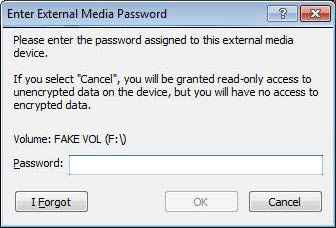
Das Element "iForgot " unterstützt nur die Dialogfelder C-1 und C-2 . Es gibt die Meldung an, die angezeigt wird, wenn der Nutzer die Schaltfläche Ich habe vergessen drückt .
fusWarningChild Element
Das Element fusWarning unterstützt nur die Dialogfelder C-1 und C-2 . Es wird angezeigt, wenn ein Nutzer versucht, ein Gerät zu authentifizieren, wenn mehrere Nutzer an einer Workstation angemeldet sind. Dieses Element macht deutlich, dass es ein Sicherheitsrisiko gibt.
abbrechenWarning Untergeordnetes Element
Das Element cancelWarning unterstützt nur das Dialogfeld F-1. Es gibt die Meldung an, die angezeigt wird, wenn der Nutzer die manuelle Authentifizierung abbricht.
| Dialogfeld-ID | Screenshot | Beschreibungen | Unterstützte Anpassung | ||
|---|---|---|---|---|---|
| Blockiert | Read-Only Access | Vollständiger Zugriff | |||
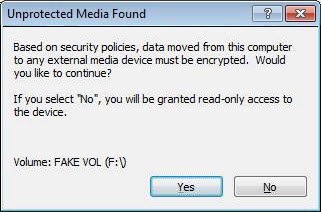
| A–1 | 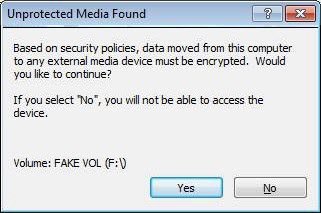 |
 |
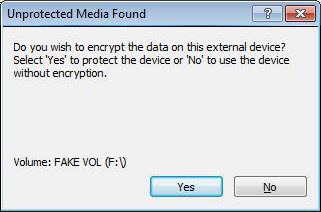 |
Bitten Sie um Shield ungeschützte Medien. Wenn der Benutzer auf Nein klickt, wird das Gerät nicht abgeschirmt gelassen und der Zugriff hängt von der Richtlinie Zugriff auf nicht abgeschirmte Medien ab. | EndState-Meldung |
| A–2 | 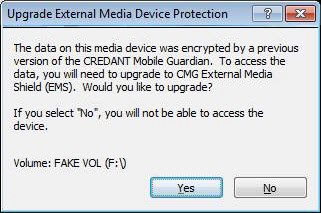 |
 |
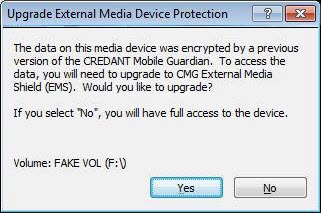 |
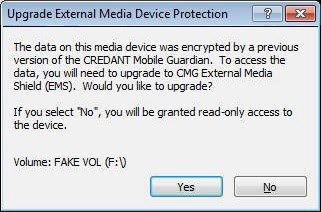
Wenn ein Gerät durch eine EMS-Version vor 5.3 abgeschirmt wird, wird in diesem Dialogfeld gefragt, ob der Benutzer ein Upgrade auf EMS durchführen möchte. Diese Meldung wird nur angezeigt, wenn das Gerät mit der aktuellen Benutzer-/Maschinenkombination gemäß den neuen Roaming-Regeln aktualisiert werden kann . | EndState-Meldung |
| A–3 | 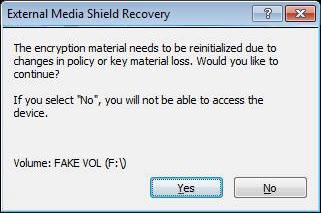 |
 |
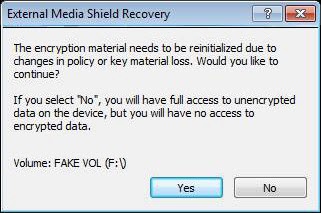 |
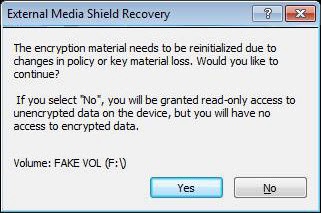
Dieses Dialogfeld wird angezeigt, wenn das Schlüsselmaterial im Gerät wiederhergestellt werden muss. Es konnte aufgrund eines manuellen Authentifizierungsfehlers, Benutzermanipulationen oder eines beschädigten Geräts gelöscht werden. Eine Änderung der Richtlinie, die erfordert, dass das Schlüsselmaterial zurückgesetzt wird, löst diesen Mechanismus ebenfalls aus. | EndState-Meldungslink |
| B bis 1 | 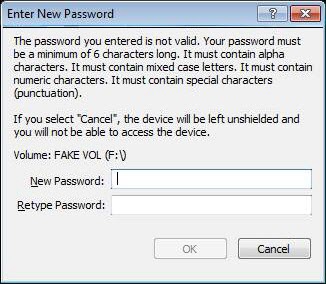 |
 |
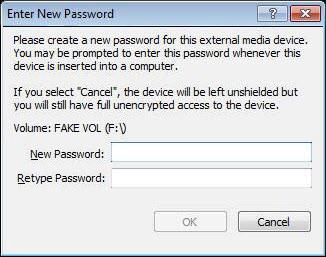 |
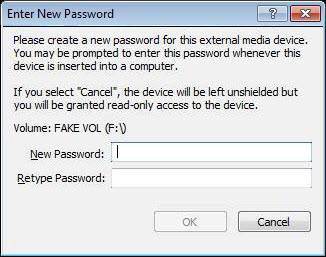
Dieses Dialogfeld wird angezeigt, wenn ein Gerät abgeschirmt oder wiederhergestellt wird. | EndState-Meldung |
| B-2 | 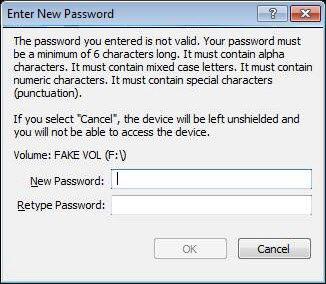 |
 |
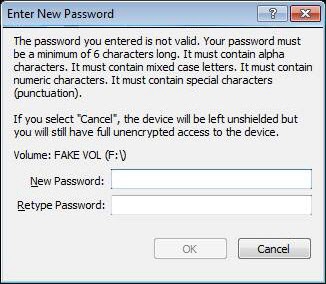 |
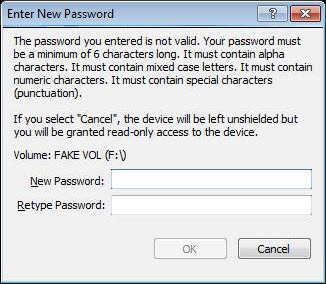
Wird angezeigt, nachdem der Benutzer ein Passwort eingegeben hat, das die vom Administrator festgelegten Einschränkungen nicht erfüllt. | EndState-Meldung |
| B-3 | 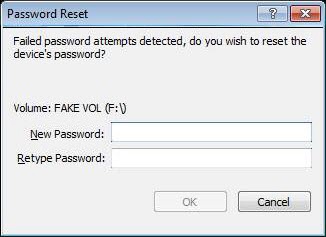 |
 |
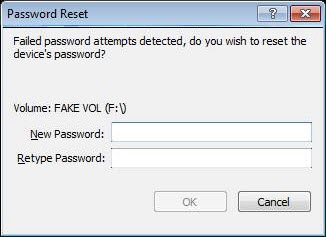 |
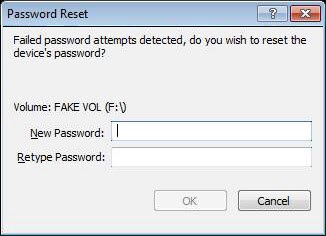
Das Dialogfeld wird angezeigt, wenn das Kennwort des Geräts erneut festgelegt werden muss, in der Regel aufgrund einer manuellen Authentifizierung. In diesem Fall verbleibt das Gerät durch einen Abbruch in einem richtliniengesteuerten Zustand. | EndState-Meldung |
| B-4 | 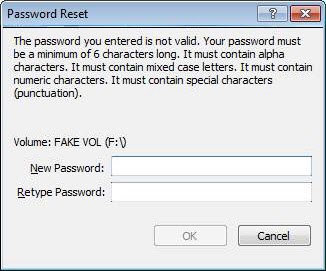 |
Zeigen Sie das Dialogfeld zum Zurücksetzen des Kennworts erneut an, wenn das angegebene Kennwort die Kennworteinschränkungen nicht erfüllt hat. | EndState-Meldung | ||
| B bis 5 | 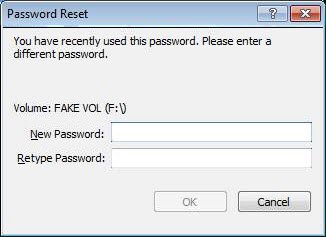 |
Zeigen Sie das Dialogfeld zum Zurücksetzen des Kennworts erneut an, nachdem Sie das neue Passwort auf dasselbe wie das vorherige Kennwort festgelegt haben. | Meldung | ||
| C-1 | 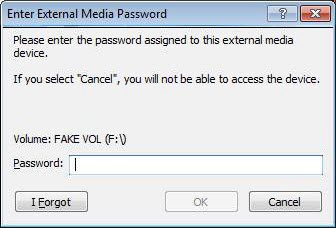 |
 |
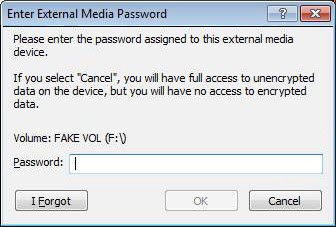 |
Fordern Sie das Gerätekennwort vom Benutzer zur Passwortauthentifizierung an, wenn die automatische Authentifizierung nicht möglich ist. | endState-Meldung "iForgot fusWarning" |
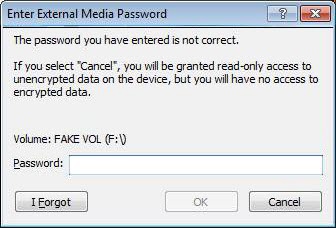
| C-2 | 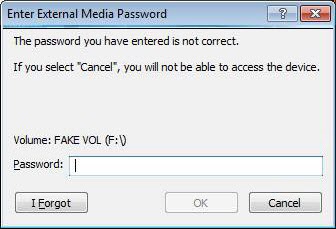 |
 |
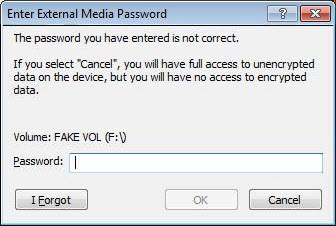 |
Wenn das für die Authentifizierung angegebene Passwort falsch war, bitten wir den Benutzer, die Eingabe des Passworts erneut zu versuchen. | endState-Meldung "iForgot fusWarning" |
| D-1 | 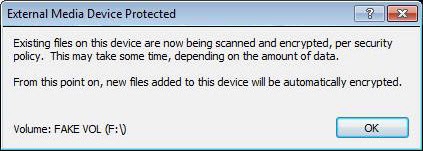 |
Das Dialogfeld "Datenträger abgeschirmt ", das beim Aufräumen angezeigt wird, und das Taskleistensymbol wird angezeigt. | Ja | ||
| D-2 | 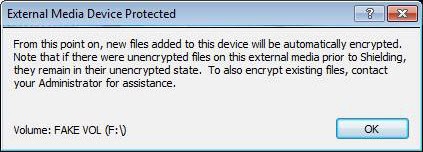 |
Das Dialogfeld "Abgeschirmt " für Medien, das beim Aufräumen angezeigt wird, ist ausgeschaltet. | Ja | ||
| E-1 | 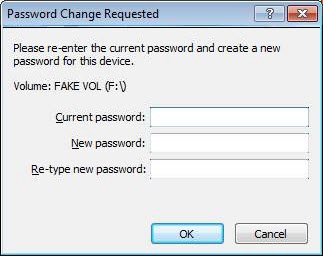
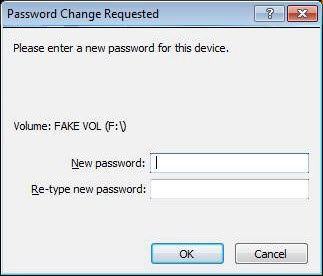 |
Wird angezeigt, wenn der Benutzer aufgefordert wird, das vorhandene Gerätekennwort zu ändern, nachdem ein Gerät authentifiziert wurde. | Ja | ||
| E2 | 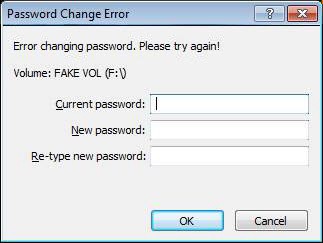
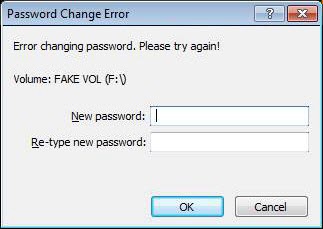 |
Das Dialogfeld zur Kennwortänderung wird erneut angezeigt, wenn die Kennwortänderung fehlschlägt, wahrscheinlich aufgrund eines falschen aktuellen Kennworts. | Ja | ||
| E-3 | 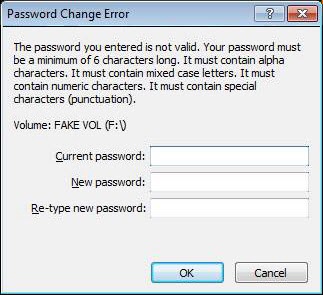
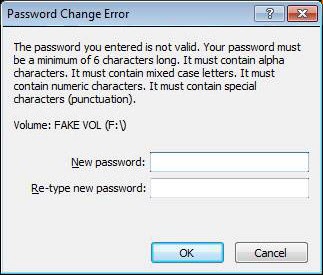 |
Das Dialogfeld "Kennwortänderung" wird erneut angezeigt, wenn das neue Passwort die administrativen Kennworteinschränkungen nicht erfüllt. | Ja | ||
| E-4 | 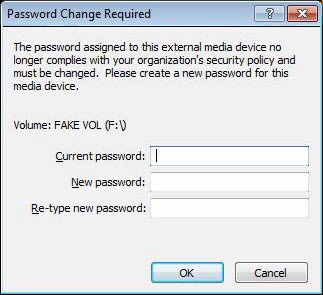
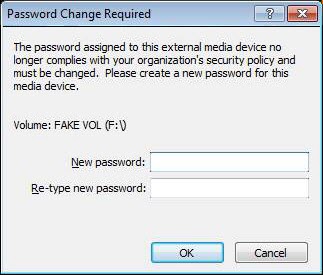 |
Das Dialogfeld "Kennwortänderung" wird angezeigt, wenn das aktuelle Kennwort die neuen Richtlinienanforderungen nicht mehr erfüllt. | Ja | ||
| F-1 | 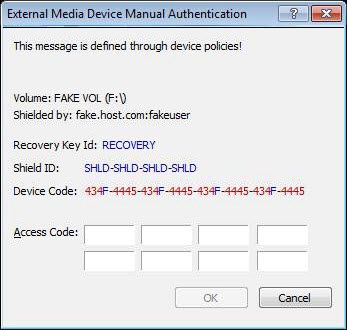
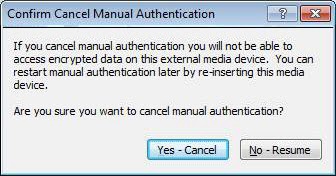 |
Wird angezeigt, wenn der Benutzer das Kennwort nicht eingegeben hat, wie oft die Richtlinie definiert hat. | Ja | ||
| F-2 | 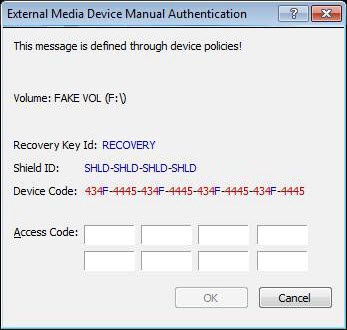
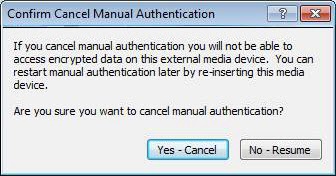 |
Wird angezeigt, wenn der Benutzer das Kennwort nicht eingegeben hat, wie oft die Richtlinie definiert hat. In diesem Fall fehlt oder ist die Datei VolumeInfo.xml beschädigt. | Dies ist in Bezug auf die Anpassung identisch mit F-1. | ||
| G-1 | 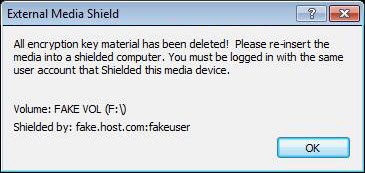 |
Wird angezeigt, wenn das Schlüsselmaterial verloren geht, aber die Kombination aus Maschine und Nutzer es uns nicht erlaubt, das Gerät wiederherzustellen (weist den Nutzer an, das Gerät in einen abgeschirmten Computer einzusetzen, auf dem der ursprüngliche Nutzer angemeldet ist (wenn Roaming), um das Schlüsselmaterial wiederherzustellen). Wenn nicht Roaming, ist eine vollständige Übereinstimmung zwischen Computer und Benutzer erforderlich, um die Wiederherstellung zu ermöglichen! | Ja | ||
| G-2 | 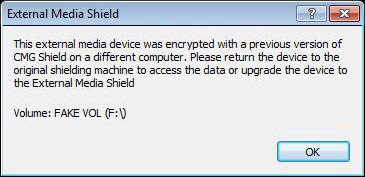 |
Wird angezeigt, wenn ein Gerät vor 5.3 durch CMG abgeschirmt wird und nicht aktualisiert werden kann, da es sich nicht auf dem ursprünglichen Computer unter dem ursprünglichen Benutzer befindet. | Ja | ||
| G-3 | 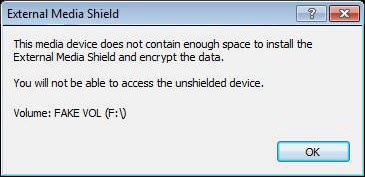 |
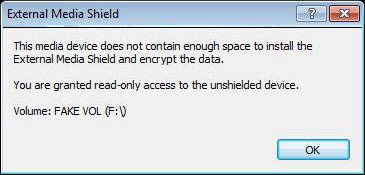 |
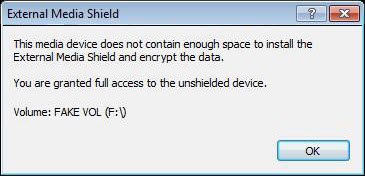 |
Wird angezeigt, wenn die Medien (Disketten) zu klein sind, um EMS-Abschirmung zu ermöglichen. | Ja |
| G-4 | 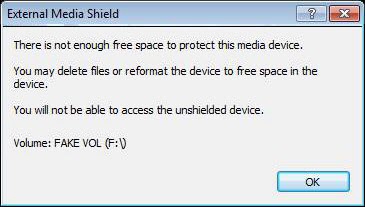 |
 |
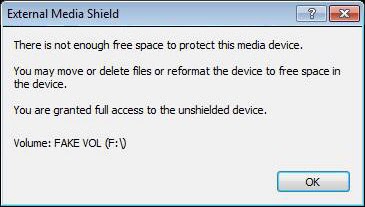 |
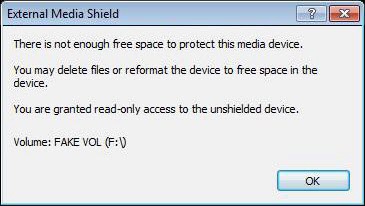
Wird angezeigt, wenn das Gerät nicht über genügend freien Speicherplatz verfügt, um EMS das Gerät abzuschirmen. | Ja |
| G-5 | 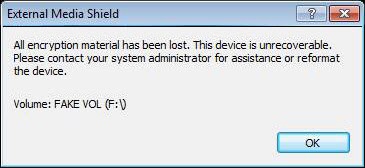 |
Wird angezeigt, wenn das Schlüsselmaterial eines Geräts verloren gegangen ist und es keine Möglichkeit zur Wiederherstellung gibt, da es keine Möglichkeit gibt, die Shield-ID abzurufen. | Ja | ||
| G-6 | 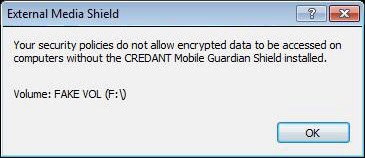 |
Wird angezeigt, wenn die Richtlinie den Zugriff auf verschlüsselte Medien ohne installiertes Shield nicht zulässt. | Ja | ||
| G-7 | 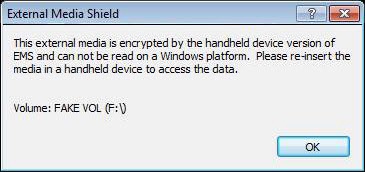 |
Wird angezeigt, wenn der Benutzer ein Handheld-EMS-Gerät in einen Mit Windows EMS abgeschirmten Computer einfügt. | Ja | ||
| G-8 | 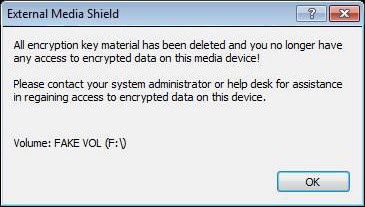 |
Wird angezeigt, wenn das Schlüsselmaterial aufgrund eines manuellen Authentifizierungsfehlers gelöscht wird. Dies wird von der Richtlinie gesteuert. | Ja | ||
| G-9 | 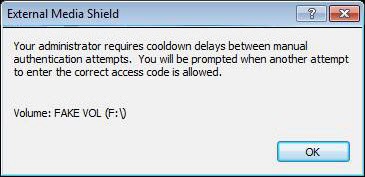 |
Wird angezeigt, wenn das Gerät aufgrund eines manuellen Authentifizierungsfehlers in einen Cooldown-Zeitraum übergegangen ist. Dies wird von der Richtlinie gesteuert. | Ja | ||
| G-10 | 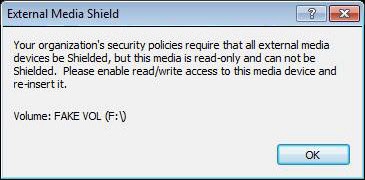 |
Warnt den Benutzer, dass ein schreibgeschütztes Gerät nicht abgeschirmt werden kann, wenn die Richtlinie dies erfordert. | Ja | ||
| G-11 | 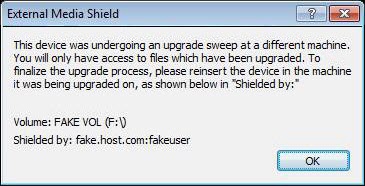 |
Warnt den Benutzer, dass das Gerät auf einem anderen Computer aktualisiert wurde | Ja | ||
| G-12 | 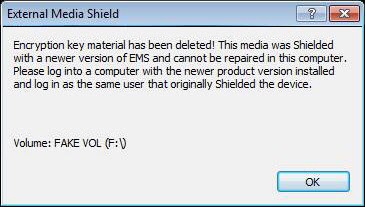 |
Ein Gerät, das neuer als das installierte EMS ist, kann nicht repariert werden. | Ja | ||
| G-13 | 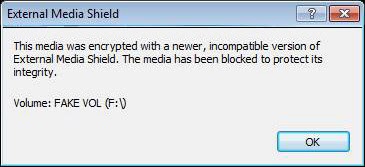 |
Das Volume wird mit einem neueren, nicht unterstützten IFF-Format verschlüsselt. Medien sind blockiert. | Ja | ||
| H-1 | 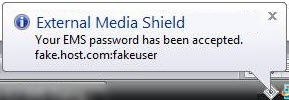 |
Zeigt eine Blase oder ein Dialogfeld an, das darauf hinweist, dass ein Gerätekennwort akzeptiert wurde. | Ja | ||
| H-2 | 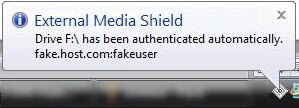 |
Zeigt die Blase an, die darauf hinweist, dass ein Gerät automatisch im ursprünglichen Shielding-Computer authentifiziert wurde. | Ja | ||
| I-1 | 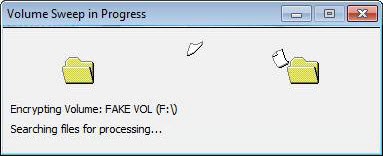 |
Es ist wichtig, dass EMS dies zeigt, da das Entfernen des Geräts, bevor dieser Schritt durchgeführt wird, unverschlüsselte Daten im Gerät belassen würde. | Ja | ||
| I-2 | 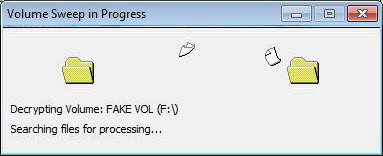 |
Ein animiertes Dialogfeld, das während der Entschlüsselungssuche angezeigt wird. Es ist wichtig, dass EMS dies zeigt, da das Entfernen des Geräts, bevor dieser Schritt durchgeführt wird, unverschlüsselte Daten im Gerät belassen würde. | Ja | ||
| J-1 | 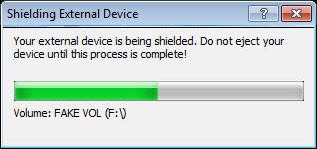 |
Fortschrittsdialogfeld, das während der Installation von EMS-Dateien auf einem neu abgeschirmten Gerät verwendet wird. Medien dürfen nicht ausgeworfen werden. | Ja | ||
| J-2 | 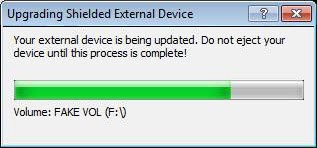 |
Fortschrittsdialogfeld, das während des Upgrades von EMS-Dateien auf einem abgeschirmten Gerät verwendet wird. Medien dürfen nicht ausgeworfen werden. | Ja | ||
| Grund- und 1 Jahr | 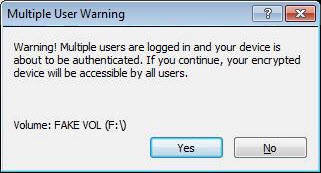 |
Das Dialogfeld "Ja/Nein" wird für die Warnmeldung "Fast User Switching" verwendet, wenn ein Gerät automatisch authentifiziert wird. | Ja | ||
XML-Beispiel
<?xml version="1.0" encoding="utf-8"?> <emsCustomDialogStrings> <version> <cmgClient>8.x.x</cmgClient> <customStrings>1.0</customStrings> </version> <!-- ENGLISH/DEFAULT --> <languageSet languageId="0x00"> <dialog id="A-1"> <message>Ask to Shield unprotected media.[EndState: ALL]</message> <link url="https: www.dell.com">Link to more info about encryption or the end state...</link> </dialog> <!-- <dialog id="A-1" endState="blocked"> <message>Ask to Shield unprotected media.[EndState: BLOCKED]</message> <link url="https: www.dell.com">Link to more info about encryption or being blocked...</link> </dialog> <dialog id="A-1" endState="readonly"> <message>Ask to Shield unprotected media.[EndState: READ-ONLY]</message> </dialog> <dialog id="A-1" endState="fullaccess"> <message>Ask to Shield unprotected media.[EndState: FULL ACCESS]</message> </dialog> --> <dialog id="A-2" endState="blocked"> <message>Ask to upgrade pre-EMS device (CMG Shielded) to EMS Shielding.[EndState: BLOCKED]</message> <link url="https: www.dell.com">Link to more info about preEMS devices or being blocked...</link> </dialog> <dialog id="A-2" endState="readonly"> <message>Ask to upgrade pre-EMS device (CMG Shielded) to EMS Shielding.[EndState: READ-ONLY]</message> </dialog> <dialog id="A-2" endState="fullaccess"> <message>Ask to upgrade pre-EMS device (CMG Shielded) to EMS Shielding.[EndState: FULL ACCESS]</message> </dialog> <dialog id="A-3" endState="blocked"> <message>Ask to restore key material.[EndState: BLOCKED]</message> <link url="https: www.dell.com">Link to more info about recovery or being blocked...</link> </dialog> <dialog id="A-3" endState="readonly"> <message>Ask to restore key material.[EndState: READ-ONLY]</message> </dialog> <dialog id="A-3" endState="fullaccess"> <message>Ask to restore key material.[EndState: FULL ACCESS]</message> </dialog> <dialog id="B-1" endState="blocked"> <message>This dialog is shown when a device is Shielded or recovered.[EndState: BLOCKED]</message> </dialog> <dialog id="B-1" endState="readonly"> <message>This dialog is shown when a device is Shielded or recovered.[EndState: READ-ONLY]</message> </dialog> <dialog id="B-1" endState="fullaccess"> <message>This dialog is shown when a device is Shielded or recovered.[EndState: FULL ACCESS]</message> </dialog> <dialog id="B-2" endState="blocked"> <message>Shown after the user enters a password which does not meet the restrictions placed by the Administrator.[EndState: BLOCKED]</message> </dialog> <dialog id="B-2" endState="readonly"> <message>Shown after the user enters a password which does not meet the restrictions placed by the Administrator.[EndState: READ-ONLY]</message> </dialog> <dialog id="B-2" endState="fullaccess"> <message>Shown after the user enters a password which does not meet the restrictions placed by the Administrator.[EndState: FULL ACCESS]</message> </dialog> <dialog id="B-3" endState="blocked"> <message>Dialog displayed when the device's password needs to be set again, usually as a result of a manual authentication. In this case a 'Cancel' will leave the device in a policy driven state..[EndState: BLOCKED]</message> </dialog> <dialog id="B-3" endState="readonly"> <message>Dialog displayed when the device's password needs to be set again, usually as a result of a manual authentication. In this case a 'Cancel' will leave the device in a policy driven state..[EndState: READ-ONLY]</message> </dialog> <dialog id="B-3" endState="fullaccess"> <message>Dialog displayed when the device's password needs to be set again, usually as a result of a manual authentication. In this case a 'Cancel' will leave the device in a policy driven state..[EndState: FULL ACCESS]</message> </dialog> <dialog id="B-4"> <message>Redisplay the password reset dialog when the password provided did not meet the password restrictions.</message> </dialog> <dialog id="B-5"> <message>Redisplay the password reset dialog after setting the new password to be the same as the previous password.</message> </dialog> <dialog id="C-1" endState="blocked"> <message>Request the device password from user for password authentication when auto authentication is not possible.[EndState: BLOCKED]</message> <iForgot>This is the confirmation that you really want to say 'I Forgot'. If you do you, will need to manually authenticate by contacting an administrator or logging in the owning user.</iForgot> <fusWarning>This is the warning about multiple users being logged in which will result in all users having access to the device if it is authenticated!</fusWarning> </dialog> <dialog id="C-1" endState="readonly"> <message>Request the device password from user for password authentication when auto authentication is not possible.[EndState: READ-ONLY]</message> <iForgot>This is the confirmation that you really want to say 'I Forgot'. If you do you, will need to manually authenticate by contacting an administrator or logging in the owning user.</iForgot> <fusWarning>This is the warning about multiple users being logged in which will result in all users having access to the device if it is authenticated!</fusWarning> </dialog> <dialog id="C-1" endState="fullaccess"> <message>Request the device password from user for password authentication when auto authentication is not possible.[EndState: FULL ACCESS]</message> <iForgot>This is the confirmation that you really want to say 'I Forgot'. If you do you, will need to manually authenticate by contacting an administrator or logging in the owning user.</iForgot> <fusWarning>This is the warning about multiple users being logged in which will result in all users having access to the device if it is authenticated!</fusWarning> </dialog> <dialog id="C-2" endState="blocked"> <message>If the password provided for authentication was incorrect, we ask the user to retry entering the password.[EndState: BLOCKED]</message> <iForgot>This is the confirmation that you really want to say 'I Forgot'. If you do you, will need to manually authenticate by contacting an administrator or logging in the owning user.</iForgot> <fusWarning>This is the warning about multiple users being logged in which will result in all users having access to the device if it is authenticated!</fusWarning> </dialog> <dialog id="C-2" endState="readonly"> <message>If the password provided for authentication was incorrect, we ask the user to retry entering the password.[EndState: READ-ONLY]</message> <iForgot>This is the confirmation that you really want to say 'I Forgot'. If you do you, will need to manually authenticate by contacting an administrator or logging in the owning user.</iForgot> <fusWarning>This is the warning about multiple users being logged in which will result in all users having access to the device if it is authenticated!</fusWarning> </dialog> <dialog id="C-2" endState="fullaccess"> <message>If the password provided for authentication was incorrect, we ask the user to retry entering the password.[EndState: FULL ACCESS]</message> <iForgot>This is the confirmation that you really want to say 'I Forgot'. If you do you, will need to manually authenticate by contacting an administrator or logging in the owning user.</iForgot> <fusWarning>This is the warning about multiple users being logged in which will result in all users having access to the device if it is authenticated!</fusWarning> </dialog> <dialog id="D-1"> <message>The 'media Shielded' dialog displayed after provisioning of a device when sweeping will occur.</message> </dialog> <dialog id="D-2"> <message>The 'media Shielded' dialog displayed after provisioning of a device, but *no* sweep will occur.</message> </dialog> <dialog id="E-1"> <message>Displayed when the user asks to change the existing device password after a device has been authenticated.</message> </dialog> <dialog id="E-2"> <message>Redisplay password change dialog when the change of password fails, probably due to an incorrect current password.</message> </dialog> <dialog id="E-3"> <message>Redisplay password change dialog when the new password does not meet administrative password restrictions.</message> </dialog> <dialog id="E-4"> <message>Display password change dialog when the current password no longer meets new policy requirements.</message> </dialog> <dialog id="F-1"> <message>Shown when the user has failed to enter the password the number of times defined by policy.</message> <cancelWarning>This text should express the repercusions of cancelling manual authentication!</cancelWarning> </dialog> <dialog id="G-1"> <message>Shown when the key material is lost but the machine/user combination does not allow us to recover the device. Should tell the user to insert the device in a CMG Shielded machine where the original user is logged in (if Roaming) to restore the key material. If not Roaming, we need a full machine/user match to recover.</message> </dialog> <dialog id="G-2"> <message>Displayed when an external device was Shielded by CMG (pre-5.3) and cannot be upgraded because its not in the original machine under the original user.</message> </dialog> <dialog id="G-3"> <message>Displayed when the media (floppies) is too small to allow EMS Shielding.</message> </dialog> <dialog id="G-4" endState="blocked"> <message>Displayed when the external device does not have enough free space to EMS Shield the device.[EndState: BLOCKED]</message> </dialog> <dialog id="G-4" endState="readonly"> <message>Displayed when the external device does not have enough free space to EMS Shield the device.[EndState: READ-ONLY]</message> </dialog> <dialog id="G-4" endState="fullaccess"> <message>Displayed when the external device does not have enough free space to EMS Shield the device.[EndState: FULL ACCESS]</message> </dialog> <dialog id="G-5"> <message>Shown when a device's key material has been lost and there is no way to recover from it because there is no way to retrieve the Shield ID.</message> </dialog> <dialog id="G-6"> <message>Displayed when policy does not allow access of encrypted media w/o the CMG Shield installed.</message> </dialog> <dialog id="G-7"> <message>Displayed if the user happens to insert a Handheld EMS device into an Windows EMS Shielded machine.</message> </dialog> <dialog id="G-8"> <message>Displayed when the key material is deleted due to a manual authorization failure. This is controlled by policy.</message> </dialog> <dialog id="G-9"> <message>Displayed when device has entered a cooldown period due to a manual authorization failure. This is controlled by policy.</message> </dialog> <dialog id="G-10"> <message>Warns the user that a read-only device cannot be Shielded when policy requires it.</message> </dialog> <dialog id="G-11"> <message>Warns the user that the device was undergoing an upgrade sweep in a different machine.</message> </dialog> <dialog id="G-12"> <message>Cannot repair a device newer than the EMS currently installed.</message> </dialog> <dialog id="G-13"> <message>Volume is encrypted with an newer, unsupported IFF format. Media is blocked.</message> </dialog> <dialog id="G-14"> <message>Shown when a user double-clicks a file in EMSExplorer. It tells them that this feature has been disabled.</message> </dialog> <dialog id="G-15"> <message>If during a sweep we fail to encrypt a file due to lack of free space on the device, this dialog is shown.</message> </dialog> <dialog id="J-1"> <message>Progress dialog used during the process of installing EMS files into a newly Shielded device. Media *should not* be ejected at this point.</message> </dialog> <dialog id="J-2"> <message>Progress dialog used during the process of upgrading EMS files in a shielded device. Media *should not* be ejected at this point.</message> </dialog> <dialog id="K-1"> <message>The Yes/No Dialog being used for the Fast User Switching related warning when a device is being autoauthenticated...</message> </dialog> </languageSet> </emsCustomDialogStrings>
Produits touchés
Dell EncryptionPropriétés de l’article
Numéro d’article: 000131588
Type d’article: How To
Dernière modification: 17 août 2026
Version: 10
Obtenez des réponses à vos questions auprès d’autre utilisateurs de Dell
Services de soutien
Vérifiez si votre appareil est couvert par les services de soutien.