Налаштування зовнішнього медіа-діалогу Dell Encryption
Sommaire: У цій статті описується, як налаштувати зовнішні носії Dell Encryption External Media (раніше Dell Data Protection | External Media Edition), використовуючи XML-файл.
Cet article s’applique à
Cet article ne s’applique pas à
Cet article n’est lié à aucun produit spécifique.
Toutes les versions de produits ne sont pas identifiées dans cet article.
Instructions
Уражені продукти:
- Захист даних Dell | Зовнішнє медіа-видання
- Зовнішні носії шифрування Dell
Налаштуйте діалоги EMS
Як це працює
XML-файл із назвою EMSStrings.xml використовується для налаштування діалогів EMS. Файл потрібно розмістити в C:\Windows\System32 для застосування налаштувань. Будь-який пристрій, який налаштований з комп'ютера з налаштованими діалогами, має файл EMSStrings.xml додається до _Encryption_Data_Do_Not_Delete_ файлу, тому налаштування передаються разом із пристроєм
.Налаштування застосовуються у наступному порядку:
- Якщо на захищеному пристрої є файл EMSStrings.xml , цей файл використовується.
- Якщо ні, то помістіть файл у C:\Windows\System32 застосовується (якщо він існує).
- Для версій 8.18 і новіших файлів розмістіть файл у C:\Program Files\Dell\Dell\Dell Data Protection\Encryption.
Коли XML-файл оновлюється на пристрої?
Щоразу, коли пристрій автентифікується і власник увійшов у систему, XML-файл оновлюється разом із файлом у C:\Windows\System32.
Якщо XML-файл оновлюється, коли застосовується ця зміна?
Після редагування файлу в C:\Windows\System32 новий текст буде застосовуватися наступного разу, коли пристрій буде вставлений. Пам'ятайте, що якщо зашифрований пристрій все ще має старий XML-файл, ми використовуємо його, але з часом XML-файл у пристрої оновлюється.
Чи бере участь EE Server чи VE Server?
Ні, EE Server або VE Server не доставляють XML-файл. XML-файл можна відправити на клієнтський комп'ютер за допомогою будь-якої технології push, доступної вашій організації.
Який формат XML-файлу?
Елемент версії
Елемент версії визначає клієнтську версію. Елемент версії використовується лише для логування.
<version>
<cmgClient>8.x.x</cmgClient>
<customStrings>1.0</customStrings>
</version>
Мовний набір
Набір мов — це налаштування діалогів для конкретної мови.
<languageSet languageId="0x00"></languageSet>
languageId визначає цільову основну мову відповідно до Windows. У цьому випадку 0x00 визначає мовний набір за замовчуванням . Якщо знайдено поточну мову MUI користувача, ми використовуємо її. Якщо ні, ми використовуємо мову за замовчуванням (0x00).
Доступні такі мовні ідентифікатори:
| LANG_NEUTRAL 0x00
LANG_ARMENIAN 0x2b LANG_BELARUSIAN 0x23 LANG_CHINESE 0x04 LANG_DIVEHI 0x65 LANG_FAEROESE 0x38 LANG_GALICIAN 0x56 LANG_GUJARATI 0x47 LANG_ICELANDIC 0x0f LANG_KANNADA 0x4b LANG_KOREAN 0x12 LANG_MACEDONIAN 0x2f LANG_MARATHI 0x4e LANG_ORIYA 0x48 LANG_ROMANIAN 0x18 LANG_SINDHI 0x59 LANG_SWAHILI 0x41 LANG_TATAR 0x44 LANG_UKRAINIAN 0x22 |
LANG_AFRIKAANS 0x36
LANG_ASSAMESE 0x4d LANG_BENGALI 0x45 LANG_CROATIAN 0x1a LANG_DUTCH 0x13 LANG_FARSI 0x29 LANG_GEORGIAN 0x37 LANG_HEBREW 0x0d LANG_INDONESIAN 0x21 LANG_KASHMIRI 0x60 LANG_KYRGYZ 0x40 LANG_MALAY 0x3e LANG_MONGOLIAN 0x50 LANG_POLISH 0x15 LANG_RUSSIAN 0x19 LANG_SLOVAK 0x1b LANG_SWEDISH 0x1d LANG_TELUGU 0x4a LANG_URDU 0x20 |
LANG_ALBANIAN 0x1c
LANG_AZERI 0x2c LANG_BULGARIAN 0x02 LANG_CZECH 0x05 LANG_ENGLISH 0x09 LANG_FINNISH 0x0b LANG_GERMAN 0x07 LANG_HINDI 0x39 LANG_ITALIAN 0x10 LANG_KAZAK 0x3f LANG_LATVIAN 0x26 LANG_MALAYALAM 0x4c LANG_NEPALI 0x61 LANG_PORTUGUESE 0x16 LANG_SANSKRIT 0x4f LANG_SLOVENIAN 0x24 LANG_SYRIAC 0x5a LANG_THAI 0x1e LANG_UZBEK 0x43 |
LANG_ARABIC 0x01
LANG_BASQUE 0x2d LANG_CATALAN 0x03 LANG_DANISH 0x06 LANG_ESTONIAN 0x25 LANG_FRENCH 0x0c LANG_GREEK 0x08 LANG_HUNGARIAN 0x0e LANG_JAPANESE 0x11 LANG_KONKANI 0x57 LANG_LITHUANIAN 0x27 LANG_MANIPURI 0x58 LANG_NORWEGIAN 0x14 LANG_PUNJABI 0x46 LANG_SERBIAN 0x1a LANG_SPANISH 0x0a LANG_TAMIL 0x49 LANG_TURKISH 0x1f LANG_VIETNAMESE 0x2a |
XML-елемент налаштування діалогу
Діалоговий XML-елемент використовується для налаштування діалогу. Нижче наведено приклад базового запису для налаштування діалогу:
<dialog id="A-1">
<message>Ask to Shield unprotected media.[EndState: ALL]</message>
</dialog>
id Атрибут
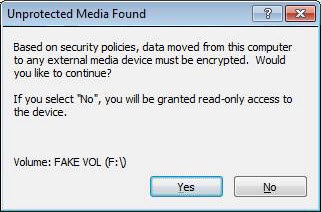
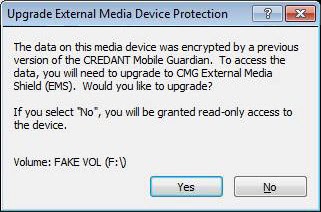
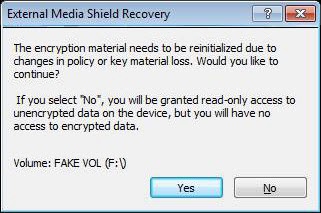
Кожен елемент налаштування діалогу потребує атрибута id , який визначає, який діалог налаштовується. Таблиця скріншотів нижче визначає діалогові ID.
кінцевий стан Атрибут
Деякі діалоги підтримують атрибут endState . Цей атрибут може використовуватися для надання різних налаштувань для конкретного діалогу, які можуть змінюватися залежно від кінцевого стану пристрою, якщо користувач не продовжує процес. Наприклад, діалог A-1 може містити три різні записи, по одному для кожного кінцевого стану:
<dialog id="A-1" endState="blocked">
<message>Ask to Shield unprotected media.[EndState: BLOCKED]</message>
<link url="https:\\www.dell.com">Link to more info about encryption or being blocked...</link>

</dialog>
<dialog id="A-1" endState="readonly">
<message>Ask to Shield unprotected media.[EndState: READ-ONLY]</message>
</dialog>
<dialog id="A-1" endState="fullaccess">
<message>Ask to Shield unprotected media.[EndState: FULL ACCESS]</message>
</dialog>
Примітка.
- — це XML-кодоване повернення карет.
- Якщо атрибут endState не вказаний, то запис використовується для всіх можливих кінцевих станів.
Повідомлення Дочірній елемент
Елемент повідомлення використовується для налаштування основного повідомлення для діалогу.
Посилання Дочірній елемент
Елемент посилання підтримує лише A-? діалоги, які дозволяють додати посилання на URL до діалогу. Вона має таку форму:
<link url="https:\\www.dell.com">Link to more info about encryption or the end state...</link>
Де атрибут url вказує посилання, а внутрішній текст — клікабельне повідомлення для відображення.
iЗабув Дочірній елемент
Елемент iForgot підтримує лише діалоги C-1 і C-2 , він вказує повідомлення, яке з'являється, якщо користувач натискає кнопку I Forgot .
fusWarningChild Елемент
Елемент fusWarning підтримує лише діалоги C-1 і C-2 , він відображається, якщо користувач намагається автентифікувати пристрій, коли кілька користувачів увійшли на робочу станцію. Цей елемент чітко вказує на ризик безпеки.
скасуватиУвага Дочірній елемент
Елемент cancelWarning підтримує лише діалог F-1 , він вказує повідомлення, яке з'являється, якщо користувач скасовує ручну автентифікацію.
| Діалоговий ідентифікатор | Скріншот | Опис | Підтримувана кастомізація | ||
|---|---|---|---|---|---|
| Заблоковано | Доступ лише для читання | Повний доступ | |||
| A-1 | 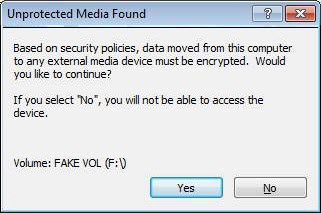 |
 |
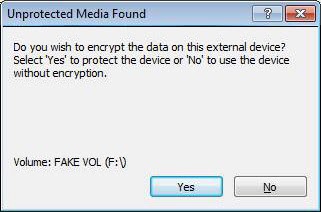 |
Попросіть Shield незахищених носіїв. Якщо користувач натискає «Ні», пристрій залишається незахищеним, і доступ залежить від політики доступу до незахищених медіа . | endState повідомлення |
| A-2 | 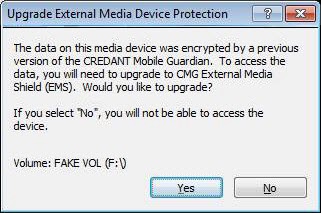 |
 |
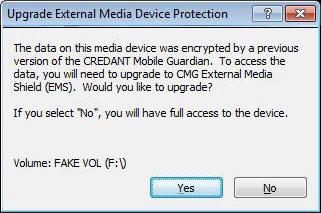 |
Якщо пристрій захищений EMS до версії 5.3, у цьому діалогу з'являється питання, чи хоче користувач перейти до EMS. Це повідомлення відображається лише якщо пристрій можна оновити з поточною комбінацією користувача/машина відповідно до нових правил роумінгу. | endState повідомлення |
| A-3 | 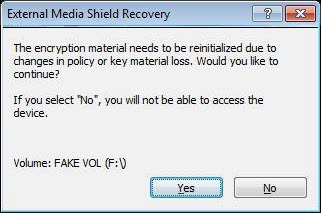 |
 |
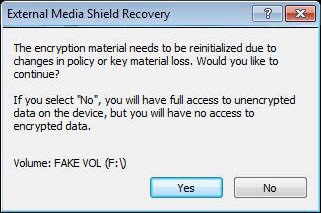 |
Цей діалог відображається, коли ключовий матеріал у пристрої потрібно відновити. Він міг бути видалений через помилку ручної автентифікації, втручання користувача або пошкодження пристрою. Зміна політики, яка вимагає скидання ключового матеріалу, також запускає цей механізм. | посилання на повідомлення endState |
| B-1 | 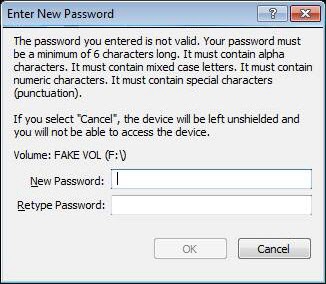 |
 |
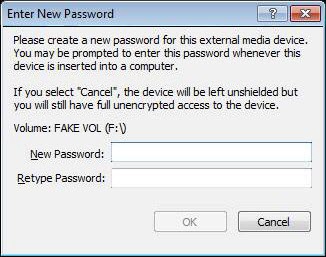 |
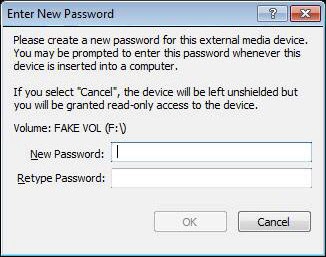
Цей діалог з'являється, коли пристрій захищений або відновлений. | endState повідомлення |
| B-2 | 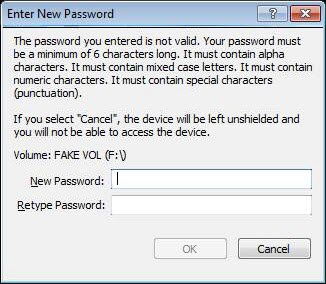 |
 |
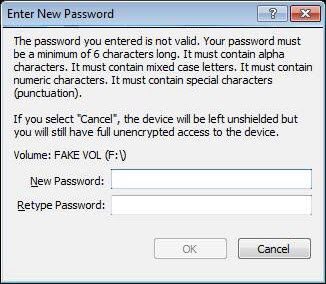 |
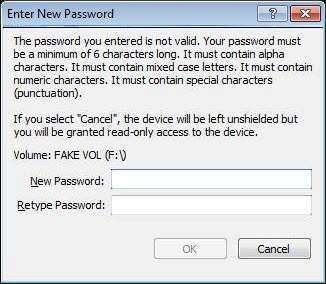
Відображається після того, як користувач ввів пароль, який не відповідає обмеженням, накладеним адміністратором. | endState повідомлення |
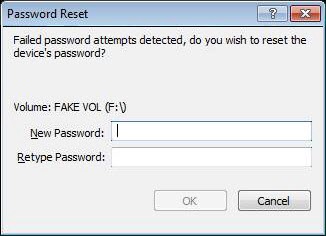
| B-3 | 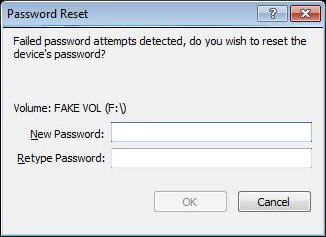 |
 |
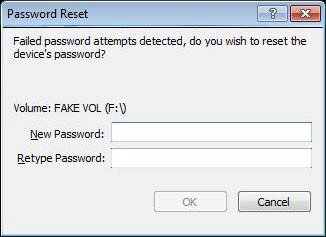 |
Діалог, що відображається, коли пароль пристрою потрібно встановити знову, зазвичай внаслідок ручної автентифікації. У цьому випадку Cancel залишає пристрій у стані, керованому політикою. | endState повідомлення |
| B-4 | 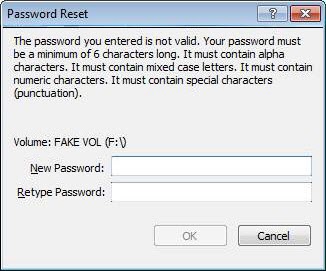 |
Повторне відображення діалогу скидання пароля, якщо вказаний пароль не відповідав обмеженням пароля. | endState повідомлення | ||
| B-5 | 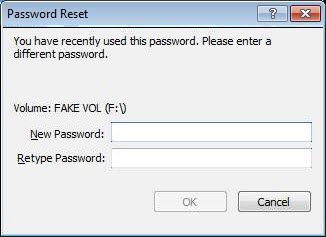 |
Відтворіть діалогу скидання пароля після встановлення нового пароля таким самим, як і попередній. | Повідомлення | ||
| C-1 | 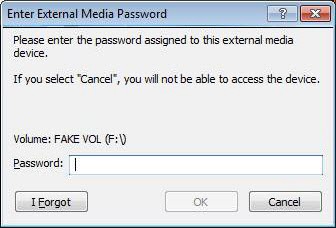 |
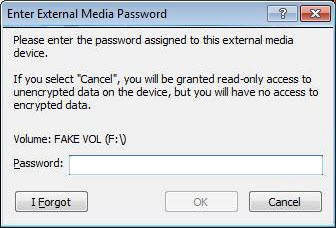 |
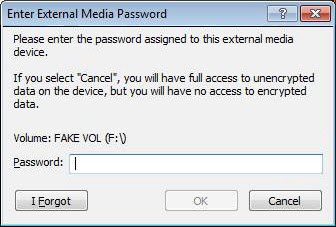 |
Запитуйте пароль пристрою у користувача для автентифікації, коли автоавтентифікація неможлива. | endState повідомлення iForgot fusWarning |
| C-2 | 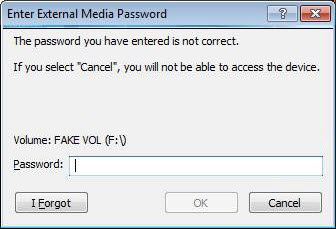 |
 |
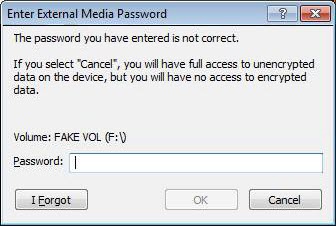 |
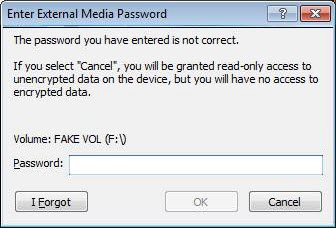
Якщо пароль, наданий для автентифікації, був неправильним, ми просимо користувача спробувати ввести пароль ще раз. | endState повідомлення iForgot fusWarning |
| D-1 | 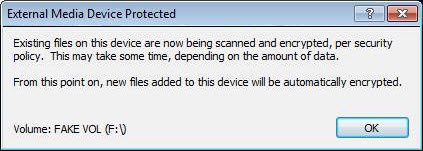 |
Діалоговий захист медіа , який відображається під час проходження і відображається іконка трека. | Так | ||
| D-2 | 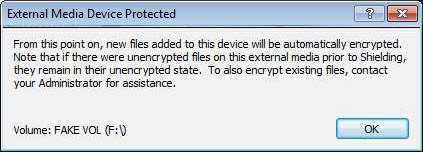 |
Діалоговий екран медіа , який відображається під час смітання, вимкнений. | Так | ||
| E-1 | 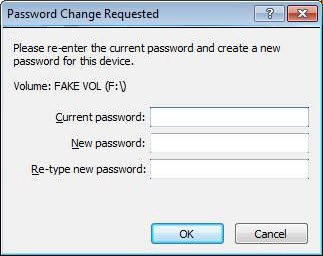
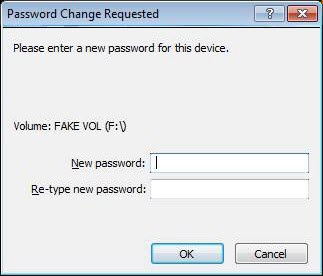 |
Відображається, коли користувач просить змінити існуючий пароль пристрою після автентифікації пристрою. | Так | ||
| E2 | 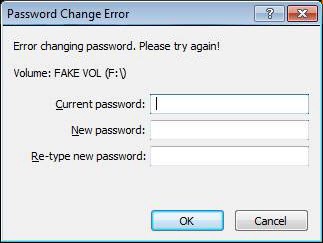
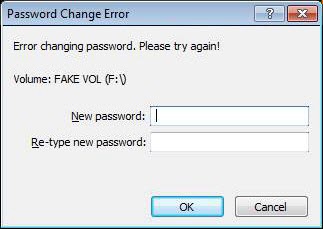 |
Перепоказуйте діалогу зміни пароля, коли зміна пароля не вдається, ймовірно, через неправильний поточний пароль. | Так | ||
| E-3 | 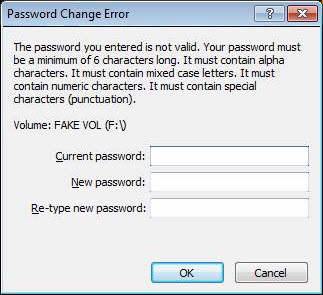
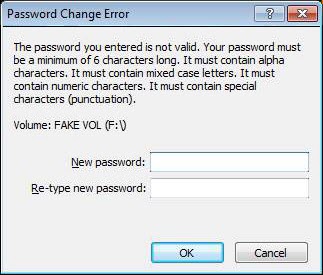 |
Повторне відображення діалогу зміни пароля, якщо новий пароль не відповідає адміністративним обмеженням. | Так | ||
| E-4 | 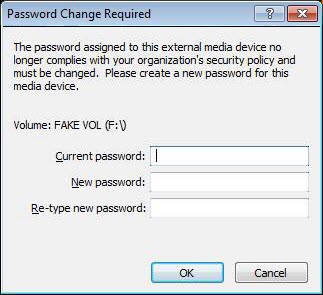
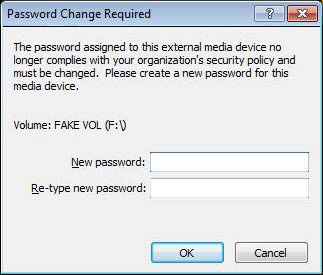 |
Показуйте діалогу зміни пароля, коли поточний пароль більше не відповідає новим вимогам політики. | Так | ||
| F-1 | 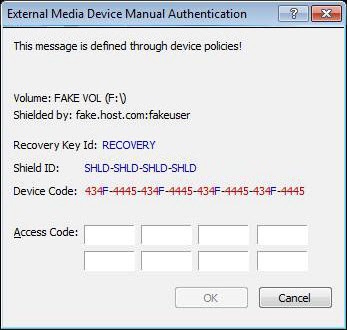
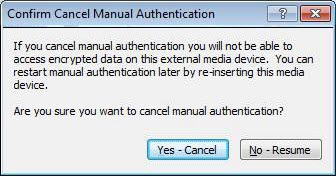 |
Відображається, коли користувач не вводив пароль, кількість разів, визначених політикою. | Так | ||
| F-2 | 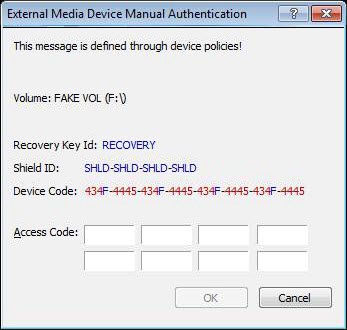
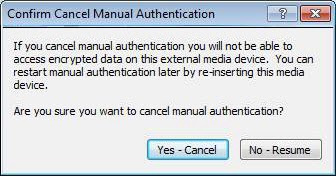 |
Відображається, коли користувач не вводив пароль, кількість разів, визначених політикою. У цьому випадку файл VolumeInfo.xml відсутній або пошкоджений. | Це те саме, що й у F-1 щодо кастіонування. | ||
| G-1 | 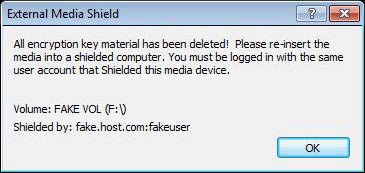 |
Показується, коли ключ втрачається, але комбінація пристрою/користувача не дозволяє відновити пристрій (підказує користувачу вставити пристрій у захищений комп'ютер, де оригінальний користувач увійшов у систему (якщо він роумінгує), щоб відновити ключ). Якщо не роумінг, для відновлення потрібна повна відповідність машині та користувача! | Так | ||
| G-2 | 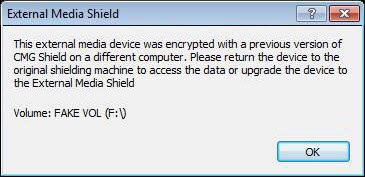 |
Відображається, коли пристрій захищений CMG до версії 5.3 і не може бути оновлений, оскільки він не знаходиться в оригінальній машині під оригінальним користувачем. | Так | ||
| G-3 | 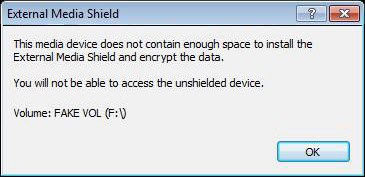 |
 |
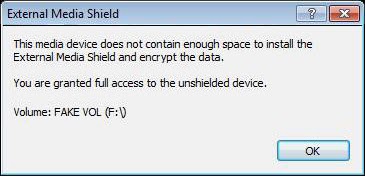 |
Відображається, коли носій (дискети) занадто малий для захисту EMS. | Так |
| G-4 | 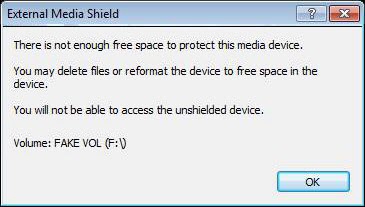 |
 |
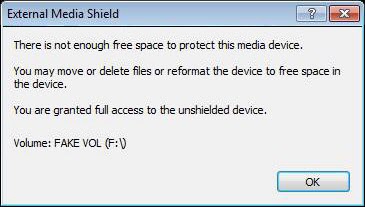 |
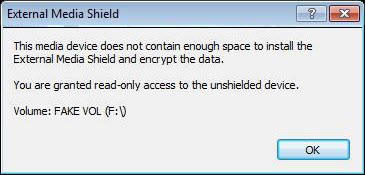
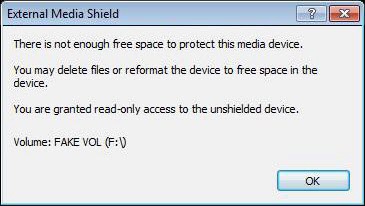
Відображається, коли пристрій не має достатньо вільного місця для EMS Shield. | Так |
| G-5 | 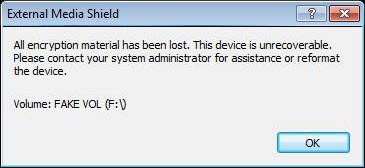 |
Показано, коли ключ пристрою втрачено, і неможливо відновити його, оскільки немає способу отримати Shield ID. | Так | ||
| G-6 | 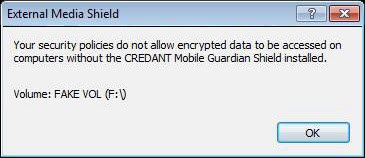 |
Відображається, коли політика не дозволяє доступ до зашифрованих носія без встановленого Shield. | Так | ||
| G-7 | 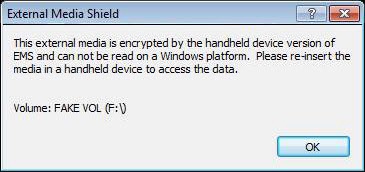 |
Відображається, якщо користувач вставляє портативний пристрій EMS у комп'ютер з захистом Windows EMS. | Так | ||
| G-8 | 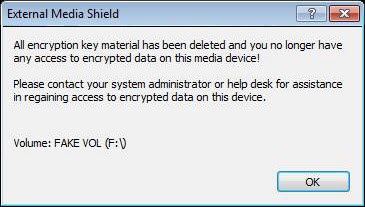 |
Відображається, коли ключовий матеріал видаляється через збій ручної автентифікації. Це контролюється політикою. | Так | ||
| G-9 | 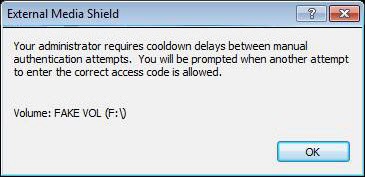 |
Відображається, коли пристрій увійшов у період охолодження через збій ручної автентифікації. Це контролюється політикою. | Так | ||
| G-10 | 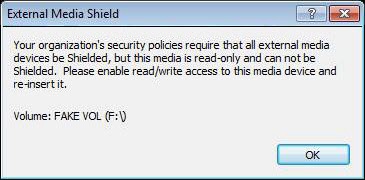 |
Попереджає користувача, що пристрій лише для читання не може бути захищений, якщо політика цього вимагає. | Так | ||
| G-11 | 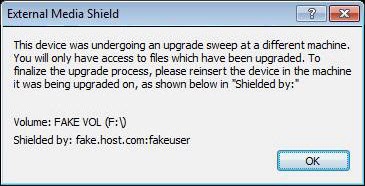 |
Попереджає користувача, що пристрій проходив оновлення в іншому комп'ютері. | Так | ||
| G-12 | 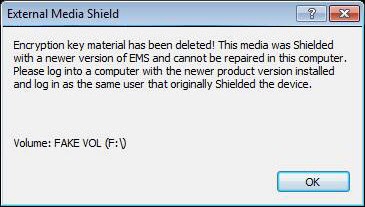 |
Не можу відремонтувати пристрій, новіший за встановлений EMS. | Так | ||
| G-13 | 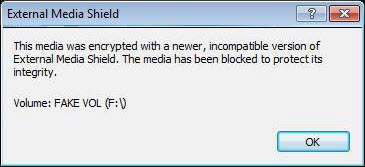 |
Том шифрується у новішому, непідтримуваному форматі IFF. Медіа заблоковані. | Так | ||
| H-1 | 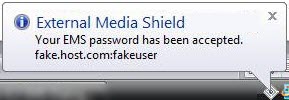 |
Відображає бульбашку або діалог, що вказує на прийняття пароля пристрою. | Так | ||
| H-2 | 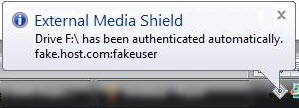 |
Відображає бульбашку , що вказує на автоматичну автентифікацію пристрою в оригінальному комп'ютері екранування. | Так | ||
| I-1 | 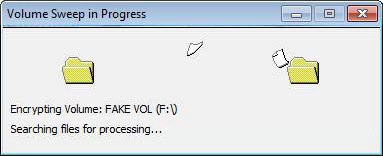 |
Анімований діалог, що відображається під час сканування (важливо, щоб EMS це показали, оскільки видалення пристрою до виконання цього етапу залишить незашифровані дані в пристрої). | Так | ||
| I-2 | 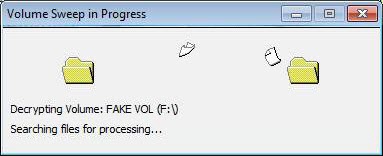 |
Анімований діалог, показаний під час дешифрування. Важливо, щоб EMS це продемонструвала, оскільки видалення пристрою до завершення цього етапу залишить незашифровані дані в пристрої. | Так | ||
| J-1 | 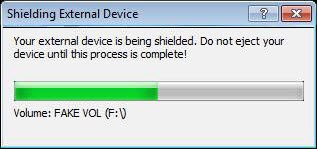 |
Діалог прогресу, який використовується під час встановлення файлів EMS на новий захищений пристрій. Медіа не слід виганяти. | Так | ||
| J-2 | 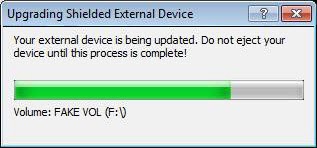 |
Діалог прогресу, який використовується під час оновлення файлів EMS у захищеному пристрої. Медіа не слід виганяти. | Так | ||
| K-1 | 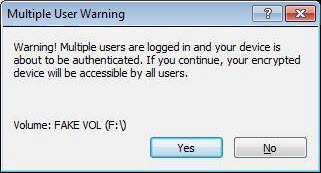 |
Діалог «Так/Ні» використовується для попередження про швидке перемикання користувача під час автоавтентифікації пристрою. | Так | ||
Зразок XML
<?xml version="1.0" encoding="utf-8"?> <emsCustomDialogStrings> <version> <cmgClient>8.x.x</cmgClient> <customStrings>1.0</customStrings> </version> <!-- ENGLISH/DEFAULT --> <languageSet languageId="0x00"> <dialog id="A-1"> <message>Ask to Shield unprotected media.[EndState: ALL]</message> <link url="https: www.dell.com">Link to more info about encryption or the end state...</link> </dialog> <!-- <dialog id="A-1" endState="blocked"> <message>Ask to Shield unprotected media.[EndState: BLOCKED]</message> <link url="https: www.dell.com">Link to more info about encryption or being blocked...</link> </dialog> <dialog id="A-1" endState="readonly"> <message>Ask to Shield unprotected media.[EndState: READ-ONLY]</message> </dialog> <dialog id="A-1" endState="fullaccess"> <message>Ask to Shield unprotected media.[EndState: FULL ACCESS]</message> </dialog> --> <dialog id="A-2" endState="blocked"> <message>Ask to upgrade pre-EMS device (CMG Shielded) to EMS Shielding.[EndState: BLOCKED]</message> <link url="https: www.dell.com">Link to more info about preEMS devices or being blocked...</link> </dialog> <dialog id="A-2" endState="readonly"> <message>Ask to upgrade pre-EMS device (CMG Shielded) to EMS Shielding.[EndState: READ-ONLY]</message> </dialog> <dialog id="A-2" endState="fullaccess"> <message>Ask to upgrade pre-EMS device (CMG Shielded) to EMS Shielding.[EndState: FULL ACCESS]</message> </dialog> <dialog id="A-3" endState="blocked"> <message>Ask to restore key material.[EndState: BLOCKED]</message> <link url="https: www.dell.com">Link to more info about recovery or being blocked...</link> </dialog> <dialog id="A-3" endState="readonly"> <message>Ask to restore key material.[EndState: READ-ONLY]</message> </dialog> <dialog id="A-3" endState="fullaccess"> <message>Ask to restore key material.[EndState: FULL ACCESS]</message> </dialog> <dialog id="B-1" endState="blocked"> <message>This dialog is shown when a device is Shielded or recovered.[EndState: BLOCKED]</message> </dialog> <dialog id="B-1" endState="readonly"> <message>This dialog is shown when a device is Shielded or recovered.[EndState: READ-ONLY]</message> </dialog> <dialog id="B-1" endState="fullaccess"> <message>This dialog is shown when a device is Shielded or recovered.[EndState: FULL ACCESS]</message> </dialog> <dialog id="B-2" endState="blocked"> <message>Shown after the user enters a password which does not meet the restrictions placed by the Administrator.[EndState: BLOCKED]</message> </dialog> <dialog id="B-2" endState="readonly"> <message>Shown after the user enters a password which does not meet the restrictions placed by the Administrator.[EndState: READ-ONLY]</message> </dialog> <dialog id="B-2" endState="fullaccess"> <message>Shown after the user enters a password which does not meet the restrictions placed by the Administrator.[EndState: FULL ACCESS]</message> </dialog> <dialog id="B-3" endState="blocked"> <message>Dialog displayed when the device's password needs to be set again, usually as a result of a manual authentication. In this case a 'Cancel' will leave the device in a policy driven state..[EndState: BLOCKED]</message> </dialog> <dialog id="B-3" endState="readonly"> <message>Dialog displayed when the device's password needs to be set again, usually as a result of a manual authentication. In this case a 'Cancel' will leave the device in a policy driven state..[EndState: READ-ONLY]</message> </dialog> <dialog id="B-3" endState="fullaccess"> <message>Dialog displayed when the device's password needs to be set again, usually as a result of a manual authentication. In this case a 'Cancel' will leave the device in a policy driven state..[EndState: FULL ACCESS]</message> </dialog> <dialog id="B-4"> <message>Redisplay the password reset dialog when the password provided did not meet the password restrictions.</message> </dialog> <dialog id="B-5"> <message>Redisplay the password reset dialog after setting the new password to be the same as the previous password.</message> </dialog> <dialog id="C-1" endState="blocked"> <message>Request the device password from user for password authentication when auto authentication is not possible.[EndState: BLOCKED]</message> <iForgot>This is the confirmation that you really want to say 'I Forgot'. If you do you, will need to manually authenticate by contacting an administrator or logging in the owning user.</iForgot> <fusWarning>This is the warning about multiple users being logged in which will result in all users having access to the device if it is authenticated!</fusWarning> </dialog> <dialog id="C-1" endState="readonly"> <message>Request the device password from user for password authentication when auto authentication is not possible.[EndState: READ-ONLY]</message> <iForgot>This is the confirmation that you really want to say 'I Forgot'. If you do you, will need to manually authenticate by contacting an administrator or logging in the owning user.</iForgot> <fusWarning>This is the warning about multiple users being logged in which will result in all users having access to the device if it is authenticated!</fusWarning> </dialog> <dialog id="C-1" endState="fullaccess"> <message>Request the device password from user for password authentication when auto authentication is not possible.[EndState: FULL ACCESS]</message> <iForgot>This is the confirmation that you really want to say 'I Forgot'. If you do you, will need to manually authenticate by contacting an administrator or logging in the owning user.</iForgot> <fusWarning>This is the warning about multiple users being logged in which will result in all users having access to the device if it is authenticated!</fusWarning> </dialog> <dialog id="C-2" endState="blocked"> <message>If the password provided for authentication was incorrect, we ask the user to retry entering the password.[EndState: BLOCKED]</message> <iForgot>This is the confirmation that you really want to say 'I Forgot'. If you do you, will need to manually authenticate by contacting an administrator or logging in the owning user.</iForgot> <fusWarning>This is the warning about multiple users being logged in which will result in all users having access to the device if it is authenticated!</fusWarning> </dialog> <dialog id="C-2" endState="readonly"> <message>If the password provided for authentication was incorrect, we ask the user to retry entering the password.[EndState: READ-ONLY]</message> <iForgot>This is the confirmation that you really want to say 'I Forgot'. If you do you, will need to manually authenticate by contacting an administrator or logging in the owning user.</iForgot> <fusWarning>This is the warning about multiple users being logged in which will result in all users having access to the device if it is authenticated!</fusWarning> </dialog> <dialog id="C-2" endState="fullaccess"> <message>If the password provided for authentication was incorrect, we ask the user to retry entering the password.[EndState: FULL ACCESS]</message> <iForgot>This is the confirmation that you really want to say 'I Forgot'. If you do you, will need to manually authenticate by contacting an administrator or logging in the owning user.</iForgot> <fusWarning>This is the warning about multiple users being logged in which will result in all users having access to the device if it is authenticated!</fusWarning> </dialog> <dialog id="D-1"> <message>The 'media Shielded' dialog displayed after provisioning of a device when sweeping will occur.</message> </dialog> <dialog id="D-2"> <message>The 'media Shielded' dialog displayed after provisioning of a device, but *no* sweep will occur.</message> </dialog> <dialog id="E-1"> <message>Displayed when the user asks to change the existing device password after a device has been authenticated.</message> </dialog> <dialog id="E-2"> <message>Redisplay password change dialog when the change of password fails, probably due to an incorrect current password.</message> </dialog> <dialog id="E-3"> <message>Redisplay password change dialog when the new password does not meet administrative password restrictions.</message> </dialog> <dialog id="E-4"> <message>Display password change dialog when the current password no longer meets new policy requirements.</message> </dialog> <dialog id="F-1"> <message>Shown when the user has failed to enter the password the number of times defined by policy.</message> <cancelWarning>This text should express the repercusions of cancelling manual authentication!</cancelWarning> </dialog> <dialog id="G-1"> <message>Shown when the key material is lost but the machine/user combination does not allow us to recover the device. Should tell the user to insert the device in a CMG Shielded machine where the original user is logged in (if Roaming) to restore the key material. If not Roaming, we need a full machine/user match to recover.</message> </dialog> <dialog id="G-2"> <message>Displayed when an external device was Shielded by CMG (pre-5.3) and cannot be upgraded because its not in the original machine under the original user.</message> </dialog> <dialog id="G-3"> <message>Displayed when the media (floppies) is too small to allow EMS Shielding.</message> </dialog> <dialog id="G-4" endState="blocked"> <message>Displayed when the external device does not have enough free space to EMS Shield the device.[EndState: BLOCKED]</message> </dialog> <dialog id="G-4" endState="readonly"> <message>Displayed when the external device does not have enough free space to EMS Shield the device.[EndState: READ-ONLY]</message> </dialog> <dialog id="G-4" endState="fullaccess"> <message>Displayed when the external device does not have enough free space to EMS Shield the device.[EndState: FULL ACCESS]</message> </dialog> <dialog id="G-5"> <message>Shown when a device's key material has been lost and there is no way to recover from it because there is no way to retrieve the Shield ID.</message> </dialog> <dialog id="G-6"> <message>Displayed when policy does not allow access of encrypted media w/o the CMG Shield installed.</message> </dialog> <dialog id="G-7"> <message>Displayed if the user happens to insert a Handheld EMS device into an Windows EMS Shielded machine.</message> </dialog> <dialog id="G-8"> <message>Displayed when the key material is deleted due to a manual authorization failure. This is controlled by policy.</message> </dialog> <dialog id="G-9"> <message>Displayed when device has entered a cooldown period due to a manual authorization failure. This is controlled by policy.</message> </dialog> <dialog id="G-10"> <message>Warns the user that a read-only device cannot be Shielded when policy requires it.</message> </dialog> <dialog id="G-11"> <message>Warns the user that the device was undergoing an upgrade sweep in a different machine.</message> </dialog> <dialog id="G-12"> <message>Cannot repair a device newer than the EMS currently installed.</message> </dialog> <dialog id="G-13"> <message>Volume is encrypted with an newer, unsupported IFF format. Media is blocked.</message> </dialog> <dialog id="G-14"> <message>Shown when a user double-clicks a file in EMSExplorer. It tells them that this feature has been disabled.</message> </dialog> <dialog id="G-15"> <message>If during a sweep we fail to encrypt a file due to lack of free space on the device, this dialog is shown.</message> </dialog> <dialog id="J-1"> <message>Progress dialog used during the process of installing EMS files into a newly Shielded device. Media *should not* be ejected at this point.</message> </dialog> <dialog id="J-2"> <message>Progress dialog used during the process of upgrading EMS files in a shielded device. Media *should not* be ejected at this point.</message> </dialog> <dialog id="K-1"> <message>The Yes/No Dialog being used for the Fast User Switching related warning when a device is being autoauthenticated...</message> </dialog> </languageSet> </emsCustomDialogStrings>
Produits touchés
Dell EncryptionPropriétés de l’article
Numéro d’article: 000131588
Type d’article: How To
Dernière modification: 17 août 2026
Version: 10
Obtenez des réponses à vos questions auprès d’autre utilisateurs de Dell
Services de soutien
Vérifiez si votre appareil est couvert par les services de soutien.