Dell Unity: 無法使用 HTTPs://FQDN 或 HTTPs://ip.address 存取 Unity 管理介面 (可由使用者更正)
Sommaire: 無法使用 HTTPs://FQDN 或 HTTPs://ip.address 存取 Unity 管理介面 您可以使用 HTTPs://FQDN/?casHome=LOCAL 和 HTTPs://ip.address/?casHome=LOCAL 存取 Unity
Cet article s’applique à
Cet article ne s’applique pas à
Cet article n’est lié à aucun produit spécifique.
Toutes les versions de produits ne sont pas identifiées dans cet article.
Symptômes
無法使用 HTTPs://FQDN 存取 Unity 管理介面,或 HTTPs://ip.address
使用 HTTPs://FQDN/?casHome=LOCAL 和 HTTPs://ip.address/?casHome=LOCAL 存取 Unity。
使用 HTTPs://FQDN/?casHome=LOCAL 和 HTTPs://ip.address/?casHome=LOCAL 存取 Unity。
Cause
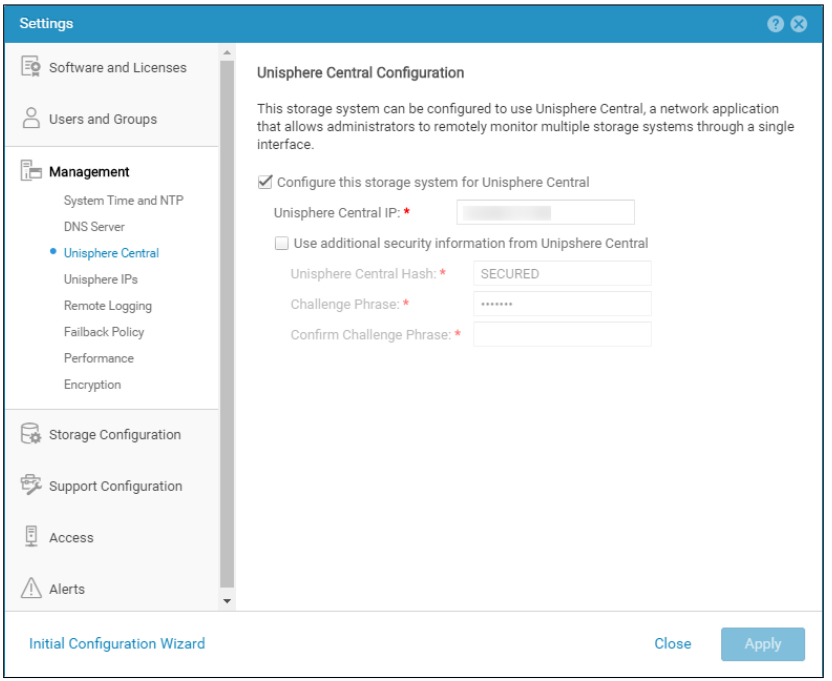
即使未使用 Unisphere Central,Unity 上仍會啟用 Unisphere Central。
Résolution
如果 Unisphere Central 正在使用中,請只檢查「為 Unisphere Central 設定此儲存系統」。如果沒有,請移除啟用 Unisphere Central 的檢查。
Produits touchés
Dell EMC UnityPropriétés de l’article
Numéro d’article: 000205133
Type d’article: Solution
Dernière modification: 15 mai 2026
Version: 6
Obtenez des réponses à vos questions auprès d’autre utilisateurs de Dell
Services de soutien
Vérifiez si votre appareil est couvert par les services de soutien.