NVE: Configure AFTD fails: The user 'root' does not own the contents of the device
Sommaire: Configure NetWorker advanced file type device (AFTD) on Isilon network file share (NFS) fails error "The user 'root (uid=0)' does not own the contents of the device"
Cet article s’applique à
Cet article ne s’applique pas à
Cet article n’est lié à aucun produit spécifique.
Toutes les versions de produits ne sont pas identifiées dans cet article.
Symptômes
Configure NetWorker AFTD on Isilon NFS share fails.
Error: The user 'root (uid=0)' does not own the contents of device '<name>'
Cause
Since NetWorker Virtual Edition (NVE) does not support NFSv3, Isilon has to enable the NFSv4 along with the default version 3. There is a "root user mapping" setting in NFSv4. By default, the mapping is set to "nobody." This causes the NFS client failing to write on the share.
Résolution
- Log in to the Isilon OneFS admin UI as root.
- Click drop down tab "Protocols" -> "UNIX sharing (NFS)" -> Check or highlight the NFS exports sharing Path "<nfs mount>" -> Click Action "View/Edit" -> Click "Edit Export" -> Browse down to "root user mapping" click "Use custom" -> check "Do not map root users" -> Save changes
- Click drop down tab "Zone settings" -> Ensure that the "Enable NFSv4 no names" is checked.
- Log in to NVE as admin, then switch to root:
sudo su -(Alternatively, the below commands can be run as admin, but you must usesudo)
Umount the NFS mount, mount it again.umount /<mount point>mount -t nfs <Isilon host>:/ifs/<nfs mount> /<mount point>
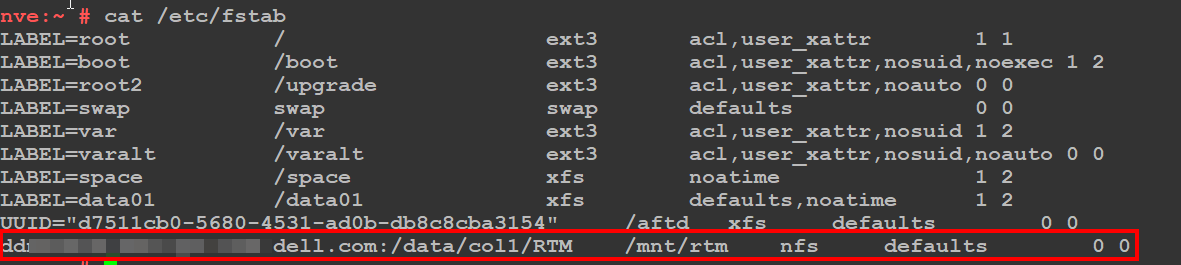
NOTE: Create an
/etc/fstab entry on the NVE to make the mountpoint persistent across system reboots. The below screenshot is a general example of a persistent NFS mountpoint.
- Log in to the NetWorker Management Console (NMC) as the NetWorker Administrator
- Configure the AFTD with the device configuration wizard.
Produits touchés
NetWorkerProduits
NetWorker FamilyPropriétés de l’article
Numéro d’article: 000206193
Type d’article: Solution
Dernière modification: 06 avr. 2026
Version: 2
Obtenez des réponses à vos questions auprès d’autre utilisateurs de Dell
Services de soutien
Vérifiez si votre appareil est couvert par les services de soutien.