NetWorker: How to perform NetWorker Client software inventory in CLI
Sommaire: This operation can be performed from the NetWorker Server directly without logging into each client machine individually or without the use of third-party software.
Cet article s’applique à
Cet article ne s’applique pas à
Cet article n’est lié à aucun produit spécifique.
Toutes les versions de produits ne sont pas identifiées dans cet article.
Instructions
Below commands must be run in the following sequence:
Step 1:
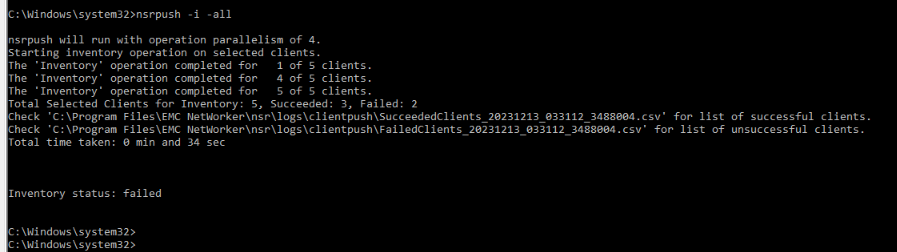
nsrpush -i -all
This performs inventory on all clients. This can be limited to a specific host by using the client name instead of option "-all"
Logs for successful/failed inventory operations can be found at the below location on the NetWorker Server along with the error message to troubleshoot the error:
NetWorker-Installation-Path\nsr\logs\clientpush\
Step 2:
nsrpush -s -t -all > output.txt
This lists all the NetWorker packages installed on each client in tabular form and directs the output to the file "output.txt." This can be limited to a specific host by using the client name instead of option "-all"

Renseignements supplémentaires
More details on the additional options provided by nsrpush can be check from the NetWorker Command Reference Guide. NetWorker documentation is available through: Support for NetWorker | Manuals & Documents (You must sign in with your Dell support account).
Produits touchés
NetWorkerPropriétés de l’article
Numéro d’article: 000220483
Type d’article: How To
Dernière modification: 06 avr. 2026
Version: 3
Obtenez des réponses à vos questions auprès d’autre utilisateurs de Dell
Services de soutien
Vérifiez si votre appareil est couvert par les services de soutien.