NVIDIA RTX Desktop Manager 讓桌上型電腦保持開啟
Sommaire: 本文提供關於 NVIDIA RTX 桌上型電腦管理員新建立的桌上型電腦無法關閉的問題相關資訊。
Cet article s’applique à
Cet article ne s’applique pas à
Cet article n’est lié à aucun produit spécifique.
Toutes les versions de produits ne sont pas identifiées dans cet article.
Symptômes
配備 NVIDIA 獨立 GPU 的 Dell 電腦可能會遇到 NVIDIA RTX Desktop Manager 無法關閉新建立的桌面的問題。
- 開啟 NVIDIA RTX Desktop Manager 並按一下 啟用 RTX DESKTOP MANAGER,應用程式會建立桌面 1 (預設)。
- 按一下 按鈕以 建立第二個桌面。
- 按一下桌上型電腦 2 右上角的 X 圖示,卻發現無法關閉。
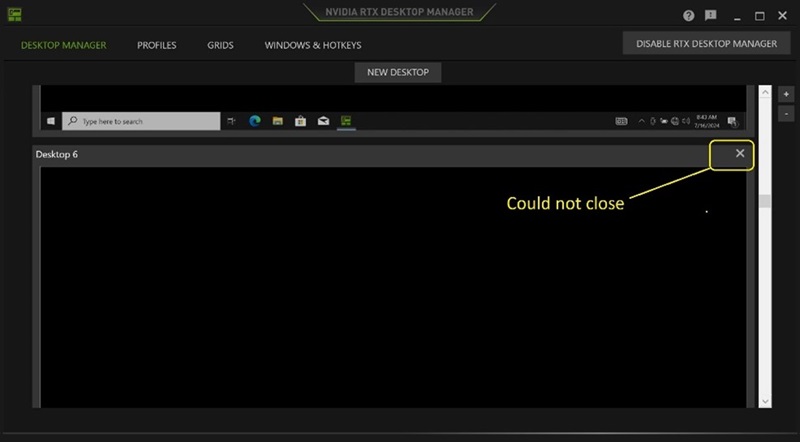
(圖 1 - NVIDIA RTX Desktop Manager)
受影響的平台:
- Precision 7780
- Precision 7680
- Precision 7770
- Precision 7670
- Precision 7560
- Precision 7760
- Precision 7550
- Precision 7750
- Precision 7540
- Precision 7740
- Precision 7530
- Precision 7730
- Precision 7520
- Precision 7720
- Precision 5480
- Precision 5490
- Latitude 3490
- Latitude 3480
- Latitude 3470
- Latitude 3550
- Latitude 3530
- Latitude 3520
Cause
N/A
Résolution
將電腦上的 NVIDIA Graphics DriveR 更新至 552.84 版或更新版本,便可解決此問題。若要下載並安裝驅動程式,請參閱 如何下載和安裝 Dell 驅動程式。
Produits touchés
Dell Latitude 3480/3488, Latitude 3490, Latitude 3520, Latitude 3530, Latitude 3550, Latitude 3470, Precision 5480, Precision 5490, Precision 7520, Precision 7530, Precision 7540, Precision 7550, Precision 7560, Precision 7670, Precision 7680
, Precision 7720, Precision 7730, Precision 7740, Precision 7750, Precision 7760, Precision 7770, Precision 7780
...
Propriétés de l’article
Numéro d’article: 000227614
Type d’article: Solution
Dernière modification: 21 mai 2026
Version: 3
Obtenez des réponses à vos questions auprès d’autre utilisateurs de Dell
Services de soutien
Vérifiez si votre appareil est couvert par les services de soutien.