Как установить Dell Client Device Manager
Sommaire: В этой статье представлена информация об установке Dell Client Device Manager (DCDM).
Cet article s’applique à
Cet article ne s’applique pas à
Cet article n’est lié à aucun produit spécifique.
Toutes les versions de produits ne sont pas identifiées dans cet article.
Instructions
Затронутые продукты:
- Диспетчер клиентских устройств Dell
- Загрузка и извлечение:
- Запустите командную строку от имени администратора.
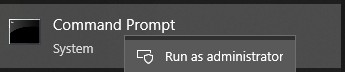
- Перейдите в каталог (cd), в который был извлечен DCDM.

- Запустите сценарий PowerShell, используя параметры или приведенные ниже примеры, в зависимости от ваших потребностей
powershell.exe -executionpolicy Bypass -windowstyle hidden -noninteractive -nologo -file "dcdm_deployment.ps1" -action -modules

| Параметр | Описание |
|---|---|
| -help | Необязательно: отображение описания параметров |
| -действие | Обязательное Указывается действие, которое необходимо выполнить (установить или удалить). |
| -Модули | Необязательный Указывает модули, которые должны быть включены. По умолчанию (DCDMCS, DCDMU, DCDMS) |
| -logpath | Необязательный: значение по умолчанию: C:ProgramData\Dell\ClientDeviceManager. Указывает путь к файлам журнала |
| -verboselog | Опционально: включает отображение журнала в консоли (True или False) |
| -уровень отладки | Необязательное значение по умолчанию — «all». Определяет уровень отладочной информации |
| -телеметриясогласие | Необязательный параметр: По умолчанию true. Указывает согласие на использование телеметрии |
| Модуль | Описание | Модуль зависит от |
|---|---|---|
| DCDMCS | Основные услуги Dell Client Device Manager (прежнее название — Dell Core Service (DCS)) | Требуется основной компонент н/д |
| ДСДМС | Dell Client Device Manager Security (ранее Dell Trusted Device (DTD)) | DCDMCS |
| ДКДМУ | Обновление Dell Client Device Manager Update (ранее Dell Command Update (DCU)) | DCDMCS, DCDMS |
Примеры:
Установка или обновление всех модулей и отправка телеметрии для DCDMU
powershell.exe -executionpolicy Bypass -windowstyle hidden -noninteractive -nologo -file "dcdm_deployment.ps1" -action "install"
Установка или обновление всех модулей без телеметрии
powershell.exe -executionpolicy Bypass -windowstyle hidden -noninteractive -nologo -file "dcdm_deployment.ps1" -action "install" -telemetryconsent "false"
Установка или обновление Dell Client Device Manager | Безопасность (DCDMS)
powershell.exe -executionpolicy Bypass -windowstyle hidden -noninteractive -nologo -file "dcdm_deployment.ps1" -action "install" -modules "DCDMS"
Удаление Dell Client Device Manager | Безопасность (DCDMS)
powershell.exe -executionpolicy Bypass -windowstyle hidden -noninteractive -nologo -file "dcdm_deployment.ps1" -action "uninstall" -modules "DCDMS"
Удалите все модули
powershell.exe -executionpolicy Bypass -windowstyle hidden -noninteractive -nologo -file "dcdm_deployment.ps1" -action "uninstall"
Produits touchés
Dell Client Device ManagerPropriétés de l’article
Numéro d’article: 000299185
Type d’article: How To
Dernière modification: 22 mai 2026
Version: 3
Obtenez des réponses à vos questions auprès d’autre utilisateurs de Dell
Services de soutien
Vérifiez si votre appareil est couvert par les services de soutien.