Sådan installerer du Dell Client Device Manager
Sommaire: Denne artikel indeholder oplysninger om installation af Dell Client Device Manager (DCDM).
Cet article s’applique à
Cet article ne s’applique pas à
Cet article n’est lié à aucun produit spécifique.
Toutes les versions de produits ne sont pas identifiées dans cet article.
Instructions
Berørte produkter:
- Dell Client Device Manager
- Download og udpak:
- Kør kommandoprompten som administrator.
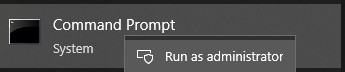
- Skift mappen (cd) til den placering, hvor DCDM blev pakket ud.

- Kør PowerShell script ved hjælp af parametrene eller eksemplerne nedenfor baseret på dine behov
powershell.exe -executionpolicy Bypass -windowstyle hidden -noninteractive -nologo -file "dcdm_deployment.ps1" -action -modules

| Parameter | Beskrivelse |
|---|---|
| -Hjælp | Valgfrit Viser en beskrivelse af parametrene |
| -handling | Obligatorisk Angiver den handling, der skal udføres (installation eller afinstallation) |
| -Moduler | Valgfrit Angiver de moduler, der skal medtages. Standard (DCDMCS, DCDMU, DCDMS) |
| -logsti | Standardindstillingen er C:ProgramData\Dell\ClientDeviceManager. Angiver stien til logfiler |
| -Verboselog | Valgfrit Aktiverer logvisning i konsollen (sand eller falsk) |
| -debuglevel | Valgfri standard er alt. Angiver niveauet for fejlfindingsoplysninger |
| -telemetrisamtykke | Valgfri Standard er sand. Angiver samtykke til telemetri |
| Modul | Beskrivelse | Modulet afhænger af |
|---|---|---|
| DCDMCS | Dell Client Device Manager Core Services (tidligere kendt som Dell Core Service (DCS)) | I/R kernekomponent kræves |
| DCDMS | Dell Client Device Manager Security (tidligere kendt som Dell Trusted Device (DTD)) | DCDMCS |
| DCDMU | Dell Client Device Manager Update (tidligere kendt som Dell Command Update (DCU)) | DCDMCS, DCDMS |
Eksempler:
Installer eller opdater alle moduler, og send telemetri til DCDMU
powershell.exe -executionpolicy Bypass -windowstyle hidden -noninteractive -nologo -file "dcdm_deployment.ps1" -action "install"
Installer eller opdater alle moduler uden telemetri
powershell.exe -executionpolicy Bypass -windowstyle hidden -noninteractive -nologo -file "dcdm_deployment.ps1" -action "install" -telemetryconsent "false"
Installer eller opdater Dell Client Device Manager | Sikkerhed (DCDMS)
powershell.exe -executionpolicy Bypass -windowstyle hidden -noninteractive -nologo -file "dcdm_deployment.ps1" -action "install" -modules "DCDMS"
Afinstallation af Dell Client Device Manager | Sikkerhed (DCDMS)
powershell.exe -executionpolicy Bypass -windowstyle hidden -noninteractive -nologo -file "dcdm_deployment.ps1" -action "uninstall" -modules "DCDMS"
Afinstaller alle moduler
powershell.exe -executionpolicy Bypass -windowstyle hidden -noninteractive -nologo -file "dcdm_deployment.ps1" -action "uninstall"
Produits touchés
Dell Client Device ManagerPropriétés de l’article
Numéro d’article: 000299185
Type d’article: How To
Dernière modification: 22 mai 2026
Version: 3
Obtenez des réponses à vos questions auprès d’autre utilisateurs de Dell
Services de soutien
Vérifiez si votre appareil est couvert par les services de soutien.