Data Domain: Commvault and Retention Lock
Sommaire: How to setup Commvault with DD Retention Lock
Cet article s’applique à
Cet article ne s’applique pas à
Cet article n’est lié à aucun produit spécifique.
Toutes les versions de produits ne sont pas identifiées dans cet article.
Instructions
For more general overview of integrating Commvault (CV) with DD, refer to this KB first:
Data Domain: DDBoost Best Practices for Commvault v11
From Retention Lock (RL) section of that KB:
Enabling WORM
Note: You should enable the DD Retention lock option on the MTree in Data Domain Console prior to enabling WORM storage lock in CommCell Console.
With DataDomain Retention Lock manual is supported both for Governance and Compliance mode.
Note: DataDomain Automatic Retention Lock is not supported.
Configuration of Retention Lock
Configure the WORM storage lock on the Data Domain Boost Storage Library.
For more information, see Enabling WORM Storage and Retention for Disk Storage .
.
The WORM lock days configured in Commvault storage pool should be set between the Retention period min and Retention period max values set in Data Domain Console under the DD Retention Lock setting. WORM Lock days is shown on the Storage Policy Copy Properties dialog box.
The DD Retention Lock can be set to either Governance mode or Compliance mode.
The Data Domain minimum Retention Lock period setting should be set to less than 7 days and maximum retention to 2x+1 than the retention set in Commvault on the storage pool. For example, if the minimum retention in Commvault is 14 days, the set maximum retention to 29 days in Data Domain Console. We set the minimum retention to less than 7 days because of CV metadata/index files that are only the system for a short period.
For other best practices, refer to CommVault Best Practices for Disk Libraries
Following those above guides will get RL setup
Now that RL and WORM are configured, there's an important distinction to understanding how to configure the retention lock periods in CV.
When you have backups with different retention periods, you will want the retention lock period to be set differently for those backups as well.
Say you have
- Daily backups which are kept for 30 days
- Weekly backups which are kept for 180 days
- Monthly backups which are kept for 1 year
- Yearly backups which are kept for 7 years
In CV, you might have these all configured under the basic retention and extended retention rules in one storage policy copy when doing normal backups without RL.
An example:
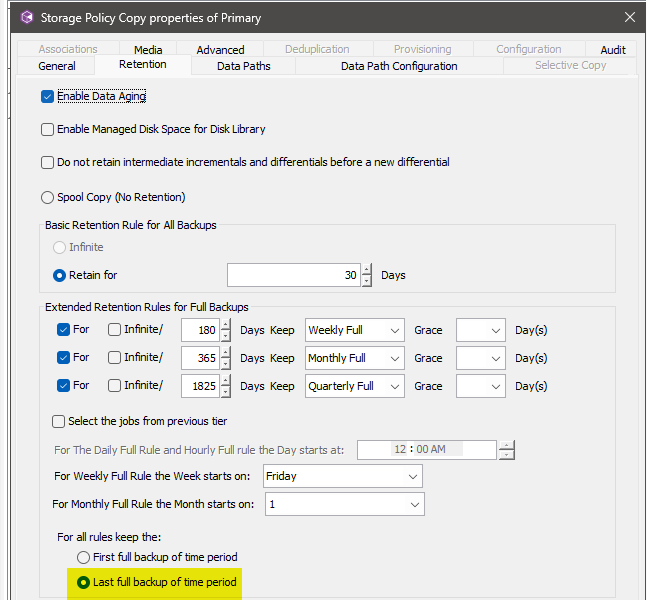
When using WORM and RL with CV and DD, we cannot use Extended Retention Rules to set the retention lock on backups.
Each retention period will have to be it's own Storage Policy Copy and the Basic Retention Rule will be used for setting the retention lock on the DD.
From our example above, we would not use extented retention rules and create a separate storage policy instead.
This is an example of storage policy for the weeklies which should be kept for 180 days and retention locked for that period as well:
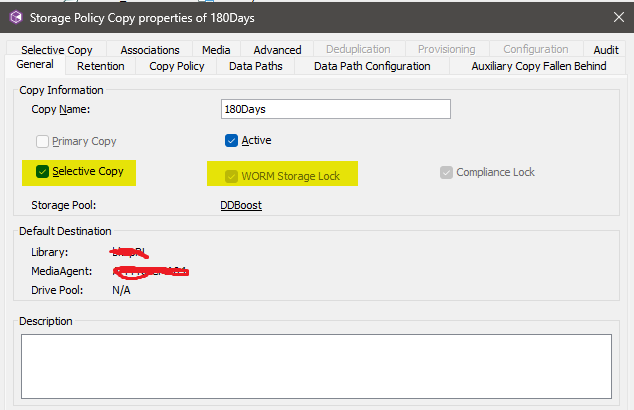
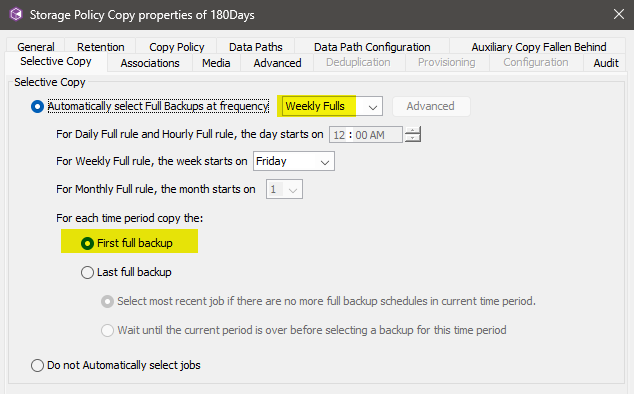
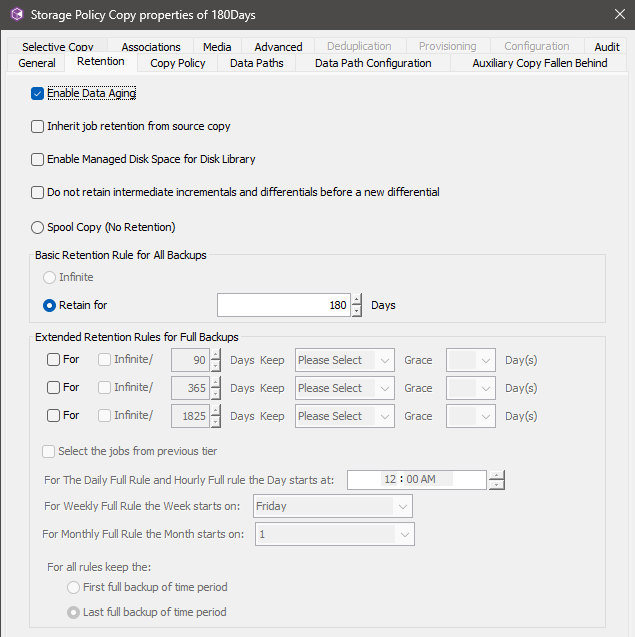
So when CV runs backup jobs for that Storage Policy Copy, it will backup the data to the DD and set a retention lock for 180 days.
It's important to understand this distinction as it won't be obvious that CV isn't setting the correct retention lock periods on the DD.
Produits touchés
Data DomainPropriétés de l’article
Numéro d’article: 000420903
Type d’article: How To
Dernière modification: 04 févr. 2026
Version: 2
Obtenez des réponses à vos questions auprès d’autre utilisateurs de Dell
Services de soutien
Vérifiez si votre appareil est couvert par les services de soutien.