BAD_SYSTEM_CONFIG_INFO or SESSION3_INITIALIZATION_FAILURE Error on a Dell Encryption Endpoints
Riepilogo: Dell Encryption Enterprise and Dell Encryption Personal BAD_SYSTEM_CONFIG_INFO and SESSION3_INITIALIZATION_FAILURE errors can be resolved by following these instructions.
Questo articolo si applica a
Questo articolo non si applica a
Questo articolo non è legato a un prodotto specifico.
Non tutte le versioni del prodotto sono identificate in questo articolo.
Sintomi
Affected Products:
- Dell Encryption Enterprise
- Dell Data Protection | Enterprise Edition
- Dell Data Protection | Server Edition
- Dell Encryption Personal
- Dell Data Protection | Personal Edition
An endpoint protected with Dell Encryption Enterprise (formerly Dell Data Protection | Enterprise Edition) or Dell Encryption Enterprise Personal (formerly Dell Data Protection | Personal Edition) may display an error of:
BAD_SYSTEM_CONFIG_INFO (stop code 0x00000074)after modification or tampering of system32 files or hardware checksumsSESSION3_INITIALIZATION_FAILURE (stop code 0x0000006f)after modification or tampering of the Windows registry
Causa
These errors are a byproduct of Dell Encryption Enterprise or Dell Encryption Personal protecting the endpoint from unauthorized tampering.
Risoluzione
BAD_SYSTEM_CONFIG_INFO or SESSION3_INITIALIZATION_FAILURE occur during boot as either a:

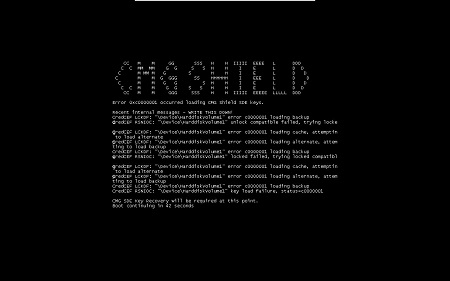
Note: The error may look slightly different on your endpoint.
If the checksums or registry modifications were intentional, then a local security administrator (LSA) recovery can be performed to resolve the blue or black screen. For more information about the recovery process, reference How to Run The Dell Encryption Enterprise / Dell Encryption Personal Recovery Bundle.
Prodotti interessati
Dell EncryptionProprietà dell'articolo
Numero articolo: 000126735
Tipo di articolo: Solution
Ultima modifica: 30 lug 2026
Versione: 12
Trova risposta alle tue domande dagli altri utenti Dell
Support Services
Verifica che il dispositivo sia coperto dai Servizi di supporto.