How to determine the factory installed Operating System of your Dell system
概要: Find the factory installed operating system on your Dell computer at Dell's Support Website.
この記事は次に適用されます:
この記事は次には適用されません:
この記事は、特定の製品に関連付けられていません。
すべての製品パージョンがこの記事に記載されているわけではありません。
手順
This article provides the steps to determine the factory installed Operating System of your Dell system.
Factory Installed operating system.
Dell provides technical support for the Factory Installed operating system according to the service agreement of the system.
To determine the factory installed operating system, browse to the Dell Support Website, enter the Service Tag number of your system and click the Submit button (Figure 1).
Figure 1: Enter the Service Tag for your Dell system
Then click the System Configuration link & click Components under the Original Configuration tab and scroll down to see the Operating System line (Figure 2).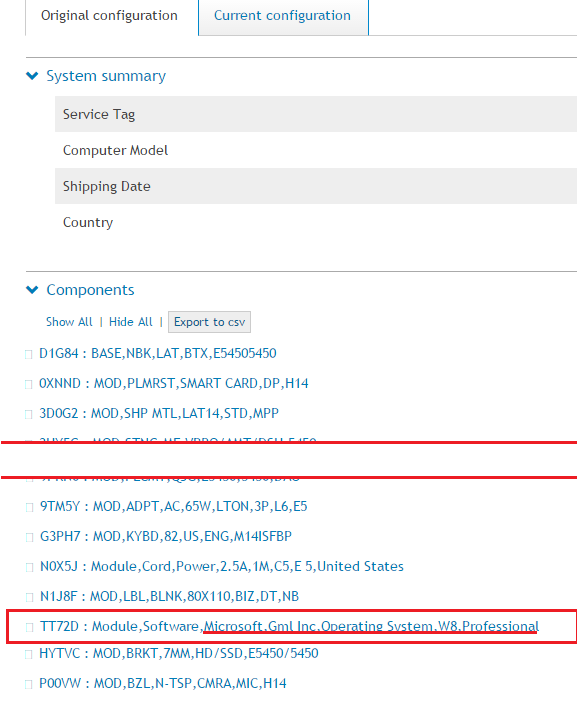
Figure 2: Find the Operating System line under the list of Components
If you need further assistance with your Dell Product, contact Dell Technical Support.
対象製品
Alienware, Dell All-in-One, Dell Pro All-in-One, Dell Pro Max Micro, Dell Pro Max Slim, Dell Pro Max Tower, Dell Pro Micro, Dell Pro Slim, Dell Pro Tower, Dell Slim, Dell Tower, Inspiron, Legacy Desktop Models, OptiPlex, Vostro, XPS, G Series
, G Series, Alienware, Dell Plus, Dell Pro, Dell Pro Max, Dell Pro Plus, Dell Pro Premium, Inspiron, Latitude, Dell Pro Rugged, Vostro, XPS, Legacy Laptop Models, Fixed Workstations, Mobile Workstations, Dell Pro Max Micro XE FCM2250, Dell Pro Max Slim XE FCS1250, Dell Pro Max Tower T2 XE FCT2250, Dell Pro Micro Plus XE QBM1250, Dell Pro Slim Plus XE5 QBS1250, Dell Pro Tower Plus XE5 QBT1250
...
文書のプロパティ
文書番号: 000122232
文書の種類: How To
最終更新: 21 7月 2025
バージョン: 5
質問に対する他のDellユーザーからの回答を見つける
サポート サービス
お使いのデバイスがサポート サービスの対象かどうかを確認してください。