NetWorker: AD over SSL (LDAPS) NMC Login Fails With "POST failed with HTTP-ERROR: 500"
概要: You have created an external authority in the NetWorker Management Console (NMC) for Active Directory (AD) using the "LDAP over SSL" option. The configuration succeeded, but AD logins fail with "POST failed with HTTP-ERROR: 500" (Internal server error). This issue occurs because the LDAP over SSL option sets an internal authc flag "Is active directory" to "false." This option must be set to "true" when the authentication method is active directory. ...
この記事は次に適用されます:
この記事は次には適用されません:
この記事は、特定の製品に関連付けられていません。
すべての製品パージョンがこの記事に記載されているわけではありません。
現象
- You have created an external authority in the NetWorker Management Console (NMC) for Active Directory (AD) using the "LDAP over SSL" option.
- The configuration succeeded, but AD logins fail with "POST failed with HTTP-ERROR: 500" (Internal server error)

- Local NetWorker user accounts (such as the default Administrator account) successfully log in to the NMC.
原因
The LDAP over SSL option defaults an internal configuration parameter "is active directory" to false. This means that the configuration expects LDAP server (Linux based LDAP servers) configuration parameters. Since the values set in the Advanced Configuration Parameters are AD-specific, the login fails.
root@nwserver:~/#: authc_config -u Administrator -e find-all-configs
Enter password:
The query returns 1 records.
Config Id Config Name
3         AD_over_SSL

root@nwserver:~/#: authc_config -u Administrator -e find-config -D config-id=3
Enter password:
Config Id                    : 3
Config Tenant Id             : 1
Config Name                  : AD_over_SSL
Config Domain                : emclab.local
Config Server Address        : ldaps://winsrvr2k16.emclab.local:636/dc=emclab,dc=local
Config User DN               : cn=Administrator,cn=users,dc=emclab,dc=local
Config User Group Attribute  :
Config User ID Attribute     : sAMAccountName
Config User Object Class     : user
Config User Search Filter    :
Config User Search Path      :
Config Group Member Attribute: member
Config Group Name Attribute  : cn
Config Group Object Class    : group
Config Group Search Filter   :
Config Group Search Path     :
Config Object Class          : objectclass
Is Active Directory          : false
Config Search Subtree        : true
解決方法
There are two options available.
Option 1:
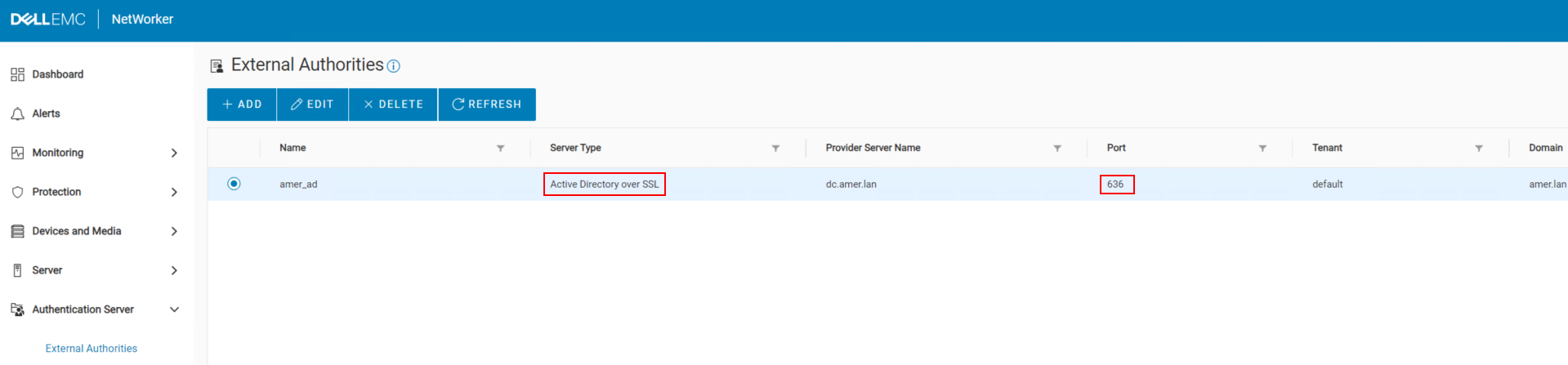
Use the NetWorker Web User Interface (NWUI) update the configuration to use AD over SSL.
1. In a web browse, go to the NWUI:
2. Log in as the default NetWorker Administrator account.
3. Go to Authentication Server->External Authorities.
4. Select the external authority repository and click Edit.
5. In the Basic Configuration tab, select AD over SSL from the Server Type drop-down.
https://NetWorker_ServerName:9090/nwui
2. Log in as the default NetWorker Administrator account.
3. Go to Authentication Server->External Authorities.
4. Select the external authority repository and click Edit.
5. In the Basic Configuration tab, select AD over SSL from the Server Type drop-down.

6. Enter the User DN Password and click Save.
Option 2:
Update the configuration using the authc_config command to set "is active directory : True"
1. Collect your config id:
authc_config -u Administrator -e find-all-configs
2. Update the "is active directory" value to equal true:
authc_config -u Administrator -e update-config -D config-id=CONFIG_ID -D config-user-dn-password=BIND_ACCOUNT_PASSWORD -D config-active-directory=y
- You are prompted to enter the NetWorker Administrator account password (hidden).
- Replace
CONFIG_IDwith theconfig idshown in step 1. - Replace
BIND_ACCOUNT_PASSWORDwith the password for the account used to add AD to NetWorker.
3. Confirm that changes were set:
authc_config -u Administrator -e find-config -D config-id=CONFIG_ID
root@nwserver:~/#: authc_config -u Administrator -e find-config -D config-id=3
Enter password:
Config Id                    : 3
Config Tenant Id             : 1
Config Name                  : AD_over_SSL
Config Domain                : emclab.local
Config Server Address        : ldaps://winsrvr2k16.emclab.local:636/dc=emclab,dc=local
Config User DN               : cn=Administrator,cn=users,dc=emclab,dc=local
Config User Group Attribute  :
Config User ID Attribute     : sAMAccountName
Config User Object Class     : user
Config User Search Filter    :
Config User Search Path      :
Config Group Member Attribute: member
Config Group Name Attribute  : cn
Config Group Object Class    : group
Config Group Search Filter   :
Config Group Search Path     :
Config Object Class          : objectclass
Is Active Directory          : true
Config Search Subtree        : true
4. You can confirm authentication by running the following command on your NetWorker server:
nsrlogin -t TENANT_NAME -d DOMAIN -u AD_USER_NAME
- Replace
TENANT_NAMEwith the name of the tenant used in your configuration. Unless you manually created a tenant, the value is default. - Replace
DOMAINwith the domain value set in your configuration. - Replace
AD_USER_NAMEwith an Active Directory username. - You are prompted to enter the password for the AD user specified.
5. If successful, run:
nsrlogout
Accessing the NetWorker server from the NMC
You must set the Distinguished Name (DN) of an AD group in the NMC Roles and NetWorker server User groups before you can log in to the NMC with your AD users. This can be done when logged in with the default Administrator account:

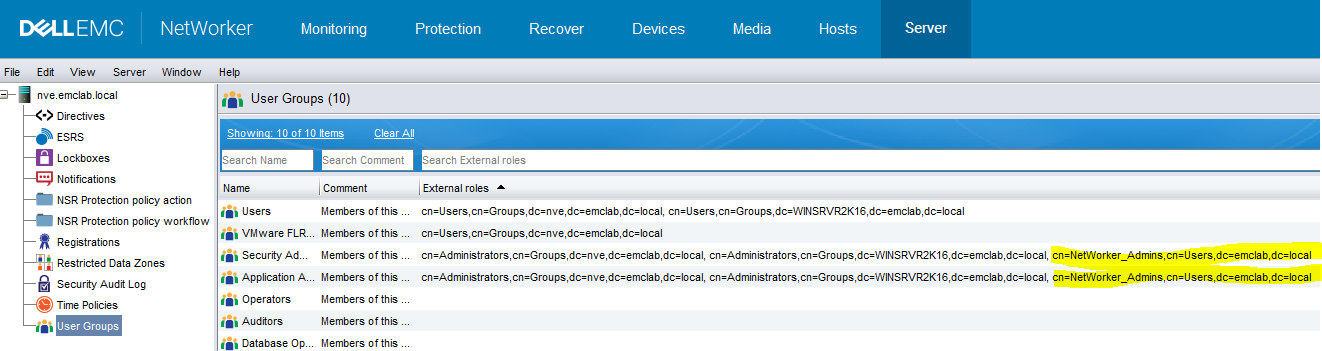
You should now be able to log in to the NMC with AD accounts over SSL.
その他の情報
対象製品
NetWorker製品
NetWorker Management Console文書のプロパティ
文書番号: 000170865
文書の種類: Solution
最終更新: 02 6月 2025
バージョン: 5
質問に対する他のDellユーザーからの回答を見つける
サポート サービス
お使いのデバイスがサポート サービスの対象かどうかを確認してください。