Dell Pro Keyboard and Mouse KM5221W Does Not Work
概要: The following article provides information about a problem with the Dell Pro Keyboard and Mouse (KM5221W). The keyboard and mouse do not work and reports a dongle mismatch.
この記事は次に適用されます:
この記事は次には適用されません:
この記事は、特定の製品に関連付けられていません。
すべての製品パージョンがこの記事に記載されているわけではありません。
現象
Dell Pro Keyboard and Mouse (KM5221W) report a dongle mismatch
The following symptoms may be seen using the Dell Pro Keyboard and Mouse (KM5221W):
- The keyboard and mouse do not work
- The dongle reports a mismatch error
原因
This is due to a synchronization error.
解決方法
The following instructions are steps to resynch or drop and pair the wireless keyboard and mouse. (Using the Dell Peripheral Manager utility):
-
Is Dell Peripheral Manager installed on the computer?
-
Install the latest Dell Peripheral Manager utility on the computer if it is not already installed. To download and install the utility, refer to: How to Download and Install Dell Drivers and Firmware
-
Go to the next step, if the utility is already installed on your computer.
-
-
Open the Utility.
-
Reseat the wireless dongle into the computer.
-
Follow these instructions if a No device found or a Device page is displayed:
-
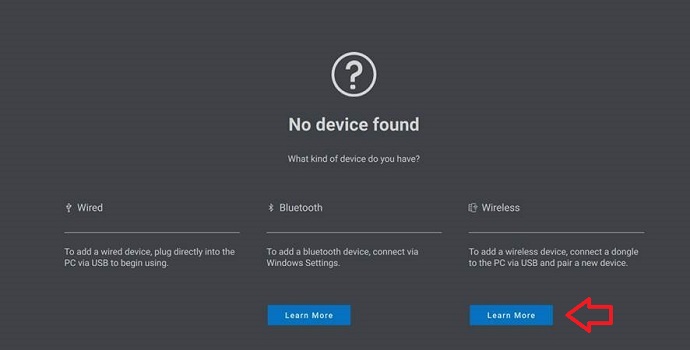
For no device found, click Learn More under the Wireless heading:
-
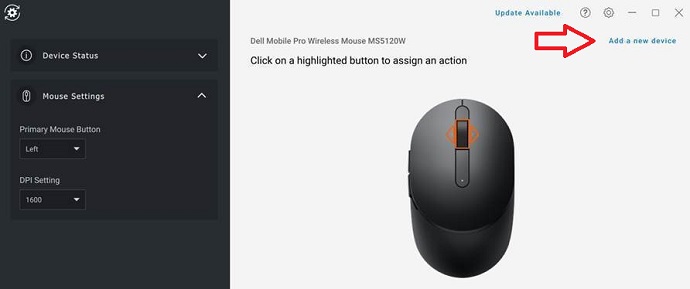
For Device, click Add a new device:
-
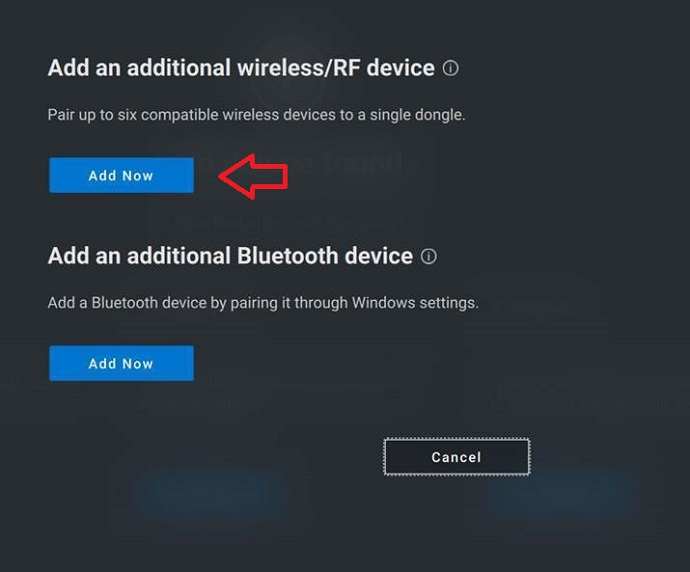
Click Add Now to Add an additional wireless and/or Radio Frequency (RF) device:
-
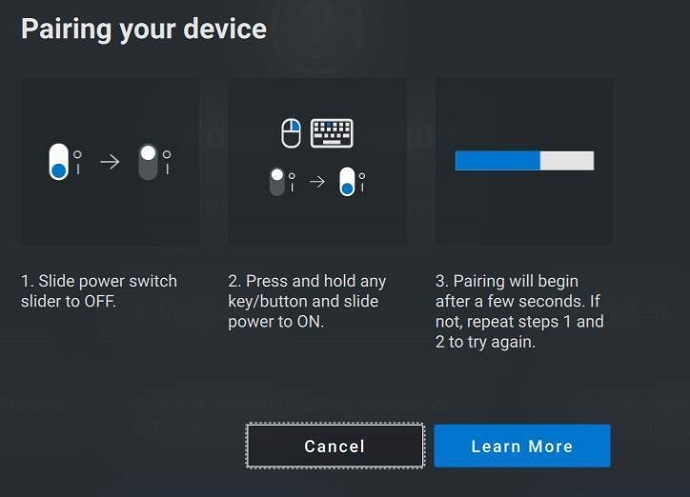
Follow the on-screen instructions to Pair your device:
-
More information about the Dell Peripheral Manager utility can be found in the following article:
対象製品
Alienware, Dell All-in-One, Dell Pro All-in-One, Dell Pro Max Micro, Dell Pro Max Slim, Dell Pro Max Tower, Dell Pro Micro, Dell Pro Slim, Dell Pro Tower, Dell Slim, Dell Tower, Inspiron, OptiPlex, Vostro, XPS, G Series, Chromebook, G Series
, Alienware, Dell Plus, Dell Pro, Dell Pro Max, Dell Pro Plus, Dell Pro Premium, Inspiron, Latitude, Dell Pro Rugged, Vostro, XPS, Fixed Workstations, Mobile Workstations, Dell Pro Max Micro XE FCM2250, Dell Pro Keyboard and Mouse KM5221W
...
文書のプロパティ
文書番号: 000194959
文書の種類: Solution
最終更新: 07 11月 2025
バージョン: 7
質問に対する他のDellユーザーからの回答を見つける
サポート サービス
お使いのデバイスがサポート サービスの対象かどうかを確認してください。