PowerStore: Create clone of NAS server failing with error "The maximum number of file system has been reached. (0xE080100D0029)"
概要: Create clone of NAS server may fail with error "The maximum number of file system has been reached. (0xE080100D0029)" even though limit is not reached. This article provides a workaround to create the NAS server. ...
この記事は次に適用されます:
この記事は次には適用されません:
この記事は、特定の製品に関連付けられていません。
すべての製品パージョンがこの記事に記載されているわけではありません。
現象
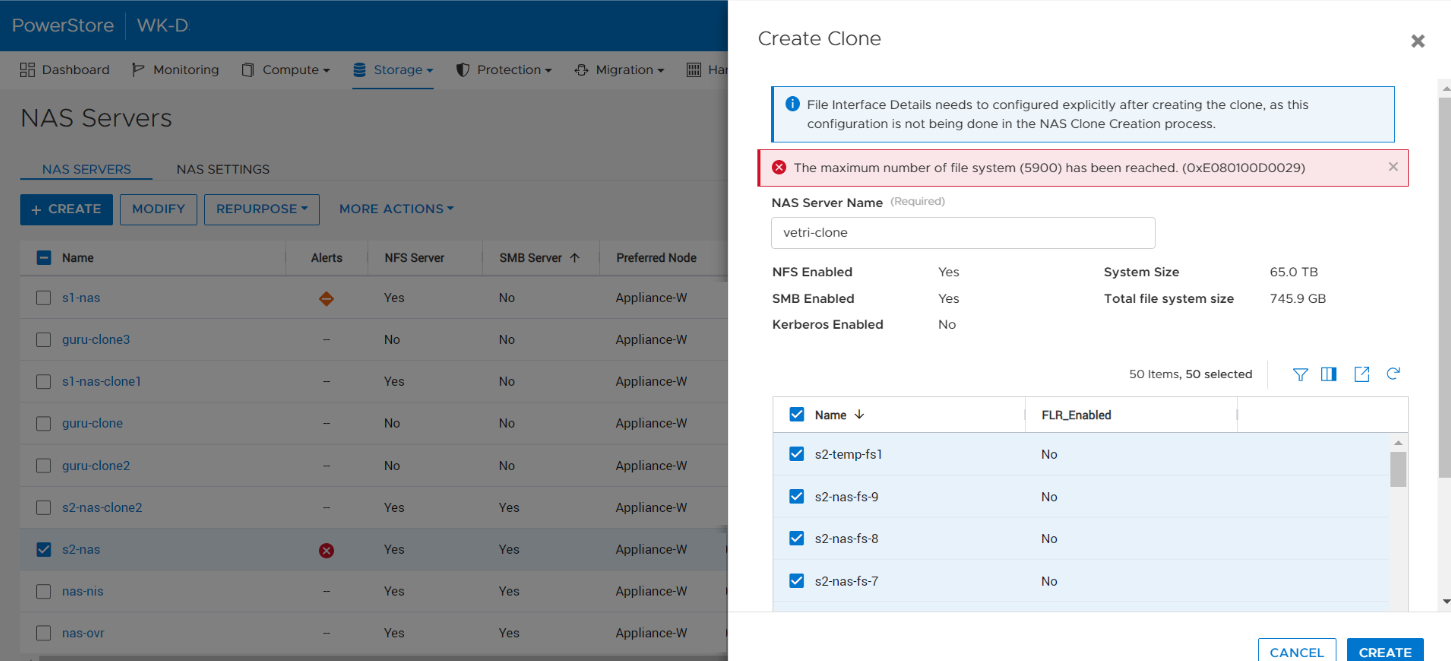
When a user tries to create the clone of a NAS server by selecting all the file systems within the PowerStore Manager NAS server or without specifying file_systems parameter (REST), the operation fails with the error The maximum number of file system (<file system limit value>) has been reached. (0xE080100D0029), even if the number of file systems in the appliance has not reached the limits.
原因
This issue occurs in certain situations where the source NAS server has a lot of snapshots created on the file systems and they are counted in the limit calculation.
解決方法
This issue is planned to be addressed in a future release of PowerStore.
In the meantime, use the following workarounds:
- Remove the unwanted snapshots from the NAS server reducing the overall count of snapshots within the NAS server.
- Select a subset of file systems within the NAS server while cloning the NAS server in the PowerStore UI.
- Explicitly specify the required file systems to be cloned with the NAS server in REST call.
対象製品
PowerStore文書のプロパティ
文書番号: 000210996
文書の種類: Solution
最終更新: 13 6月 2025
バージョン: 5
質問に対する他のDellユーザーからの回答を見つける
サポート サービス
お使いのデバイスがサポート サービスの対象かどうかを確認してください。