Dell Unity: Windows host using native MPIO unable to see LUNs on depopulated Unity XT 380 (Dell Correctable)
概要: Windows hosts using native MPIO are unable to see LUNs on a Unity XT 380/380F with depopulated service processors. This occurs when using the last two ports of the IOModule (port 2 or 3). Or when using the two CNA ports (4 or 5) without an IOModule installed. ...
この記事は次に適用されます:
この記事は次には適用されません:
この記事は、特定の製品に関連付けられていません。
すべての製品パージョンがこの記事に記載されているわけではありません。
現象
- Windows hosts using native MPIO are unable to see LUNs
- Unity OE 5.2.x
- Unity XT 380 or 380F with depopulated (no onboard Ethernet ports) service processors (SPs)
- Using the last two ports of the IOModule (port 2 or 3) or using the two CNA ports (4 or 5) without an IOModule installed.
- The issue happens on both ISCSI connected and FC connected hosts.
- The issue happens with direct connect hosts and hosts connected through a switch.
- Windows VM with MPIO enabled shows two disks in Disk Management instead of having two connections seen as one disk.
原因
The Unity XT 380/380F running OE 5.2.x supports the new depopulated storage processors with the onboard Ethernet ports removed.
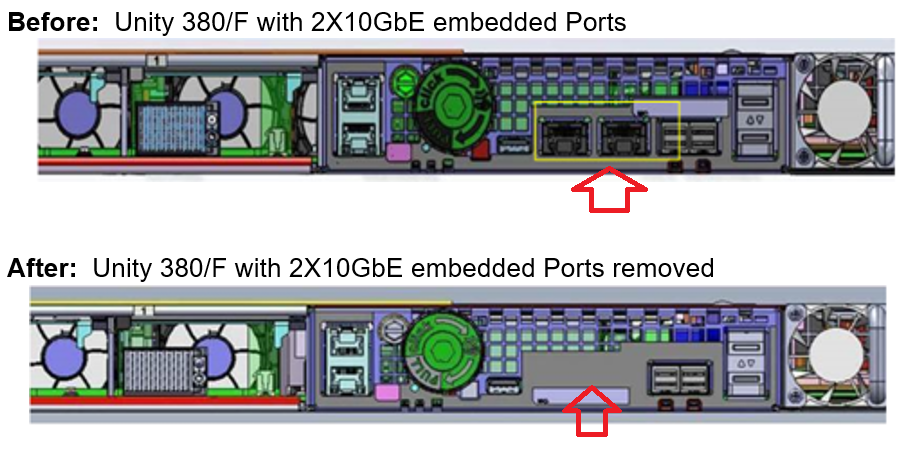
Windows hosts using native MPIO are unable to see LUNs on a Unity XT 380/380F with depopulated service processors. This occurs when using the last two ports of the IOModule (port 2 or 3). Or when using the two CNA ports (4 or 5) without an IOModule installed.
Windows hosts using native MPIO are unable to see LUNs on a Unity XT 380/380F with depopulated service processors. This occurs when using the last two ports of the IOModule (port 2 or 3). Or when using the two CNA ports (4 or 5) without an IOModule installed.
解決方法
Fix:
Workaround:
- This issue is fixed in Unity OS: 5.3.1.0.5.008
- Hotfixes are also available for Unity OE version 5.2. Contact Dell Technical Support or your Authorized Service Provider and quote this Dell Knowledge Base article ID to obtain those fixes.
Workaround:
- If an IOModule is installed, use CNA ports 4 & 5 and IOModule ports 0 & 1.
- Use PowerPath instead of Windows native MPIO.
- If there is no IOModule installed, CNA ports 4 and 5 do not work for Windows hosts using native MPIO.
対象製品
Dell EMC Unity XT 380, Dell EMC Unity XT 380F文書のプロパティ
文書番号: 000212923
文書の種類: Solution
最終更新: 25 7月 2025
バージョン: 11
質問に対する他のDellユーザーからの回答を見つける
サポート サービス
お使いのデバイスがサポート サービスの対象かどうかを確認してください。