Windows Credential Manager Stops Working With Error Code 0x80070003
Sammendrag: After installing Dell Encryption Enterprise Policy Based Encryption and SDE, the Windows Credential Manager stops working with error code 0x80070003. The System cannot find the path that is specified. ...
Denne artikkelen gjelder for
Denne artikkelen gjelder ikke for
Denne artikkelen er ikke knyttet til noe bestemt produkt.
Det er ikke produktversjonene som identifiseres i denne artikkelen.
Symptomer
Affected Products:
- Dell Encryption Enterprise
Affected Versions:
- v8.15 - 8.17
On a computer with installed Dell Encryption Enterprise Policy Based Encryption and SDE, the Windows Credentials Manager stops working with the below error message:
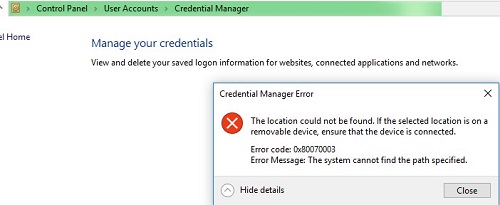
Figure 1: (English Only) Credential manager Error
The issue disappears, after removing Dell Encryption Enterprise Policy Based Encryption and decrypting the computer.
While reproducing the issue, it is possible to see PATH NOT FOUND for the file policy.vpol for the connected user in the Process Monitor logs:

Figure 2: (English Only) Policy.vpol path not found
Note: Process Monitor is a Windows
Sysinternals Tool.
In the CMGShiled.log in C:\ProgramData\Dell\Dell Data Protection\Encryption, it is possible to see the error 0xC000003A for the same Policy.vpol file:
[04.10.18 11:35:16:671 CredUMES.cpp:13281 H] CmgFFE CFDE: Queue CefDb update retry for path="\Device\HarddiskVolume3\Users\ddpusr2\AppData\Local\Microsoft\Vault\4BF4C442-9B8A-41A0-B380-DD4A704DDB28\Policy.vpol", status=0xC000003A
Årsak
Not Applicable
Oppløsning
To fix the issue, follow the steps below:
- Connect to the Dell Security Management Server.
- Go to Populations -> Enterprise -> Policy-Based Encryption -> SDE Encryption Rules.
- Scroll to the end of the list and add the exclusion below and click Save:
-^%ENV:USERPROFILE%\AppData\Local\Microsoft\Vault
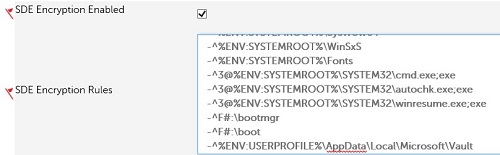
Figure 3: (English Only) SDE exclusions
- Go to Management-> Commit and click Commit Policies to commit the policy changes.
To contact support, reference Dell Data Security International Support Phone Numbers.
Go to TechDirect to generate a technical support request online.
For additional insights and resources, join the Dell Security Community Forum.
Berørte produkter
Dell EncryptionArtikkelegenskaper
Artikkelnummer: 000130912
Artikkeltype: Solution
Sist endret: 19 apr. 2026
Versjon: 10
Få svar på spørsmålene dine fra andre Dell-brukere
Støttetjenester
Sjekk om enheten din er dekket av støttetjenestene.