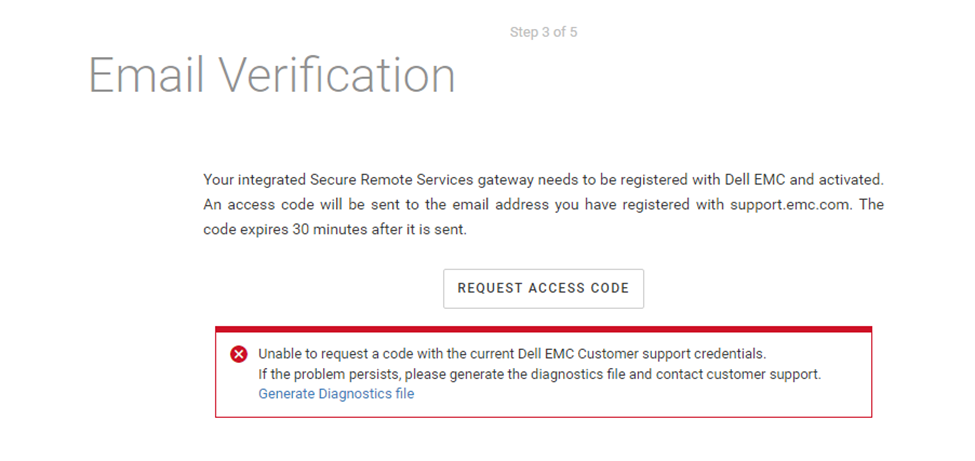
CloudIQ: Unable to request a code with the current Dell EMC Customer support credentials
Podsumowanie: The above error may occur when a CloudIQ Collector is being configured to an integrated gateway.
Ten artykuł dotyczy
Ten artykuł nie dotyczy
Ten artykuł nie jest powiązany z żadnym konkretnym produktem.
Nie wszystkie wersje produktu zostały zidentyfikowane w tym artykule.
Objawy
Customer is attempting to configure a CloudIQ Collector to an integrated gateway using the following procedure:
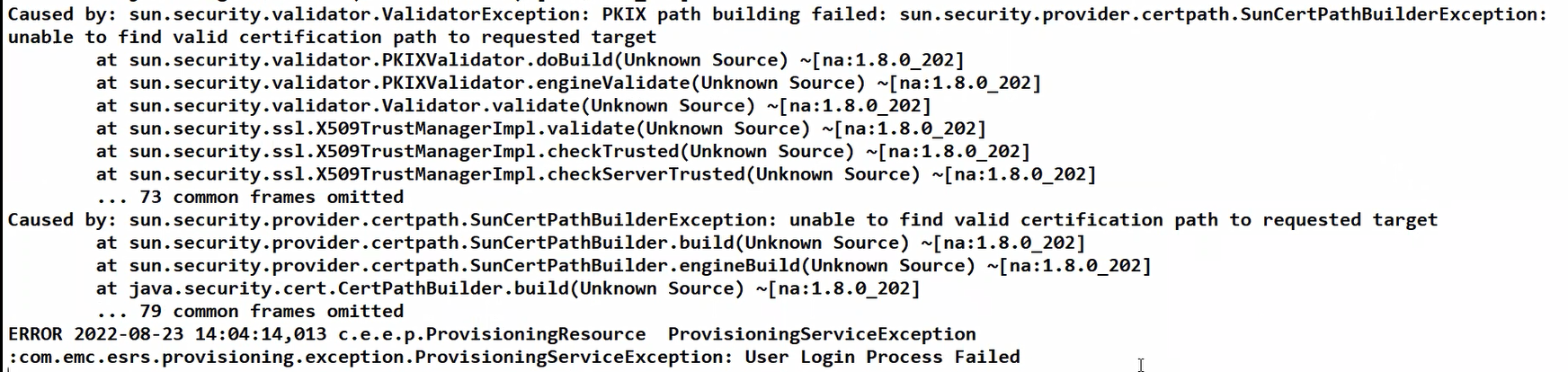
Collecting the Diagnostic file shows the following ERROR within the provisioning log (hostmnt_log > var > log > esrs).
"PKIX path building failed"
- Power on the CloudIQ Collector.
- Login to the CloudIQ Collector.
- Select Admin > Settings and the Integrated Gateway tab.
- Plug in the Dell EMC user account (email) and password (no special characters) and click on Start Provisioning.
- No proxy direct connection – leave off unless required.
- It then verifies the user account (email) and asks the customer to request an access code.
- Once the code is received the customer would then plug this in and select a site ID that is also verified.
- The integrated gateway (ISWID) is then created and the CIQ Collector is created (SWID) and placed under the gateway to be managed.
Collecting the Diagnostic file shows the following ERROR within the provisioning log (hostmnt_log > var > log > esrs).
"PKIX path building failed"
Przyczyna
Customer is utilizing an SSL interceptor or transparent proxy within their network. This will substitute the certificate authority and crack the inscription causing the issue.
Rozwiązanie
Options:
- Customer can enter in an exception or exclusion for the SSL interceptor (or transparent proxy) application to continue using the CloudIQ Collector’s eVE configuration.
- Customer can install a new centralized gateway and configure the CloudIQ Collector to it. The centralized gateway being used would also need an exception or exclusion for the SSL interceptor (or transparent proxy) application. This would need to be addressed by the customer and/or the customer’s network team in the same manner as in option 1 above.
Dodatkowe informacje
Exceptions/exclusions must be made using a third party tool or the SSL interceptor or proxy application outside of Secure Connect Gateway (SCG).
Customers may exclude *.emc.com to cover all the domains or list each separately.
● The local system must be able to connect to the following Enterprise servers through ports 443 and 8443:
- esrs3-core.emc.com
- esrs3-coredr.emc.com
● The local system must be able to connect to the following Global access servers through ports 443 and 8443:
- esr3gduprd01.emc.com
- esr3gduprd02.emc.com
- esr3gduprd03.emc.com
- esr3gduprd04.emc.com
- esr3gduprd05.emc.com
- esr3gduprd06.emc.com
- esr3ghoprd01.emc.com
- esr3ghoprd02.emc.com
- esr3ghoprd03.emc.com
- esr3ghoprd04.emc.com
- esr3ghoprd05.emc.com
- esr3ghoprd06.emc.com
- esr3gscprd01.emc.com
- esr3gscprd02.emc.com
- esr3gscprd03.emc.com
- esr3gscprd04.emc.com
- esr3gscprd05.emc.com
- esr3gscprd06.emc.com
- esr3gckprd01.emc.com
- esr3gckprd02.emc.com
- esr3gckprd03.emc.com
- esr3gckprd04.emc.com
- esr3gckprd05.emc.com
- esr3gckprd06.emc.com
- esr3gckprd07.emc.com
- esr3gckprd08.emc.com
- esr3gckprd09.emc.com
- esr3gckprd10.emc.com
- esr3gckprd11.emc.com
- esr3gckprd12.emc.com
- esr3gspprd01.emc.com
- esr3gspprd02.emc.com
- esr3gspprd03.emc.com
- esr3gspprd04.emc.com
- esr3gspprd05.emc.com
- esr3gspprd06.emc.com
- support.emc.com
Produkty, których dotyczy problem
CloudIQProdukty
CloudIQWłaściwości artykułu
Numer artykułu: 000202819
Typ artykułu: Solution
Ostatnia modyfikacja: 15 maj 2026
Wersja: 8
Znajdź odpowiedzi na swoje pytania u innych użytkowników produktów Dell
Usługi pomocy technicznej
Sprawdź, czy Twoje urządzenie jest objęte usługą pomocy technicznej.