Avamar : Not able to access Avamar GUI "Avamar Administrator client is not compatible with the selected server" error reported
Summary: Not able to access Avamar GUI with "Avamar Administrator client is not compatible with the selected server" error reported
Acest articol se aplică pentru
Acest articol nu se aplică pentru
Acest articol nu este legat de un produs specific.
Acest articol nu acoperă toate versiunile de produs existente.
Symptoms
Not able to access GUI and the following error is reported:
The Avamar Administrator client is not compatible with the selected server.
The Avamar Administrator client cannot continue and will now exit.
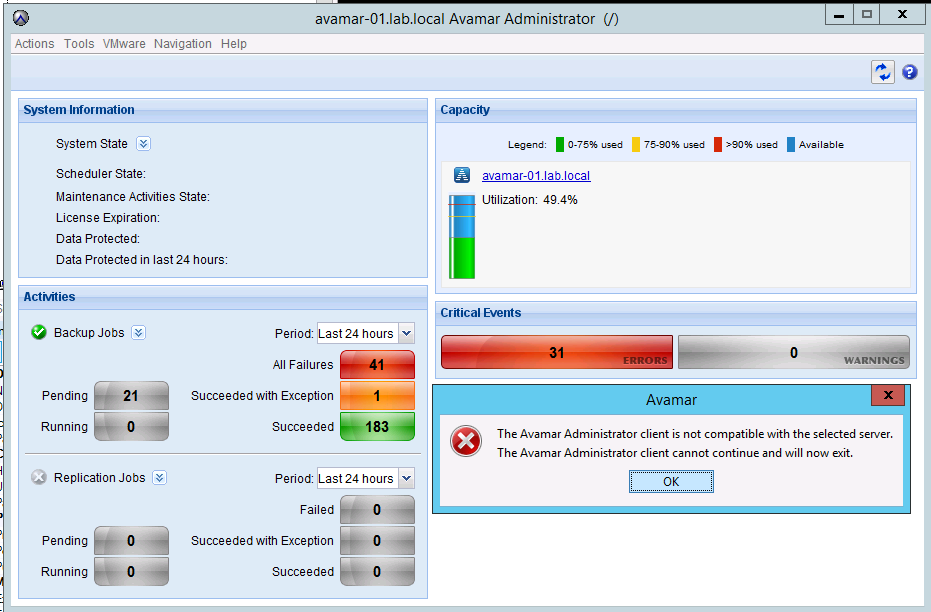
The MCS version has been checked and it matches the Avamar Administrator version.
If the MCS version doesn't match the Avamar Administrator version, download the latest Avamar Administrator version from the Downloads page.
The Avamar Administrator client is not compatible with the selected server.
The Avamar Administrator client cannot continue and will now exit.
The MCS version has been checked and it matches the Avamar Administrator version.
If the MCS version doesn't match the Avamar Administrator version, download the latest Avamar Administrator version from the Downloads page.
Cause
- Under certain circumstances, one or more Java processes can become hung.
- Usually, the hung Java PIDs have quite an old date.
- The following command can be used to confirm:
ps -ef | grep java
Resolution
- Stop the MCS, EMS/EMT and avinstaller services. The backup scheduler will be stopped with MCS.
dpnctl stop mcs
dpnctl stop ems
dpnctl stop avinstaller
dpnctl stop ems
dpnctl stop avinstaller
- As user "root" kill all java processes
killall java
- Verify no java processes remain
ps -ef | grep java
- As user "admin" restart the services
dpnctl start
- Verify services are running
dpnctl status
Produse afectate
AvamarProduse
Avamar, Avamar ServerProprietăți articol
Article Number: 000071469
Article Type: Solution
Ultima modificare: 17 Dec 2025
Version: 4
Găsiți răspunsuri la întrebările dvs. de la alți utilizatori Dell
Servicii de asistență
Verificați dacă dispozitivul dvs. este acoperit de serviciile de asistență.