Dell Large Frame Monitors Touch Screen Function Does Not Work
摘要: Information about fixing no touch functionality on Dell Large Frame Monitors (LFM) when multiple video inputs are plugged into the display.
本文章適用於
本文章不適用於
本文無關於任何特定產品。
本文未識別所有產品版本。
症狀
The touch functionaliy does not work when you have multiple video inputs connected to a Dell Large Frame Monitor and the firmware update will fail.
Affected Monitors:
- P5524QT
- P6524QT
- P7524QT
- P8624QT
原因
When video inputs are plugged into the Dell Large Frame Monitor, you can only have one video input connected into the computer for the touch function to work properly. If you plug in two video inputs in from one computer, the touch function will not function. For multiple computers, each computer must be connected to the monitor with one HDMI or DisplayPort (DP) cable and one USB upstream cable.
解析度
Video Input Sources and USB Pairing
Ensure to connect both the video input source cable and the USB upstream cable that matches the Table below. Example: if you connect HDMI 1 and USB 2, it will not have touch functionality.
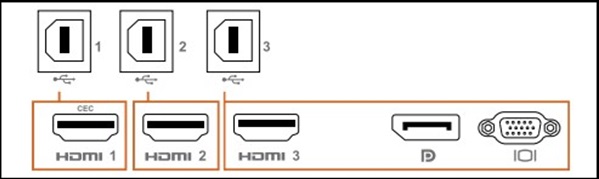
Table
| Input Sources | USB Upstream | Touch Function Works or Does Not |
|---|---|---|
| HDMI 1 (CEC) | USB 1 | ✔ |
| HDMI 2 | USB 2 | ✔ |
| HDMI 3 | USB 3 | ✔ |
| DisplayPort (DP) | ||
| VGA |
受影響的產品
Dell P5524QT, Dell P6524QT, Dell P7524QT, Dell P8624QT文章屬性
文章編號: 000228000
文章類型: Solution
上次修改時間: 16 4月 2025
版本: 3
向其他 Dell 使用者尋求您問題的答案
支援服務
檢查您的裝置是否在支援服務的涵蓋範圍內。