PowerStore: Partial data collection cannot be downloaded
Summary: Partial data collection cannot be downloaded.
This article applies to
This article does not apply to
This article is not tied to any specific product.
Not all product versions are identified in this article.
Symptoms
Partial data collection can occur in a multi appliance setup when data collection fails in one of the appliances.
When this occurs, the status of the data collection is 'PARTIAL' and in PowerStore Manager UI, when choosing this DC for downloading, displays the message "Support material not available for download" as seen in the following screenshot:.
Example:
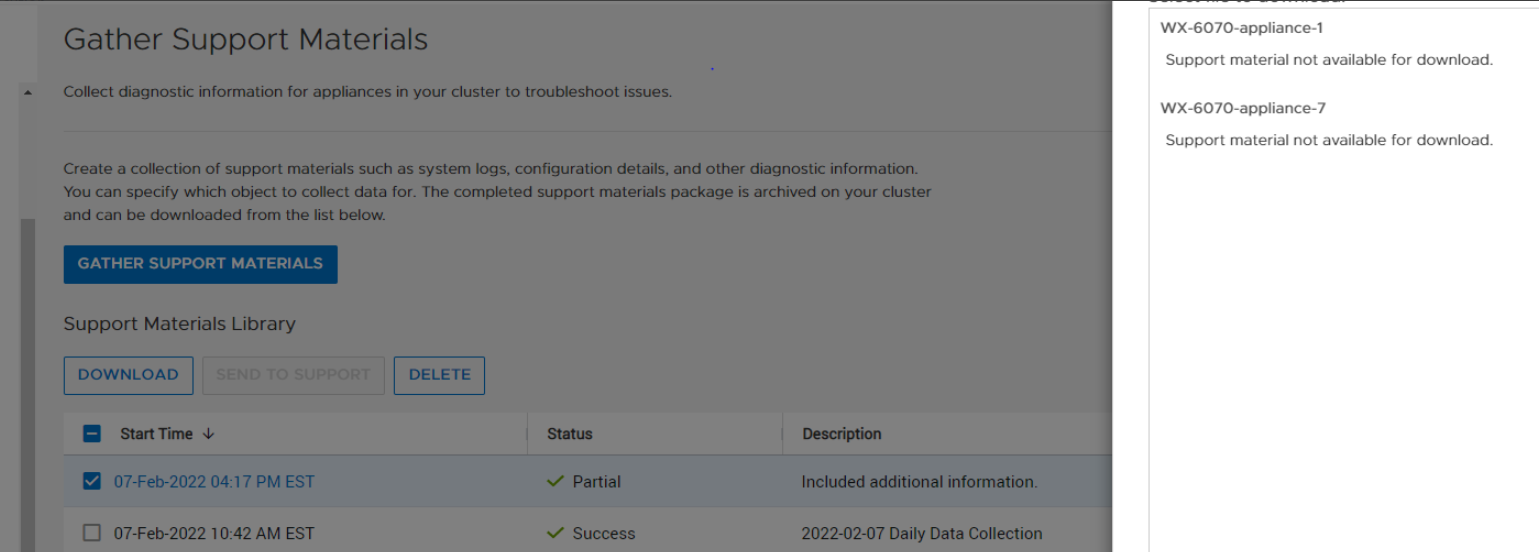
When this occurs, the status of the data collection is 'PARTIAL' and in PowerStore Manager UI, when choosing this DC for downloading, displays the message "Support material not available for download" as seen in the following screenshot:.
Example:
Cause
The root cause is download for a data collection with 'dc_status' of 'PARTIAL' is not supported.
Resolution
To download the PARTIAL data collection bundle, use 'scp' from the command line in the service docker.
On the service docker of the appliance that has the PARTIAL data collection, do the following:
- Run 'svc_dc list' as shown below and identify the data collection to download.
[SVC:service@ABCDEF-B ~]$ svc_dc list |
- Elevate to root.
- Go to /cyc_var/cyc_service/data_collection/ and 'scp' the data collection to your target location as shown below:
root@ABCDEF-A:/home/service/user>cd /cyc_var/cyc_service/data_collection |
Resolution
This issue is fixed in PowerStore 3.0 and above where partial DCs can be downloaded for the PowerStore Manager UI.
Affected Products
PowerStoreArticle Properties
Article Number: 000213481
Article Type: Solution
Last Modified: 13 Jun 2025
Version: 4
Find answers to your questions from other Dell users
Support Services
Check if your device is covered by Support Services.