Falta la carpeta geodrive de ECS
Zusammenfassung: Falta la carpeta GeoDrive de ECS en la unidad local.
Dieser Artikel gilt für
Dieser Artikel gilt nicht für
Dieser Artikel ist nicht an ein bestimmtes Produkt gebunden.
In diesem Artikel werden nicht alle Produktversionen aufgeführt.
Symptome
El usuario verá la carpeta de GeoDrive o una subcarpeta que falta en su unidad local en el host.
La carpeta tendrá los datos, pero será invisible/oculta.
- Por ejemplo, falta una carpeta "folder1" en GeoDrive.

- Intente crear una nueva carpeta con el mismo nombre y, a continuación, recibirá el indicador de que la carpeta realmente existe.
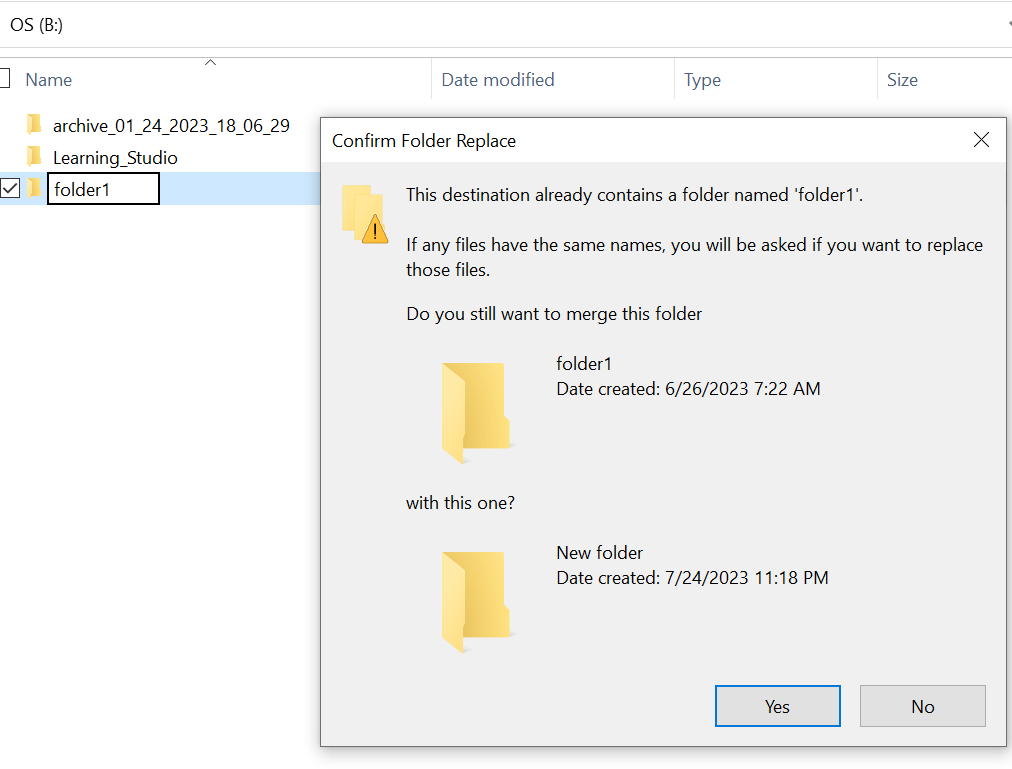
- Busque con la ruta de la carpeta faltante en el explorador. Deberíamos poder ver el contenido.

Ursache
Esto se debe a los atributos HIDDEN y SYSTEM que se configuraron en la carpeta.
Lösung
Siga los pasos que se indican a continuación.
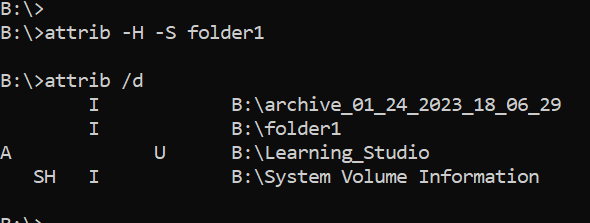
Después de ejecutar este comando, vuelva a comprobar la unidad local. La carpeta faltante volverá a la normalidad.
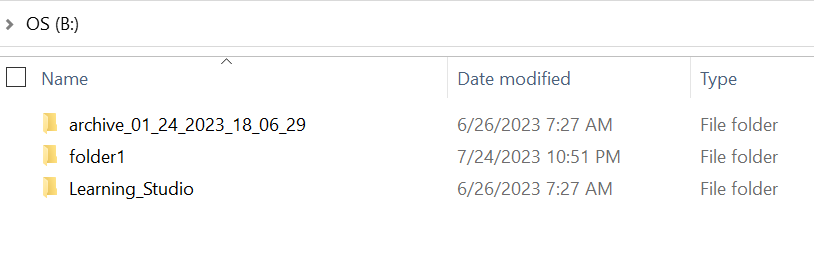
- Vaya al símbolo del sistema de Windows en el sistema host.
- cd al directorio primario donde falta la carpeta y ejecute "attrib /d".
- Debería ver una lista de directorios y la carpeta faltante debe estar en la lista.
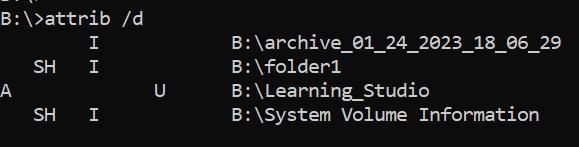
- Las letras antes de ella indican los atributos. Debería ver SH antes del archivo (SYSTEM y HIDDEN).
- A continuación, ejecute este comando para eliminar los dos atributos anteriores: attrib -H -S folder_name
Weitere Informationen
Hay muchas otras opciones disponibles para el comando attrib.
B:\>attrib /?
Displays or changes file attributes.

ATTRIB [+R | -R] [+A | -A] [+S | -S] [+H | -H] [+O | -O] [+I | -I] [+X | -X] [+P | -P] [+U | -U]
       [drive:][path][filename] [/S [/D]] [/L]

  +   Sets an attribute.
  -   Clears an attribute.
  R   Read-only file attribute.
  A   Archive file attribute.
  S   System file attribute.
  H   Hidden file attribute.
  O   Offline attribute.
  I   Not content indexed file attribute.
  X   No scrub file attribute.
  V   Integrity attribute.
  P   Pinned attribute.
  U   Unpinned attribute.
  B   SMR Blob attribute.
  [drive:][path][filename]
      Specifies a file or files for attrib to process.
  /S  Processes matching files in the current folder
      and all subfolders.
  /D  Processes folders as well.
  /L  Work on the attributes of the Symbolic Link versus
      the target of the Symbolic Link
Betroffene Produkte
ECS, Elastic Cloud StorageArtikeleigenschaften
Artikelnummer: 000215245
Artikeltyp: Solution
Zuletzt geändert: 18 Mai 2026
Version: 4
Antworten auf Ihre Fragen erhalten Sie von anderen Dell NutzerInnen
Support Services
Prüfen Sie, ob Ihr Gerät durch Support Services abgedeckt ist.