ECS GeoDrive 폴더가 누락되었습니다.
Zusammenfassung: 로컬 드라이브에 ECS GeoDrive 폴더가 없습니다.
Dieser Artikel gilt für
Dieser Artikel gilt nicht für
Dieser Artikel ist nicht an ein bestimmtes Produkt gebunden.
In diesem Artikel werden nicht alle Produktversionen aufgeführt.
Symptome
호스트의 로컬 드라이브에서 GeoDrive 폴더 또는 하위 폴더가 누락된 것을 볼 수 있습니다.
폴더에 데이터가 있지만 표시되지 않고 숨겨집니다.
- 예를 들어 GeoDrive에 "folder1" 폴더가 없습니다.

- 이름이 같은 새 폴더를 생성해 보십시오. 그러면 폴더가 실제로 존재하는 프롬프트가 표시됩니다.
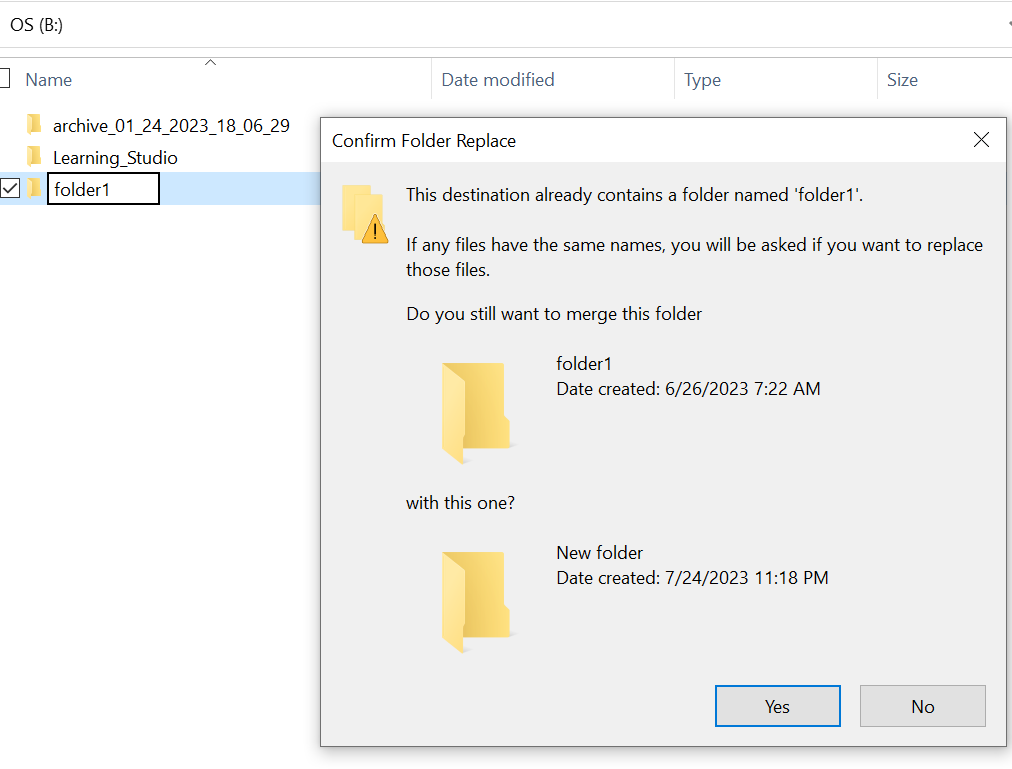
- 탐색기에서 누락된 폴더 경로로 검색합니다. 내용을 볼 수 있어야 합니다.

Ursache
이는 폴더에 설정된 숨김 및 시스템 속성 때문입니다.
Lösung
아래 단계를 따르십시오.
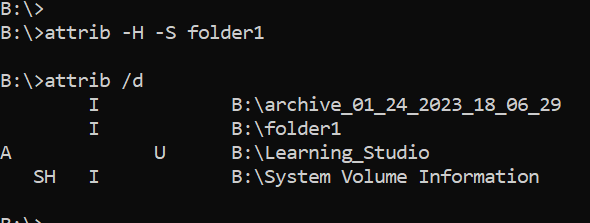
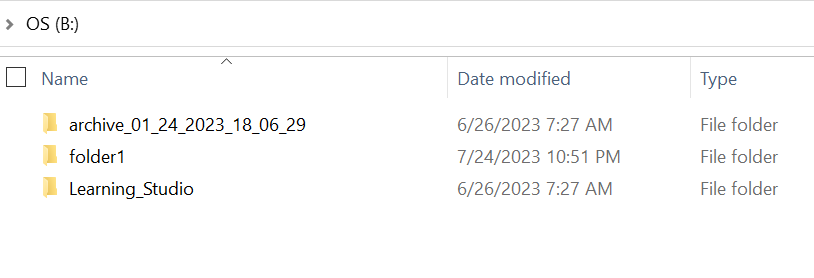
이 명령을 실행한 후 로컬 드라이브를 다시 확인합니다. 누락된 폴더가 정상으로 돌아갑니다.
- 호스트 시스템의 Windows 명령 프롬프트로 이동합니다.
- cd에서 폴더가 누락된 상위 디렉토리로 이동하여 "attrib /d"를 실행합니다.
- 디렉토리 목록이 표시되고 누락된 폴더가 목록에 있어야 합니다.
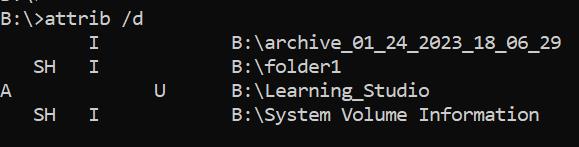
- 앞에 있는 문자는 속성을 나타냅니다. 파일 앞에 SH가 표시되어야 합니다(시스템 및 숨김).
- 그런 다음 이 명령을 실행하여 위의 두 가지 속성인 attrib -H -S folder_name 제거합니다.
Weitere Informationen
attrib 명령에 사용할 수 있는 다른 옵션은 여러 가지가 있습니다.
B:\>attrib /?
Displays or changes file attributes.

ATTRIB [+R | -R] [+A | -A] [+S | -S] [+H | -H] [+O | -O] [+I | -I] [+X | -X] [+P | -P] [+U | -U]
       [drive:][path][filename] [/S [/D]] [/L]

  +   Sets an attribute.
  -   Clears an attribute.
  R   Read-only file attribute.
  A   Archive file attribute.
  S   System file attribute.
  H   Hidden file attribute.
  O   Offline attribute.
  I   Not content indexed file attribute.
  X   No scrub file attribute.
  V   Integrity attribute.
  P   Pinned attribute.
  U   Unpinned attribute.
  B   SMR Blob attribute.
  [drive:][path][filename]
      Specifies a file or files for attrib to process.
  /S  Processes matching files in the current folder
      and all subfolders.
  /D  Processes folders as well.
  /L  Work on the attributes of the Symbolic Link versus
      the target of the Symbolic Link
Betroffene Produkte
ECS, Elastic Cloud StorageArtikeleigenschaften
Artikelnummer: 000215245
Artikeltyp: Solution
Zuletzt geändert: 18 Mai 2026
Version: 4
Antworten auf Ihre Fragen erhalten Sie von anderen Dell NutzerInnen
Support Services
Prüfen Sie, ob Ihr Gerät durch Support Services abgedeckt ist.