ECS GeoDriveフォルダーがありません
Zusammenfassung: ECS GeoDriveフォルダーがローカル ドライブに存在しない。
Dieser Artikel gilt für
Dieser Artikel gilt nicht für
Dieser Artikel ist nicht an ein bestimmtes Produkt gebunden.
In diesem Artikel werden nicht alle Produktversionen aufgeführt.
Symptome
ユーザーには、ホスト上のローカル ドライブにGeoDriveフォルダーまたはサブフォルダーが見つかりません。
フォルダーにはデータが格納されますが、非表示/非表示になります。
- たとえば、GeoDriveにフォルダー「folder1」がありません。

- 同じ名前で新しいフォルダーを作成しようとすると、フォルダーが実際に存在することを示すプロンプトが表示されます。
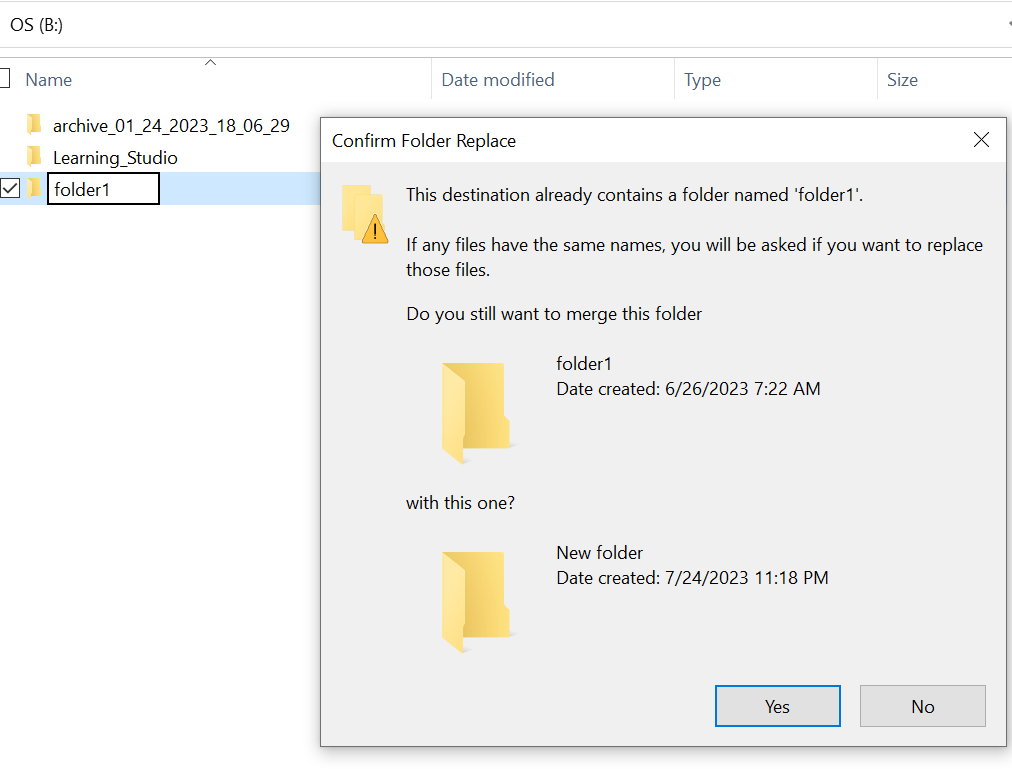
- エクスプローラーで、見つからないフォルダー パスを使用して検索します。コンテンツが表示されます。

Ursache
これは、フォルダーに設定された非表示属性とSYSTEM属性が原因です。
Lösung
以下の手順に従ってください。
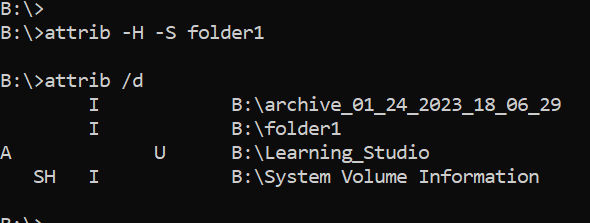
このコマンドを実行した後、ローカル ドライブをもう一度確認します。見つからないフォルダーは通常の状態に戻ります。
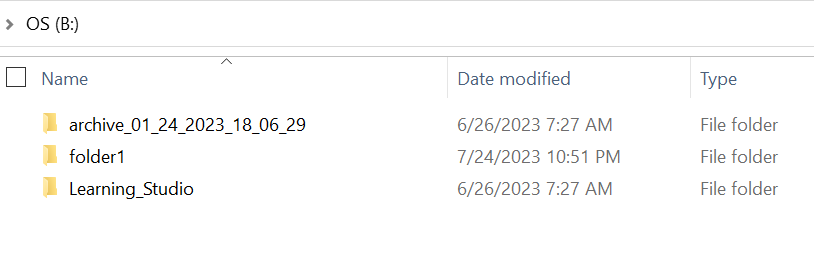
- ホスト システムのWindowsコマンド プロンプトに移動します。
- cd をフォルダが存在しない親ディレクトリに移動し、「attrib /d」を実行します。
- ディレクトリのリストが表示され、見つからないフォルダがリストに表示されます。
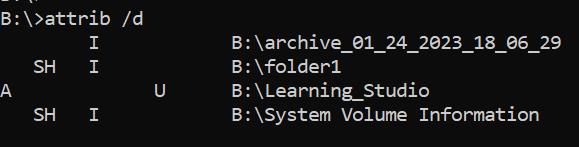
- 前の文字は属性を示します。ファイルの前に SH が表示されているはずです(システムと非表示)。
- 次に、このコマンドを実行して、前述の2つの属性を削除します。 attrib -H -S folder_name
Weitere Informationen
attribコマンドには、他にも多くのオプションがあります。
B:\>attrib /?
Displays or changes file attributes.

ATTRIB [+R | -R] [+A | -A] [+S | -S] [+H | -H] [+O | -O] [+I | -I] [+X | -X] [+P | -P] [+U | -U]
       [drive:][path][filename] [/S [/D]] [/L]

  +   Sets an attribute.
  -   Clears an attribute.
  R   Read-only file attribute.
  A   Archive file attribute.
  S   System file attribute.
  H   Hidden file attribute.
  O   Offline attribute.
  I   Not content indexed file attribute.
  X   No scrub file attribute.
  V   Integrity attribute.
  P   Pinned attribute.
  U   Unpinned attribute.
  B   SMR Blob attribute.
  [drive:][path][filename]
      Specifies a file or files for attrib to process.
  /S  Processes matching files in the current folder
      and all subfolders.
  /D  Processes folders as well.
  /L  Work on the attributes of the Symbolic Link versus
      the target of the Symbolic Link
Betroffene Produkte
ECS, Elastic Cloud StorageArtikeleigenschaften
Artikelnummer: 000215245
Artikeltyp: Solution
Zuletzt geändert: 18 Mai 2026
Version: 4
Antworten auf Ihre Fragen erhalten Sie von anderen Dell NutzerInnen
Support Services
Prüfen Sie, ob Ihr Gerät durch Support Services abgedeckt ist.