Alienware Pro Wireless Gaming Mouse Firmware Update Fails in Alienware Command Center 6.5
Summary: This article provides information about the firmware update failure for the Alienware Pro Wireless Gaming Mouse.
This article applies to
This article does not apply to
This article is not tied to any specific product.
Not all product versions are identified in this article.
Symptoms
The firmware update for Alienware Pro Wireless Gaming may fail with a following error message:
Invalid firmware file. Firmware update cannot proceed.
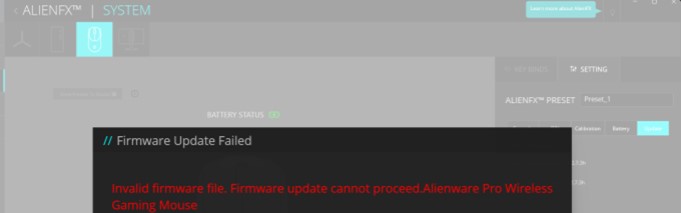
The issue occurs in the following scenario:
- Alienware Command Center (AWCC) 6.5 is installed and launched.
- Alienware Pro Wireless Gaming Mouse is connected through both dongle and wired connection.
- The firmware version for the Alienware Pro Wireless Gaming Mouse differs from the included 2.4Ghz Dongle firmware version. For example, the mouse is on version 3.5 and the dongle is on version 2.7.
- Go to the AlienFX page and select Single device view of Alienware Pro Wireless Gaming Mouse.
- Go to the Settings tab and click the Update tab.
- Click the Update button, and the issue occurs.
Affected Product:
- Alienware Pro Wireless Gaming Mouse
Affected Application Version:
- Alienware Command Center 6.5
Cause
This is due to some unexpected errors with the Azure server.
Resolution
Updating to AWCC version 6.6 or later on the computer resolves the issue. To download and install the firmware, reference How to Download and Install Dell Drivers.
Affected Products
Alienware Command Center, Alienware Pro Wireless Gaming MouseArticle Properties
Article Number: 000262078
Article Type: Solution
Last Modified: 06 Aug 2025
Version: 4
Find answers to your questions from other Dell users
Support Services
Check if your device is covered by Support Services.