NMM SQL VDI AG backups have delayed start in a multi-subnet AG configuration
This article applies to
This article does not apply to
This article is not tied to any specific product.
Not all product versions are identified in this article.
Symptoms
n/a
SQL server is configured in a multi-subnet configuration. The SQL client is configured either with CNO (Cluster Name Object) or the listener name. See below a representation of such a setup:
Networker server: Redhat Linux 7.7, NetWorker version 19.1.1
NMM client: 19.2.0.2
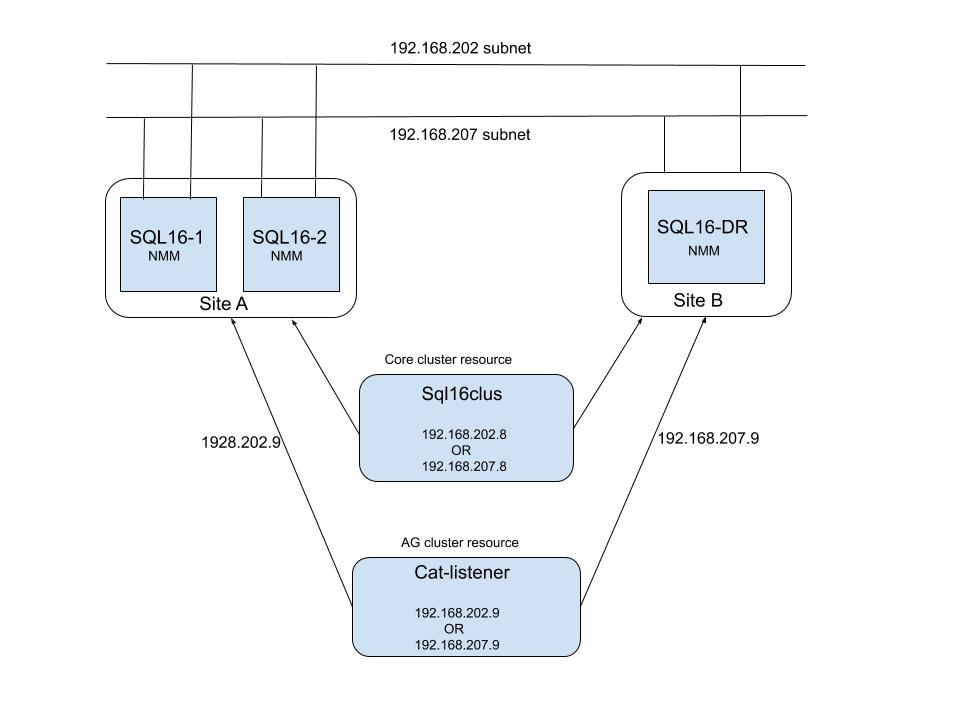
The SQL AG listener name / CNO has 2 IP's in the DNS, one for each subnet. But only one IP is active at a given time. When NMM backup runs for AG listener/CNO, NetWorker server will cache both IP's returned by DNS and attempts to connect to each IP in order of resolution. If the IP used happens to be the active IP, the connection succeeds and the backup proceeds. If the IP used to connect is inactive/offline, the connection attempt will fail due to a timeout (The default TCP timeout may be ~180 seconds) before attempting on active IP and the connection succeeds with the active IP. The logs typically only show connection attempts to the failed IP . The delay in timeout is operating system dependent with message as below logged in the 'daemon.raw' of Networker server.
172089 02/25/2020 08:19:33 PM nsrjobd RPC error Unable to create the connection with 'portmapper' to host 'cat-listener.aqua.local' with address '192.168.207.9' at port number 7938.
172089 02/25/2020 08:21:40 PM nsrexecd RPC error Unable to create the connection with 'portmapper' to host 'cat-listener.aqua.local' with address '192.168.207.9' at port number 7938.
Notice NetWorker server processes such has nsrjobd/nsrexecd/nsrmmdbd makes an attempt to connect to an inactive IP and 2 minutes later 'nsrexecd' attempts to connect to the same IP. In this example the above attempts cause a delay of 4 minutes before an attempt is made to connect to the active IP and the backup starts.
Since SQL log backups are normally configured every 30 minutes or so, this delay effects the overall backup performance.
SQL server is configured in a multi-subnet configuration. The SQL client is configured either with CNO (Cluster Name Object) or the listener name. See below a representation of such a setup:
Networker server: Redhat Linux 7.7, NetWorker version 19.1.1
NMM client: 19.2.0.2
The SQL AG listener name / CNO has 2 IP's in the DNS, one for each subnet. But only one IP is active at a given time. When NMM backup runs for AG listener/CNO, NetWorker server will cache both IP's returned by DNS and attempts to connect to each IP in order of resolution. If the IP used happens to be the active IP, the connection succeeds and the backup proceeds. If the IP used to connect is inactive/offline, the connection attempt will fail due to a timeout (The default TCP timeout may be ~180 seconds) before attempting on active IP and the connection succeeds with the active IP. The logs typically only show connection attempts to the failed IP . The delay in timeout is operating system dependent with message as below logged in the 'daemon.raw' of Networker server.
172089 02/25/2020 08:19:33 PM nsrjobd RPC error Unable to create the connection with 'portmapper' to host 'cat-listener.aqua.local' with address '192.168.207.9' at port number 7938.
172089 02/25/2020 08:21:40 PM nsrexecd RPC error Unable to create the connection with 'portmapper' to host 'cat-listener.aqua.local' with address '192.168.207.9' at port number 7938.
Notice NetWorker server processes such has nsrjobd/nsrexecd/nsrmmdbd makes an attempt to connect to an inactive IP and 2 minutes later 'nsrexecd' attempts to connect to the same IP. In this example the above attempts cause a delay of 4 minutes before an attempt is made to connect to the active IP and the backup starts.
Since SQL log backups are normally configured every 30 minutes or so, this delay effects the overall backup performance.
Cause
NetWorker server attempts to connect to inactive IP before connecting to the active IP, resulting in a delay to the start of backup.
Resolution
Modified the tcp_sync_retries parameter to fast fail the connection attempt
Affected Products
NetWorkerProducts
NetWorkerArticle Properties
Article Number: 000069414
Article Type: Solution
Last Modified: 25 Apr 2025
Version: 3
Find answers to your questions from other Dell users
Support Services
Check if your device is covered by Support Services.