High Definition Audio Controller Error on Precision Laptops
Summary: This article discusses the High Definition Audio Controller showing an error code 55 and no audio using external speakers on Precision Workstations and Dell Pro Max laptops.
This article applies to
This article does not apply to
This article is not tied to any specific product.
Not all product versions are identified in this article.
Symptoms
Affected Platforms:
- Dell Pro Max 14 Premium MA14250
- Dell Pro Max 16 Premium MA16250
- Precision 5690
- Precision 7680
- Precision 7780
Symptoms:
- The High Definition Audio Controller shows error code 55 in the device manager.
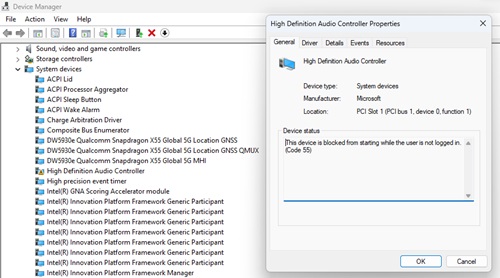
- There is no audio using an external monitor connected to the computer due to the driver being in an error state.
Cause
A combination of settings causes this issue:
- Enable Pre-Boot DMA Support and Enable OS Kernel DMA Support being enabled in the BIOS.
- The Group Policy Object: Enumeration policy for external devices incompatible with Kernel DMA Protection is enabled.
- Enumeration Policy is set to Only while logged in (default) or block all.
When these settings are configured in this way, it causes error code 55 with the High Definition Audio Controller as it does not contain DMA remapping.
Resolution
Updating the BIOS to version 1.17.0 or later on the computer resolves the issue. To download and install the BIOS, refer to the BIOS Update Guide.
Note: Dell Pro Max 16 Premium MA16250 and Dell Pro Max 14 Premium MA14250 (function already implement in the shipping BIOS, users must enable the following settings).
After updating the BIOS, you must enable Internal Port DMA Compatibility Mode under the Virtualization Section of the BIOS.
Affected Products
Dell Pro Max 14 Premium MA14250, Dell Pro Max 16 Premium MA16250, Precision 7680, Precision 7780Products
Mobile Precision 5690Article Properties
Article Number: 000224493
Article Type: Solution
Last Modified: 24 Nov 2025
Version: 10
Find answers to your questions from other Dell users
Support Services
Check if your device is covered by Support Services.