Windows Hello Fingerprint Log In Does Not Work after Resuming from Hibernation or Standby
Summary: The following article provides information about a Windows Hello Fingerprint recognition Login on-screen error after resuming from hibernation or sleep. On-screen error cannot log in using Windows Hello by Fingerprint reported at the Log in screen coming out of modern standby mode. ...
This article applies to
This article does not apply to
This article is not tied to any specific product.
Not all product versions are identified in this article.
Symptoms
Unable to log in using Windows Hello fingerprint recognition after resuming hibernate or standby
You can experience a log-in problem with your Dell Pro 14 Premium PA14250 or Dell Pro 13 Premium PA13250 laptop. You cannot log in using the Windows Hello Fingerprint Recognition feature. The following error message is reported on the log in screen when resuming from hibernate or modern standby:
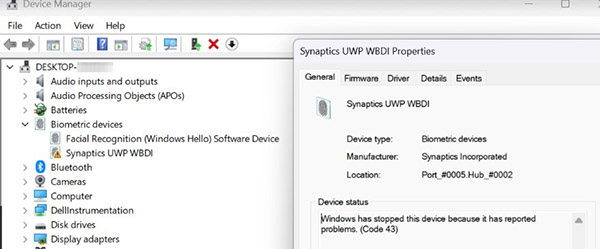
User cannot log in by Windows Hello Fingerprint.You can still log in using your Windows Personal Identification Number (PIN) or your personal password. Opening the Device Manager application and going to the Biometrics shows a Yellow bang against the Synaptics UWMP WBDI device.
Cause
The fingerprint driver runs without verifying the status of the firmware after resuming from hibernation or standby. This can cause the driver to fail because of a memory access violation.
Resolution
Note: You must have administrator rights on your laptop to make any operating system changes or update any software.
Update the security driver to Fingerprint Sensor Driver, version 4.10.6.370, A08 or later. The following link includes step-by-step instructions to download and install the Fingerprint-Sensor-Driver_DX842_WIN64_4.10.6.370_A08_01.exe installation file:
Affected Products
Dell Pro Plus, Dell Pro Premium, Dell Pro 13 Premium PA13250, Dell Pro 14 Premium PA14250, Dell Pro 13 Plus PB13250, Dell Pro 14 Plus PB14250, Dell Pro 16 Plus PB16250Article Properties
Article Number: 000286719
Article Type: Solution
Last Modified: 24 Apr 2025
Version: 3
Find answers to your questions from other Dell users
Support Services
Check if your device is covered by Support Services.