Dell Connected Service Delivery BIOS Update May Require a Second Reboot
Summary: Information about a second system reboot may be required after a BIOS update to enable the Dell Connected Service Delivery (DCSD) virtual device and trigger software installation using Windows Update. ...
This article applies to
This article does not apply to
This article is not tied to any specific product.
Not all product versions are identified in this article.
Symptoms
After installing or updating the BIOS with the DCSD feature:
- The virtual device ACPI\DELL0033\2&DABA3FF&0 may not appear in Device Manager.
- The device should be listed as an Unknown Device with a yellow warning icon.
- DCSD-related software such as SupportAssist PC Analytics may not install automatically if the virtual device is not found.
The expected behavior is that the virtual device appears in Device Manager immediately after a BIOS installation or update. Once visible, Windows Update detects the device and installs the required DCSD software component.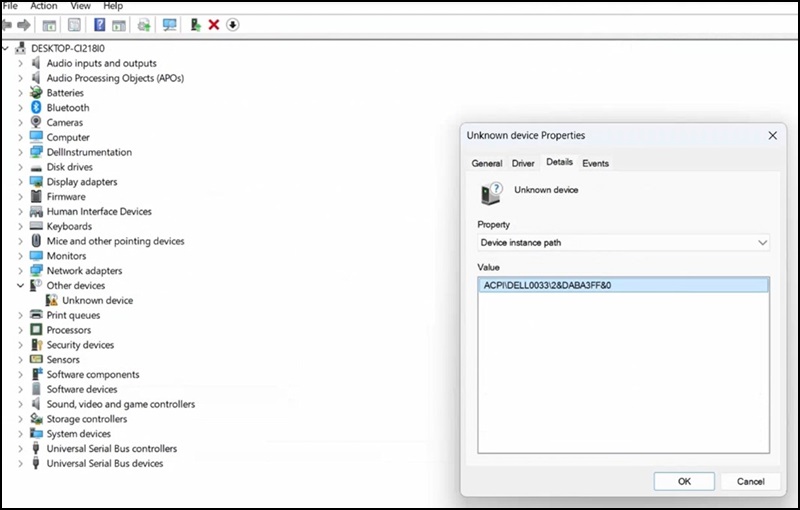
Affected Systems:
- Vostro 3710
- Vostro 3910
For the affected Vostro platforms, testing showed that the virtual device did not appear until a second reboot occurred. This delayed detection prevented Windows Update from initiating the software installation.
Cause
No cause information is available.
Resolution
Unknown Device in Device Manager
If the virtual device does not appear in Device Manager after a BIOS installation or update:
- Restart the system again.
- After the reboot, check Device Manager for the Unknown Device (ACPI\DELL0033\2&DABA3FF&0) with a yellow warning icon.
- Once detected, Windows Update will automatically install the required DCSD software component.
Note: This behavior has been confirmed on the systems listed above and may apply to other systems that support DCSD.
Affected Products
Vostro 3710, Vostro 3910Article Properties
Article Number: 000367374
Article Type: Solution
Last Modified: 18 Dec 2025
Version: 2
Find answers to your questions from other Dell users
Support Services
Check if your device is covered by Support Services.