Ubuntu 20.04를 사용하는 Dell 노트북의 WD19 또는 WD19S 도크로 연결된 외부 모니터에 디스플레이가 표시되지 않음
Summary: 다음 문서에서는 WD19 또는 WD19S 도킹 스테이션을 사용하는 Dell 노트북의 외부 모니터 디스플레이 문제를 해결하기 위해 Ubuntu 20.04를 업그레이드하는 과정을 안내합니다.
This article applies to
This article does not apply to
This article is not tied to any specific product.
Not all product versions are identified in this article.
Symptoms
Ubuntu 20.04를 사용하는 Dell 노트북에 연결된 WD19 또는 WD19S 도크에 외부 화면이 표시되지 않음
Ubuntu 20.04 운영 체제를 사용하는 Dell 노트북 소유자는 Dell WD19 또는 WD19S 도킹 스테이션을 통해 연결된 외부 모니터에 대한 비디오 출력이 표시되지 않는다는 보고를 받았습니다.
영향을 받는 시스템:
- Latitude 5320
- Latitude 7320
- Latitude 3420
- Latitude 5420
- Latitude 7420
- Latitude 3520
- Latitude 5520
- Latitude 7520
- Latitude 9520
- Precision 3560 모바일 워크스테이션
Cause
Dell 엔지니어링 부서는 실행 중인 Ubuntu 버전에 이러한 하드웨어 구성에 필요한 지원이 포함되어 있지 않은 것을 확인했습니다.
Resolution
Ubuntu 업데이트
다음 단계를 사용하여 Ubuntu 20.04 버전을 최신 버전으로 업데이트하여 이 문제를 해결할 수 있습니다.
- Ubuntu에서 Terminal 창을 엽니다.
- Terminal을 검색하여 Dash에서 Terminal을 실행할 수 있습니다.
- Ctrl, Alt 및 T 키를 함께 누르는 키보드 단축키를 사용할 수 있습니다.
- 다음 명령을 입력합니다.
sudo apt updatesudo apt upgrade
- 컴퓨터를 재부팅하고 문제가 해결되었는지 테스트합니다.
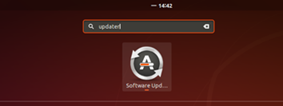
- Ubuntu에서 Software Updater 애플리케이션을 엽니다.
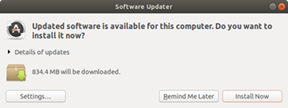
- 네트워크에 연결할 수 있는 경우 새 패치가 자동으로 푸시됩니다.
- Install Now를 클릭합니다.
- 컴퓨터를 재부팅하고 문제가 해결되었는지 테스트합니다.
Affected Products
Dell Dock WD19, Dell Dock – WD19S, Latitude 5320, Latitude 7320, Latitude 3420, Latitude 7420, Latitude 3520, Latitude 5520, Latitude 7520, Latitude 9520, Latitude 5420, Precision 3560Products
Dell Dock WD19, Dell Dock – WD19SArticle Properties
Article Number: 000182775
Article Type: Solution
Last Modified: 03 Apr 2025
Version: 5
Find answers to your questions from other Dell users
Support Services
Check if your device is covered by Support Services.